This Excel workbook is a lawn care customer lifetime value calculator for estimating the financial value of recurring customer relationships. It turns monthly revenue, visit frequency, direct service cost, overhead, acquisition cost, and expected retention into customer-level contribution value.
The XLSX includes customer records, editable assumptions, automatic calculations, review alerts, and a summary of portfolio and segment results. Lawn care and landscaping operators can use it to examine account economics, identify inputs that need attention, and make informed pricing, retention, and acquisition decisions.
How this workbook can help
- Estimate customer value from recurring revenue, service costs, overhead, acquisition cost, and retention.
- See how individual accounts and customer segments contribute to the value of the customer base.
- Identify incomplete records, date problems, low margins, and long acquisition payback periods for review.
- Separate lifetime revenue from contribution-based customer value when evaluating account economics.
What is in the file
How to get started
1. Review the assumptions
Start with the valuation date, margin and payback review thresholds, accepted date range, input limits, and default retention months by segment. Use assumptions that reflect your operating history rather than treating the included defaults as universal benchmarks.
2. Enter customer records
On the Customers sheet, enter one account per row. Complete the customer, property, segment, service plan, dates, status, monthly recurring revenue, visits per month, direct cost per visit, monthly overhead, and acquisition cost fields. Add a retention override only when an account needs a different estimate from its segment default.
3. Check calculations and alerts
Review retention months used, monthly contribution, contribution margin, estimated lifetime revenue, estimated customer value, observed months, acquisition payback, and the Review Alert column. Correct missing or inconsistent inputs before relying on the results.
4. Interpret the summary
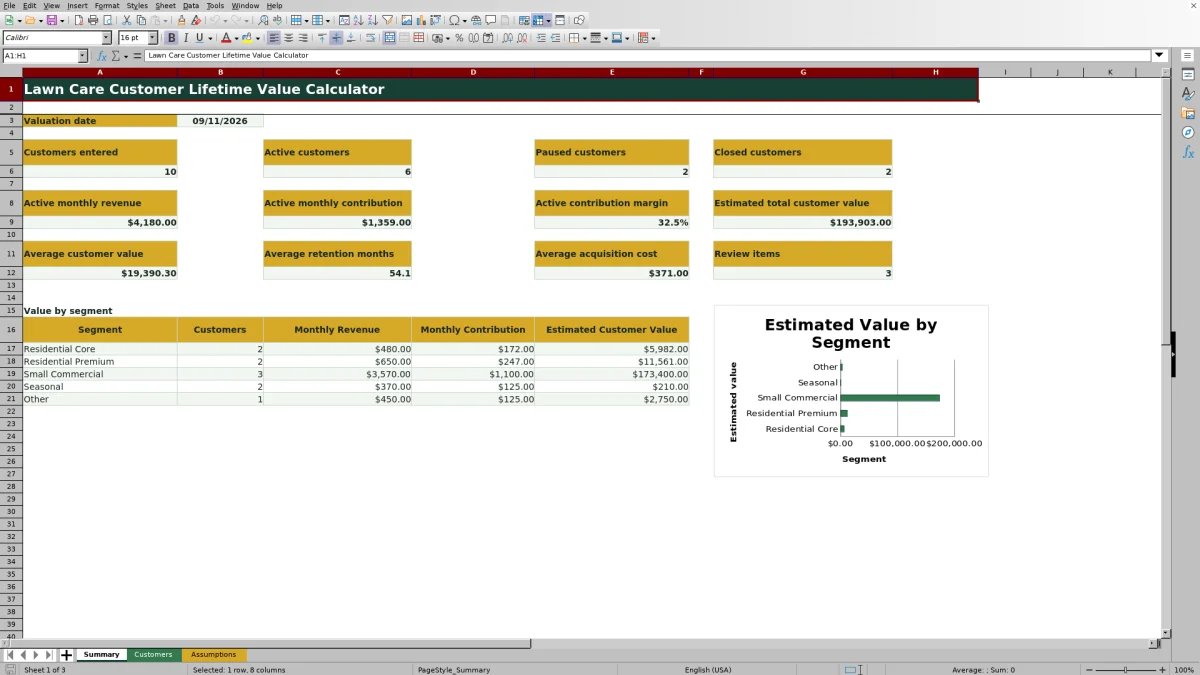
Use the Summary sheet to examine active customer counts, active monthly revenue and contribution, estimated total customer value, averages, review items, and value by segment. Decide whether the results support a pricing change, cost review, retention effort, or revised acquisition budget.
How the lawn care customer lifetime value calculation works
The workbook calculates monthly contribution as monthly recurring revenue minus visits per month multiplied by direct cost per visit, minus monthly overhead. Contribution margin is monthly contribution divided by monthly recurring revenue. Estimated lifetime revenue equals monthly recurring revenue multiplied by retention months used, while estimated customer value equals monthly contribution multiplied by retention months used, minus acquisition cost.
This distinction matters because lifetime revenue shows projected billing, while estimated customer value reflects the contribution remaining after modeled service costs, overhead, and acquisition cost. Acquisition payback divides acquisition cost by positive monthly contribution, helping an operator see how many months of contribution are needed to recover the cost of winning the account.
Retention assumptions and observed customer history
Each customer can use either a retention override or a default tied to the selected segment. The included defaults are 36 months for Residential Core, 48 for Residential Premium, 60 for Small Commercial, 18 for Seasonal, and 24 for Other. An override takes priority when entered.
Observed months are calculated from the start date to the valuation date, except for a closed customer with an end date, where the end date is used. Observed history provides context, but it does not automatically replace the retention estimate. Operators should compare expected retention with actual account history and revise assumptions when their records support a change.
Practical lawn care customer value example
Situation: A Residential Core account has $185 in monthly recurring revenue, four visits per month, a $28 direct cost per visit, $18 in monthly overhead, and a $90 acquisition cost. Its segment supplies a 36-month retention estimate. Action: The workbook subtracts $112 in visit costs and $18 in overhead from $185 of revenue. Result: Monthly contribution is $55, contribution margin is about 29.7%, estimated lifetime revenue is $6,660, estimated customer value is $1,890, and acquisition payback is about 1.6 months. Interpretation: The account produces positive modeled contribution, clears the included 25% low-margin review threshold, and recovers acquisition cost within the included eight-month payback threshold. Next decision: The operator can compare this result with similar accounts before deciding whether to maintain pricing, adjust service costs, or direct more acquisition spending toward the segment.
Common errors and practical solutions
Input error: Missing service, date, status, revenue, visit, cost, overhead, or acquisition fields can prevent a complete value calculation. Enter the required inputs, use the supplied choice lists, and confirm that dates fall within the accepted range. A closed account should have an end date, the end date should not precede the start date, and future dates should be checked against the valuation date.
Economic warning: A low contribution margin or long acquisition payback is not necessarily a formula problem. Verify visit frequency, direct cost per visit, overhead allocation, and monthly revenue first. If the data is correct, consider pricing, route efficiency, service scope, or acquisition spending before changing the retention assumption merely to improve the estimate.
Comparison with manual tracking and field-service software
Choose by workflow need: This workbook is one complete operational method for entering customer economics, applying retention assumptions, calculating value, flagging review items, and summarizing results. A paper process, blank spreadsheet, or dedicated field-service platform may be more suitable when a different level of structure, mobility, or system integration is required.
| Method | What it provides | More suitable when |
|---|---|---|
| This Excel workbook | Structured customer inputs, validation rules, formulas, review alerts, segment assumptions, summary metrics, and a segment chart in one XLSX. | You need a transparent, editable customer value model for up to 100 records without implementing another operating system. |
| Paper form or manual process | Simple offline collection with calculations and consolidation performed separately. | You have very few accounts, collect information away from a computer, or only need an initial intake record. |
| Blank spreadsheet | A flexible grid that requires you to create formulas, validation, alerts, summaries, and controls. | You need a fully custom model and have the spreadsheet skills and time to build and maintain it. |
| Dedicated field-service software | Broader operational functions that may include scheduling, dispatch, invoicing, customer communication, and centralized records, depending on the product. | You need customer value analysis connected to daily field operations and are prepared for software setup, subscription costs, and process changes. |
The workbook offers visible formulas and assumptions, while field-service software may provide broader workflow integration. The appropriate option depends on account volume, reporting needs, staff access, existing systems, and how often customer data must be updated.
Reading the Summary sheet accurately
The Summary sheet counts entered, active, paused, and closed customers. Active monthly revenue and active monthly contribution include only records marked Active, and active contribution margin divides those active totals. Average customer value, average retention months, average acquisition cost, and review-item counts provide additional portfolio context.
Estimated total customer value and the segment value totals aggregate calculated customer values across entered records rather than limiting the calculation to Active status. Check customer status and review the underlying rows before treating the total as the value of only the current active book of business.
Turning the estimate into the next operating decision
Use the calculated values as planning estimates rather than sale prices or promises of future profit. A high-revenue account can still have weak contribution if visit costs and overhead are high, while a smaller account may produce useful value when service delivery is efficient and retention is stable.
Compare customers within similar service plans and segments, investigate outliers, and document why a retention override is used. The next decision may be to adjust pricing, change visit frequency, reduce acquisition spending, improve route density, focus retention work on valuable accounts, or gather more history before acting.
Frequently asked questions
How does the Excel calculator estimate lawn care customer lifetime value?
It multiplies monthly contribution by the retention months used and then subtracts acquisition cost. Monthly contribution equals monthly recurring revenue minus visit-related direct costs and monthly overhead.
Where do the retention months come from?
The workbook uses a customer-level retention override when one is entered. Otherwise, it looks up the default retention months assigned to the customer's segment on the Assumptions sheet.
Does customer status affect every Summary calculation?
No. Active monthly revenue and active monthly contribution include only customers marked Active. Estimated total customer value and segment value totals aggregate calculated values across entered customer records, so status should be reviewed when interpreting those totals.
How many customer records can the workbook hold?
The Customers sheet provides 100 working rows, from row 4 through row 103. Each row includes editable customer inputs and formulas for the calculated fields.
What should I do when a customer has a Review Alert?
Check the row for missing required inputs, inconsistent dates, a low contribution margin, or a long acquisition payback period. Correct data errors first; if the inputs are accurate, review pricing, service costs, overhead, acquisition spending, and retention expectations.
Editorial responsibility

Nadia KesslerEstimates, customers and job workflows

Ethan ReedWorkbook QA, crews and business controls