This tree service estimate spreadsheet is an Excel workbook for estimating labor, equipment, disposal, travel, materials, markup, and customer pricing. It gives tree care and landscaping operators a consistent way to turn job scope and resource requirements into a documented estimate.
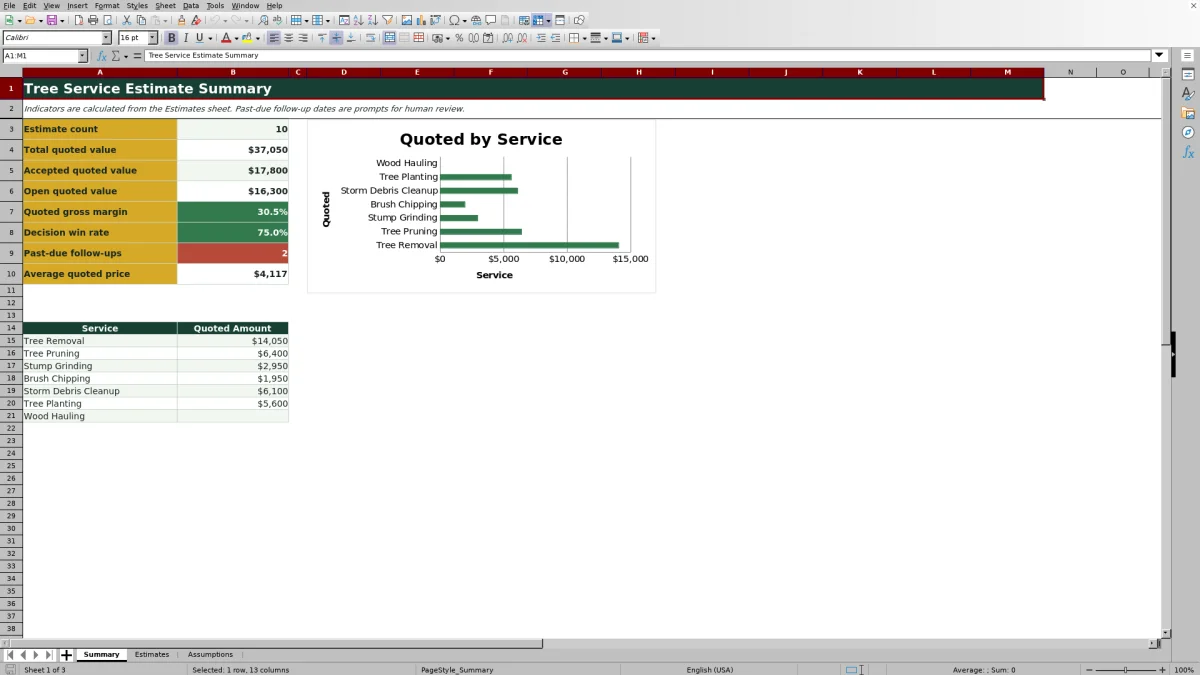
The XLSX includes separate Estimates, Assumptions, and Summary sheets. Operators can maintain planning rates, prepare up to 100 estimates, compare calculated costs with quoted prices, track estimate status and follow-up dates, and review sales indicators by service.
How this workbook can help
- Build estimates from tree-specific labor, equipment, disposal, travel, and material cost inputs.
- Keep planning rates and operational choices in one editable assumptions area.
- Compare calculated suggested prices with manually entered customer quotes and resulting gross margins.
- Monitor quoted value, accepted value, open opportunities, decision win rate, and past-due follow-ups.
What is in the file
How to get started
1. Update rates and choices
Open the Assumptions sheet and review the hourly crew costs, hourly equipment costs, disposal rate, travel rate, services, statuses, and units. Replace the sample planning inputs with figures appropriate for your operation.
2. Enter the job scope
On the Estimates sheet, add an estimate ID, date, customer, property, service, quantity, and unit. Select the crew and equipment, then enter crew hours, equipment hours, disposal loads, travel miles, and materials or other costs.
3. Review cost and pricing
Check the calculated labor, equipment, disposal, travel, and total estimated costs. Enter a markup percentage to produce a suggested price, then record the actual quoted price and review the calculated gross margin percentage.
4. Track the sales decision
Assign a status and follow-up date to each estimate. Use the Summary sheet to review quoted value, accepted value, open value, decision win rate, average quoted price, past-due follow-ups, and quoted amounts by service.
Build a Complete Tree Service Cost Estimate
The Estimates sheet organizes the cost build around the resources commonly involved in tree work. Crew type and hours determine labor cost, while equipment selection and hours determine equipment cost. Disposal loads, travel miles, materials, and other costs complete the estimate. The workbook adds these categories to calculate total estimated cost, helping an operator check whether climbing labor, crane time, hauling, or stump equipment has been left out of the scope.
Turn Estimated Cost Into a Customer Quote
The workbook calculates a suggested price by applying the entered markup percentage to total estimated cost. The quoted price remains a separate manual input, so an estimator can account for site access, risk, scheduling, competitive conditions, or a revised scope before giving the customer a number. Gross margin percentage is then calculated from the quoted price and estimated cost. This distinction matters because markup is applied to cost, while gross margin measures the remaining share of revenue after estimated cost.
Practical Tree Pruning Estimate Example
Situation: The fictional EST-26001 sample covers four trees requiring a Climber Crew, a Bucket Truck, one disposal load, 18 travel miles, and $125 of materials or other costs. Action: The operator enters 14 crew hours, eight equipment hours, and a 35% markup. Using the sample assumptions, labor is $2,030 and equipment is $624; disposal and travel are added from their editable rates. Result: The known subtotal is $2,779 before disposal and travel, the workbook calculates total estimated cost, and the suggested price equals that total multiplied by 1.35. The recorded quoted price is $4,200. Interpretation: The gross margin formula shows how much of the $4,200 quote remains after all estimated costs, rather than treating the 35% markup as the margin. Next decision: The estimator can retain the quote, revise the scope or markup, or adjust the quoted price after confirming disposal, travel, access, and production assumptions.
Common Estimate Errors and Solutions
Blank cost results: Cost formulas remain blank when required entries such as the estimate ID, crew, hours, equipment, disposal loads, travel miles, or materials cost are missing. Complete the applicable input cells, entering zero where a valid cost category has no charge. A crew or equipment label that does not match the Assumptions list can also prevent a lookup result, so use the provided lists or update the corresponding assumption entry. Unexpected margin: Confirm that Quoted Price contains the actual customer quote and remember that Gross Margin % is based on quoted revenue, not the markup percentage. If a follow-up appears past due, review the date and change the status or follow-up date only after confirming the current customer situation.
Comparison With Other Estimating Methods
This workbook operates as one complete method: rate maintenance, job-cost calculation, quote tracking, follow-up dates, and summary reporting remain connected in the same XLSX. The comparison below identifies when each realistic alternative is more suitable.
| Method | More suitable when | Operational trade-off |
|---|---|---|
| Tree service estimate workbook | A small or midsize tree care operation wants repeatable Excel calculations, editable rates, quote tracking, and a summary without implementing another software platform. | Users need to maintain assumptions, enter complete data, and manage the shared XLSX carefully. |
| Paper form | An estimator is working where a device is impractical and needs a quick field record for later entry. | Calculations, status tracking, and portfolio reporting remain manual. |
| Blank spreadsheet | The business has a specialized pricing model and the staff has time to design, test, and maintain formulas and controls. | It requires building the cost structure, validation, follow-up fields, and reporting from the beginning. |
| Dedicated field-service software | The company needs integrated dispatching, mobile crews, customer communications, invoicing, payments, or broader workflow automation. | Implementation, subscriptions, configuration, and staff training may be required. |
The appropriate choice depends on job volume, field connectivity, reporting needs, existing systems, and who will maintain the estimating process.
Track Quotes, Decisions, and Follow-Ups
The Status field distinguishes Draft, Quoted, Accepted, Declined, On Hold, and Expired estimates. The Summary sheet totals accepted quoted value and treats Quoted and On Hold records as open quoted value. Decision win rate uses Accepted and Declined records, while the past-due indicator counts dated follow-ups that remain outside Accepted, Declined, or Expired status. These indicators help the operator decide which customer conversations need attention, but a flagged date remains a prompt for human review.
Maintain Rates and Review Service Mix
The Assumptions sheet stores hourly costs for four crew types and six equipment choices, plus disposal and travel operating rates. It also supplies the service, status, and unit lists used for Estimates-sheet entries. After rates and choices are reviewed, the Summary sheet groups quoted amounts across seven tree service categories and displays them in a chart. An operator can use that view to identify where quoted work is concentrated, then decide whether rates, estimating practices, or follow-up priorities require review.
Frequently asked questions
How many tree service estimates can the workbook hold?
The Estimates sheet provides 100 working rows, from row 5 through row 104. Each row represents one estimate record.
Can I change the crew and equipment rates?
Yes. The Assumptions sheet contains editable hourly costs for four crew types and six equipment choices, along with disposal and travel operating rates. Review these sample inputs before preparing estimates.
Can I use a quoted price that differs from the suggested price?
Yes. Suggested Price is calculated from total estimated cost and markup, while Quoted Price is a separate entry. Gross Margin % uses the quoted price and total estimated cost.
Which estimates are included in open quoted value?
The Summary sheet includes estimates with a status of Quoted or On Hold and a quoted price greater than zero when calculating open quoted value.
Does the workbook create a customer proposal or invoice?
No. The workbook estimates costs, develops pricing, tracks quote status and follow-up dates, and summarizes results. A separate customer-facing proposal, contract, work order, or invoice process is still needed.
Editorial responsibility

Nadia KesslerEstimates, customers and job workflows

Ethan ReedWorkbook QA, crews and business controls