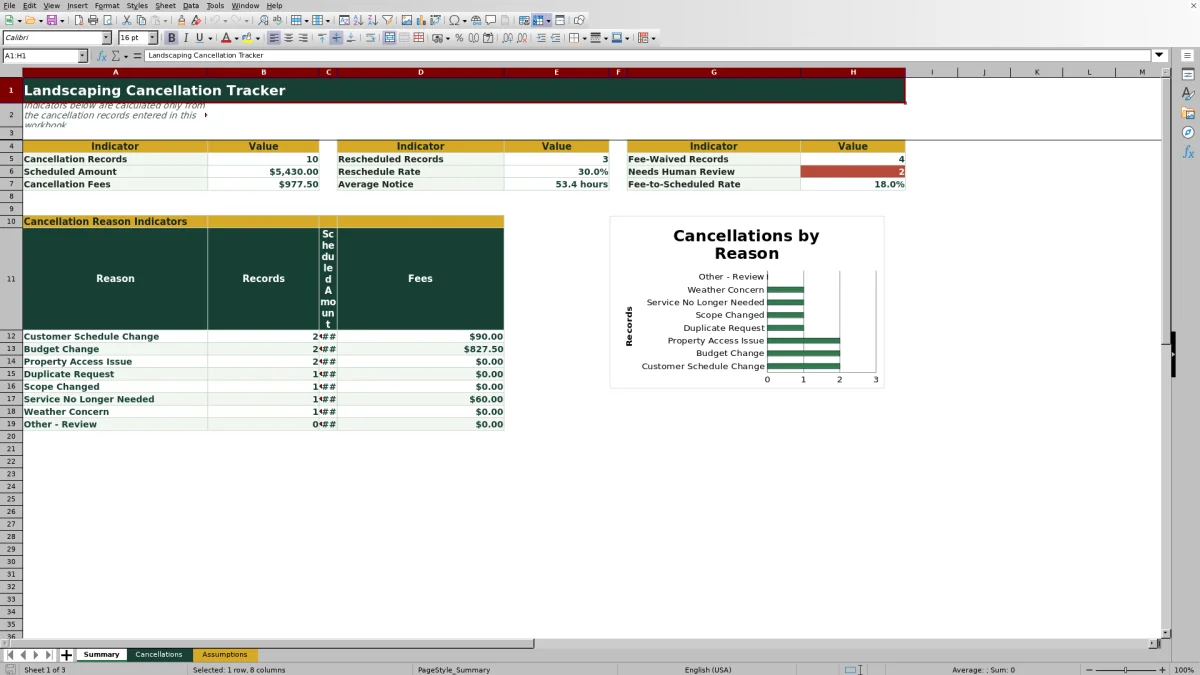
This landscaping cancellation tracker records canceled services, notice hours, reasons, scheduled amounts, fee decisions, rescheduling outcomes, crew assignments, and follow-up notes. It gives lawn care and landscaping operators one structured place to document what happened and determine what requires attention.
The Excel workbook includes 100 prepared cancellation rows, editable assumptions, calculated fee rates and amounts, record-level review alerts, summary indicators, a reason analysis, and a chart. Notice Hours is entered manually, while the fee calculations use the visible thresholds and rates on the Assumptions sheet.
How this workbook can help
- Keeps customer, property, service, cancellation, fee, and follow-up details together in a consistent record.
- Makes notice-based fee decisions easier to review by keeping the thresholds, rates, waiver choice, and calculated amount visible.
- Helps managers identify cancellation patterns through totals and a reason-level breakdown of records, scheduled amounts, and fees.
- Supports retention follow-up by distinguishing rescheduled work, retained service, unresolved customer decisions, and work that was not rescheduled.
What is in the file
How to get started
1. Review the assumptions
Open the Assumptions sheet and confirm the cancellation reasons, services, crews, rescheduling outcomes, date limits, notice limits, and fee rules. Keep the notice thresholds in ascending order so the approximate lookup works as intended.
2. Enter the cancellation record
Add one cancellation per row on the Cancellations sheet. Enter a unique ID, customer, property, service, scheduled and canceled dates, Notice Hours, reason, scheduled amount, and fee-waiver choice. Notice Hours is not calculated from the dates.
3. Record the follow-up result
Select the rescheduling outcome, enter a rescheduled date when the outcome is Rescheduled, assign a crew if appropriate, and document the customer conversation or next action in Follow-Up Notes.
4. Resolve alerts and review results
Check the calculated rate and fee, then address every message in the Review Alert column. Use the Summary sheet to review cancellation volume, scheduled value, fees, average notice, rescheduling activity, waived fees, and patterns by reason.
What the Landscaping Cancellation Tracker Records
The Cancellations sheet uses one cancellation per row. Its fields cover the cancellation ID, customer, property, service, scheduled date, canceled date, Notice Hours, reason, scheduled amount, fee rate, waiver choice, cancellation fee, rescheduling outcome, rescheduled date, crew assignment, follow-up notes, and review alert. Filters span the prepared record area from rows 5 through 104, and the header remains visible while operators move through the list.
How Notice-Based Cancellation Fees Work
The supplied assumptions use notice thresholds of 0, 24, and 48 hours with corresponding fee rates of 50%, 25%, and 0%. The lookup selects the greatest notice-hour threshold that does not exceed the entered notice, so the thresholds need to remain ordered from lowest to highest.
The Cancellation Fee formula multiplies Scheduled Amount by Fee Rate. Selecting Yes in Fee Waived? overrides that calculation and returns a zero fee. These settings are editable business assumptions, not a substitute for the company’s service agreement or local requirements.
Interpreted Practical Example
Situation: A fictional $425 spring cleanup scheduled for September 18 is canceled on September 15 with 72 Notice Hours because the customer needs a different service week. Action: The operator records Customer Schedule Change, leaves Fee Waived? as No, selects Rescheduled, and enters September 25 as the new date. Result: The 48-hour threshold applies a 0% rate, producing a $0 cancellation fee, and the Summary counts the record as rescheduled. Interpretation: under the supplied assumptions, the early notice avoids a fee while the rescheduled outcome indicates that the work was retained. Next decision: confirm the new date and crew availability, update the follow-up notes, and verify that the record is ready for review.
Common Errors and Solutions
A Duplicate ID alert means the same cancellation identifier appears more than once. Assign a unique ID or confirm whether one row should be removed. A Check required fields alert means at least one required entry is blank; complete the customer, property, service, dates, Notice Hours, reason, scheduled amount, waiver choice, or outcome as applicable.
A Check dates alert appears when Canceled Date is later than Scheduled Date. Correct the dates or verify how the business wants to document a cancellation entered after the planned service date. Add rescheduled date means the outcome is Rescheduled but no new date is present; enter the new date. Check rescheduled date means a date was entered for another outcome; clear the date or change the outcome.
If a fee rate or amount remains blank, confirm that the cancellation ID, Notice Hours, scheduled amount, and waiver choice are present. Then check that the notice thresholds and rates on the Assumptions sheet are numeric and that the thresholds remain in ascending order.
Comparison With Other Cancellation Tracking Methods
The workbook is a complete operational method combining structured entry, fee calculations, validation, review alerts, and management reporting. The alternatives below may be more suitable when different operating conditions apply.
| Method | What it provides | More suitable when | Trade-off |
|---|---|---|---|
| This Excel workbook | Prepared cancellation fields, editable lists, notice-based fee calculations, review alerts, summary indicators, and reason analysis. | A team wants a self-contained Excel process for up to 100 prepared records and can maintain entries manually. | Notice Hours must be entered, and formulas, validations, formatting, filters, and summary ranges must be extended if more rows are needed. |
| Paper form or manual log | A simple record that can be completed without a computer. | Crews work in locations where devices or spreadsheet access are impractical. | Totals, fee calculations, duplicate checks, and trend analysis require separate manual work. |
| Blank spreadsheet | An unrestricted grid that can be designed around a company’s existing process. | An operator needs a highly customized layout and is prepared to build formulas, lists, alerts, and reporting. | It does not start with the controls or calculations included in this workbook. |
| Dedicated field-service software | May combine cancellation handling with scheduling, dispatch, mobile updates, customer records, and integrations. | A larger operation needs multiuser workflows, real-time dispatch coordination, or links to other systems. | It can require subscription costs, implementation, configuration, and staff training. |
The choice depends on record volume, field access, collaboration needs, reporting requirements, and whether cancellation tracking must connect to scheduling or customer-management systems.
Reading the Summary and Reason Analysis
The Summary sheet reports cancellation records, scheduled amount, cancellation fees, rescheduled records, reschedule rate, average notice, fee-waived records, fee-to-scheduled rate, and records needing human review. The reason analysis shows record count, scheduled amount, and fees for each of the eight listed cancellation reasons.
Use these measures together rather than reading a single total in isolation. For example, a rising cancellation count paired with a stable reschedule rate may call for capacity planning, while a large scheduled amount with low collected fees may justify reviewing notice thresholds, waiver practices, and customer agreements.
Operating Limits and Next Decisions
The prepared data-entry area contains 100 rows, and the workbook’s formulas, validation rules, filter, and Summary calculations point to rows 5 through 104. If the business needs additional capacity, extend all of those elements together so new records are included consistently.
The supplied date validation range is January 1, 2024, through December 31, 2031. Managers should review that range, all dropdown lists, fee thresholds, and rates before operational use. At each review cycle, decide whether the main issue calls for a customer follow-up, a schedule adjustment, a crew reassignment, a fee-policy review, or correction of an incomplete record.
Frequently asked questions
What information does the landscaping cancellation tracker record?
It records the cancellation ID, customer, property, service, scheduled and canceled dates, Notice Hours, reason, scheduled amount, fee rate, waiver choice, cancellation fee, rescheduling outcome, rescheduled date, crew assignment, follow-up notes, and review alert.
Does the Excel workbook calculate Notice Hours automatically?
No. Notice Hours is an entered field. The workbook uses that value to look up the applicable fee rate, but it does not derive the hours from Scheduled Date and Canceled Date.
How does the workbook calculate a cancellation fee?
It finds the applicable rate using the greatest configured notice threshold that does not exceed the entered Notice Hours, then multiplies Scheduled Amount by that rate. If Fee Waived? is Yes, the calculated fee is zero.
What cancellation problems can the Review Alert identify?
The alert formula can identify duplicate cancellation IDs, missing required fields, a canceled date later than the scheduled date, a missing date for a Rescheduled outcome, and a rescheduled date entered for another outcome. Each alert should be checked manually.
How many cancellation records can the template hold?
The Cancellations sheet has 100 prepared rows from row 5 through row 104. Additional rows require corresponding extensions to formulas, validation, formatting, filters, and Summary references.
Editorial responsibility

Nadia KesslerEstimates, customers and job workflows

Ethan ReedWorkbook QA, crews and business controls