This Excel workbook provides a structured customer deposit register for landscaping companies that need to record project contract amounts, required deposits, due dates, receipts, applications, and outstanding balances.
The XLSX includes a 100-row Deposits register, a Summary sheet for totals and review priorities, and an Assumptions sheet for editable limits and lists. It is an administrative tracker: it does not process payments, replace receipt records, or determine the terms of a customer agreement.
How this workbook can help
- Keep deposit requirements, receipt details, applications, and remaining balances in one project-level register.
- Identify deposits that are approaching their due dates or have become past due while a balance remains.
- Distinguish money still due from customers from receipts that have not yet been applied to projects.
- Surface missing or inconsistent entries for review against contracts, receipts, and other source records.
What is in the file
How to get started
1. Review the workbook settings
Open the Assumptions sheet and confirm the upcoming-due review period, amount limit, date boundaries, service choices, and project status choices. The reference rate is informational; enter the actual project terms on each Deposits row.
2. Enter each landscaping project
Use one row per project on the Deposits sheet. Record the project ID, customer, property or project, service, contract amount, agreed deposit rate, deposit due date, and project status.
3. Update receipts and applications
Enter the receipt date, reference, and cumulative receipt and application totals. When another payment or application occurs, update the cumulative amounts rather than entering a separate transaction row for the same project.
4. Review calculated outputs and follow up
Use the required deposit, unapplied receipt, balance due, deposit status, and Human Check columns to review calculated outputs. Then consult the Summary sheet for upcoming deadlines, past-due deposits, status totals, and balances that require action.
Situation: Deposit Details Spread Across Project Records
A landscaping office may have contracted jobs, scheduled installations, and active projects that are all at different deposit stages. Without one row per project, staff can lose sight of whether a deposit is required, when it is due, how much has been received, and whether that receipt has been applied. This workbook brings those related facts into a consistent register while retaining customer, property, service, and project-status context.
Action: Record Terms, Receipts, and Applications
Enter the contract amount and the deposit rate agreed for each project so the workbook can calculate the required deposit. Add the due date, then update receipt and application information from source records. Because receipt and applied amounts are cumulative, the row should show current totals rather than a separate line for each payment event. Receipt references can hold the identifiers needed to trace the total back to supporting records.
Result: Review the Current Deposit Position
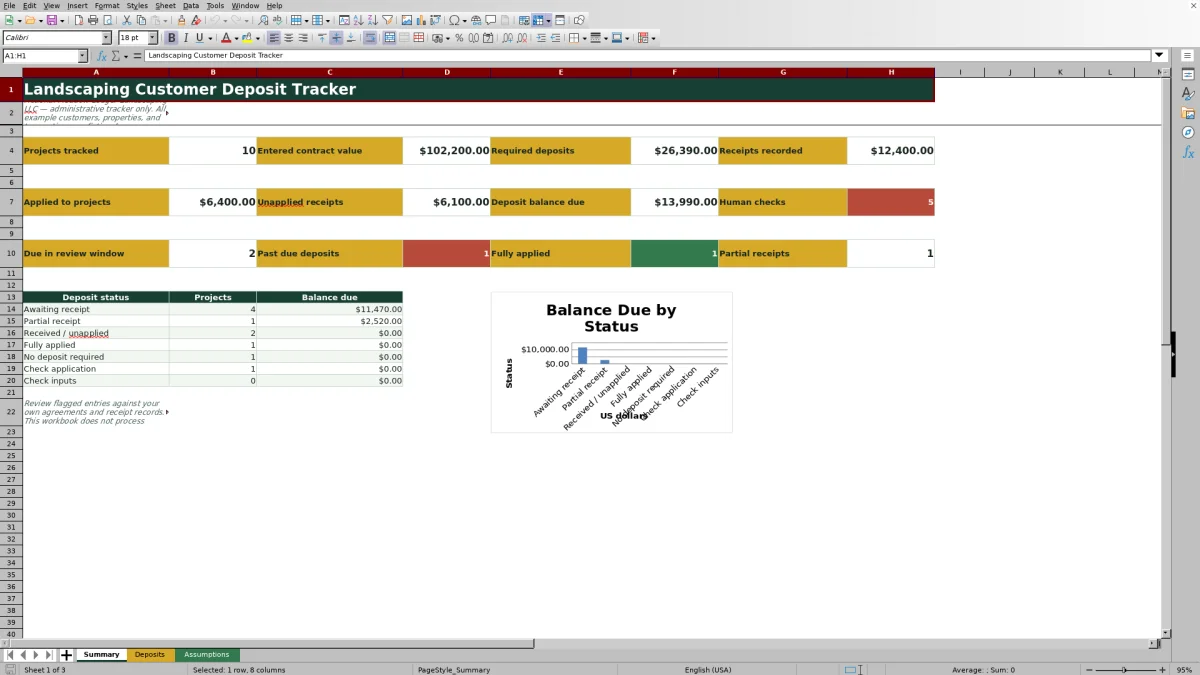
The formulas produce an operational picture of required deposits, amounts received, unapplied receipts, and balances still due. The Summary sheet totals those values and counts projects due within the configurable review window, projects that are past due with a positive balance, fully applied deposits, partial receipts, and rows containing Human Check messages. The status chart groups balance due across seven deposit-status categories.
Interpretation: A Practical Landscaping Deposit Example
Consider the fictional DP-2602 landscape installation project in the workbook. Its $18,400 contract and 30% deposit rate produce a required deposit of $5,520. A cumulative receipt of $3,000 leaves a $2,520 deposit balance due. With no applied amount entered, the unapplied receipt is $3,000, while the deposit status remains Partial receipt because the amount received is below the requirement. The practical interpretation is that the office has two distinct follow-ups: collect the remaining deposit and determine when the recorded receipt should be applied to the project.
Next Decision: Choose the Appropriate Follow-Up
The next decision depends on the calculated position. An upcoming positive balance calls for a timely customer reminder; a past-due balance calls for review under the company's own agreement and collection process. A Received / unapplied status calls for application review rather than another payment request. Check application or Check inputs indicates that staff should reconcile the row before relying on its status. Fully applied and No deposit required records generally need no deposit action unless other project records disagree.
Common Entry Errors and Practical Solutions
A missing contract amount or rate prevents the required deposit calculation; solve it by checking the signed agreement and completing both fields. A receipt date without an amount, or an amount without a date, should be resolved from the receipt record. An applied amount greater than the receipt amount requires reconciliation before the row can be trusted. If staff enter only the latest payment instead of the cumulative receipt total, recalculate the cumulative amount and update the references. If a formula in columns G, N, O, Q, or R is overwritten, restore the corresponding formula pattern from an intact configured row and verify the references point to the repaired row.
Comparison: Excel Workbook, Manual Tracking, and Field-Service Software
The comparison below treats the Summary, Deposits, and Assumptions sheets together as one complete operational method and contrasts that method with realistic external alternatives.
| Method | Setup and upkeep | Deposit visibility | More suitable when |
|---|---|---|---|
| This complete Excel workbook | Uses a configured 100-row register, formulas, validation rules, editable settings, summary metrics, and review flags. | Shows required deposits, cumulative receipts, applications, unapplied amounts, balances, statuses, and deadline counts in one file. | More suitable when an office team wants a controlled project-level tracker without adopting a full business platform. |
| Paper form or manual log | Requires little technical setup but relies on handwriting, filing, and manual calculations. | Individual records may be easy to read, but totals and cross-project follow-up require manual review. | More suitable when project volume is very low and live rollups are not needed. |
| Blank spreadsheet | Allows unrestricted customization, but the user must design fields, formulas, validation, statuses, and summaries. | Visibility depends entirely on the structure and controls created by the user. | More suitable when the company's process differs substantially from this workbook and someone can build and maintain the required controls. |
| Dedicated field-service software | May require subscriptions, implementation, user administration, and workflow configuration. | Can connect deposit activity with broader customer, estimating, scheduling, invoicing, mobile, or payment workflows when those modules are available. | More suitable when multiple teams need integrated operations, mobile access, transaction processing, or system-to-system connections. |
The workbook remains an administrative record rather than a payment processor or transaction-level accounting system, so the choice should reflect operating scale, integration needs, and recordkeeping practices.
Frequently asked questions
What does the landscaping customer deposit tracker calculate?
For each entered project, it calculates the required deposit from the contract amount and deposit rate, the unapplied portion of recorded receipts, the remaining deposit balance, a deposit status, and Human Check messages. The Summary sheet aggregates project counts, dollar totals, deadline counts, status counts, and balances by status.
Are receipts and applications entered as individual transactions?
No. The Deposits sheet is a project-level register, and its instructions specify cumulative receipt and application amounts. Update those totals and the related dates or references when additional activity occurs; keep transaction-level documentation in the appropriate receipt or accounting records.
How does the workbook identify upcoming and past-due deposits?
The Summary sheet counts projects with a positive deposit balance and a due date from today through the configured review-window end date. It separately counts positive balances with a due date before today. The default review period shown in the Assumptions sheet is 14 days and can be edited.
Can the service and project status choices be changed?
Yes. The Assumptions sheet contains editable lists for eight landscaping service choices and six project status choices. Changes affect future dropdown selections, but existing entries do not change automatically.
What should I do when the Human Check column contains a message?
Compare the row with the applicable agreement, receipt, and project records. Complete missing contract terms or due dates, pair receipt and application amounts with their dates, and reconcile any applied amount that exceeds the recorded receipt. The message is a review prompt, not a determination of payment status or contract rights.
Editorial responsibility

Nadia KesslerEstimates, customers and job workflows

Ethan ReedWorkbook QA, crews and business controls