This landscaping proposal pipeline tracker is an Excel workbook for managing proposals from the initial draft through follow-up, customer decision, and final outcome. Its Proposals sheet provides 100 proposal rows for customer, property, service, pricing, dates, status, sales owner, and outcome information.
The Summary sheet turns proposal records into pipeline indicators, while the Assumptions sheet stores editable service rates, markups, status probabilities, sales owners, and outcome reasons. Date-based alerts support human review by identifying missing, scheduled, due-today, or overdue follow-ups and missing decision dates on closed proposals.
How this workbook can help
- Keeps draft, sent, follow-up, on-hold, won, and lost proposals in one consistent sales workflow.
- Connects labor hours and direct costs with service-specific labor rates and markups for clearer proposal planning.
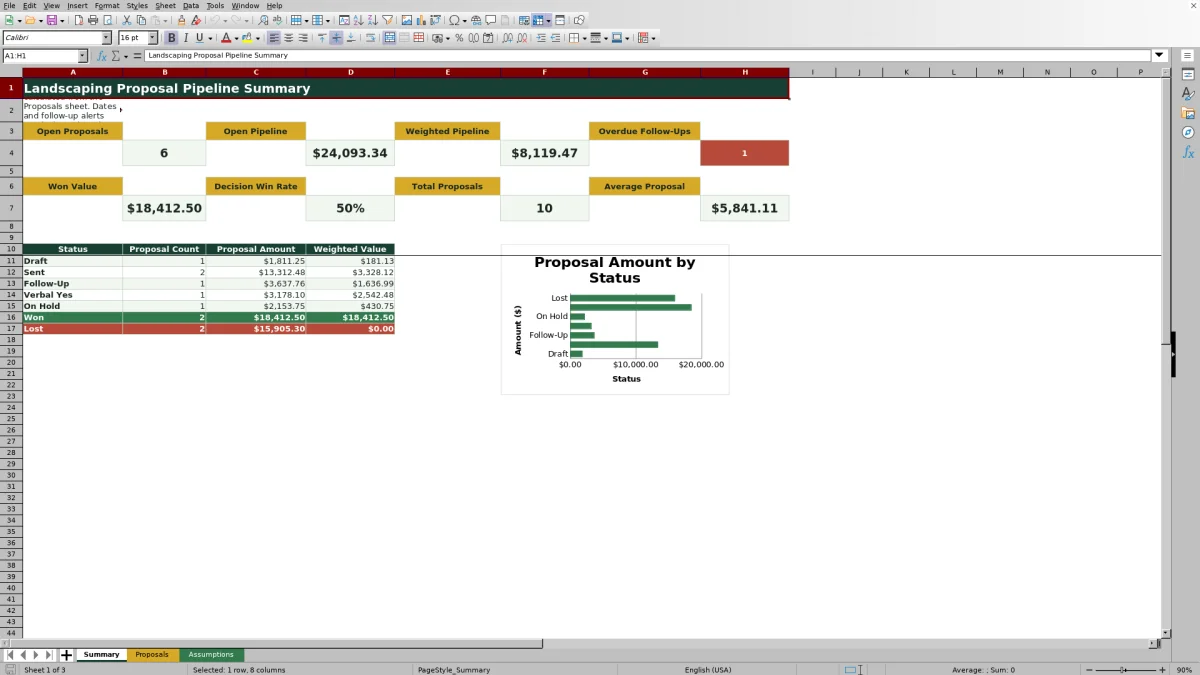
- Shows open pipeline value, weighted pipeline value, won value, decision win rate, proposal volume, and overdue follow-ups.
- Helps landscaping sales teams identify records that need a follow-up date, customer contact, status change, decision date, or outcome reason.
What is in the file
How to get started
1. Review the planning assumptions
Open the Assumptions sheet and confirm the six service categories, labor rates, markups, seven status probabilities, sales owners, and outcome reasons. Update the yellow planning inputs to reflect how your landscaping company estimates and manages proposals.
2. Enter each proposal
Use the yellow editable cells on the Proposals sheet to record the proposal ID, customer, property, property size, service, proposal date, cost inputs, status, and sales owner. Select list-based values from the available dropdowns so the related lookup formulas can calculate correctly.
3. Maintain follow-up and outcome details
Enter a follow-up date for every open proposal. When a customer accepts or declines, change the status to Won or Lost, enter the decision date, and select an outcome reason when appropriate.
4. Review the pipeline and choose the next action
Use the Summary sheet to review proposal counts, amounts, weighted values, win rate, and overdue follow-ups. Filter the Proposals sheet by alert, status, owner, or date to decide which customer should be contacted next.
A Status-Based Landscaping Proposal Workflow
Status-based pipeline tracking gives a landscaping operator one place to move work through Draft, Sent, Follow-Up, Verbal Yes, On Hold, Won, and Lost. The situation is visible in the current status, the required action is clarified by the follow-up alert, and the result appears in proposal counts and values on the Summary sheet. Managers can then interpret whether work is advancing or stalling and decide which proposal needs attention next.
Estimate Proposal Amounts From Service Assumptions
The workbook looks up a labor rate and markup from the selected landscaping service. It calculates estimated cost from labor hours multiplied by the labor rate, plus materials, equipment, and other costs; proposal amount is estimated cost multiplied by one plus the markup. These pricing assumptions are editable planning inputs, so operators should review them for local wages, supplier costs, equipment needs, and company pricing policy rather than treating them as fixed market rates.
Use Follow-Up Alerts Without Losing Human Judgment
For an open proposal, the alert reports Set follow-up when no follow-up date is entered, Scheduled when the date is ahead, Due today on the follow-up date, and Overdue after that date. Won and Lost records report Closed when a decision date is present or Add decision date when it is missing. These prompts organize review work, but the sales owner still decides whether to call, email, revise the scope, place the proposal on hold, or close the opportunity.
Practical Example: Interpreting a Landscape Installation Proposal
Situation: the fictional Juniper Lantern landscape installation proposal includes 42 labor hours, $2,850 in materials, $740 in equipment, and $210 in other costs. Action: selecting Landscape Installation applies the listed $64 hourly labor rate and 30% markup, while Sent applies a 25% probability. Result: estimated cost is $6,488, proposal amount is $8,434.40, and the $2,108.60 weighted value is added to weighted pipeline reporting. Interpretation: weighted value is a planning measure, not a promise that this amount will be sold. Next decision: the owner should make the scheduled contact, then update the status, follow-up date, or decision details according to the customer's response.
Common Entry Errors and Their Solutions
Error: calculated pricing cells remain empty. Solution: follow an input first, formula second check by selecting a listed service and entering at least one labor or cost input. Error: an open proposal displays Set follow-up. Solution: enter the next customer-contact date. Error: a Won or Lost proposal displays Add decision date. Solution: record the actual decision date. Error: a dropdown-based calculation does not return the expected value. Solution: select an existing service or status from its list and verify the corresponding rate, markup, or probability on the Assumptions sheet.
Comparison With Other Proposal Tracking Methods
The workbook operates as one complete method: proposal entry, pricing assumptions, status tracking, follow-up review, outcome recording, and summary reporting are connected. The following comparison shows when each alternative may be more suitable.
| Method | How it works | More suitable when | Operational tradeoff |
|---|---|---|---|
| This Excel workbook | Uses structured proposal rows, dropdown lists, lookup assumptions, formulas, alerts, filters, summary indicators, and a status chart. | A landscaping company wants a reusable file-based process for up to 100 proposals and already works in Excel. | Users must maintain entries, review alerts, and manage file access; it does not send messages or dispatch crews. |
| Paper form or whiteboard | Records opportunities manually without linked calculations or automatic summary metrics. | A very small team needs a quick visual list in one physical location and has only a few active proposals. | Records are harder to search, total, preserve, or review away from the office. |
| Blank spreadsheet | Lets the operator design columns, formulas, lists, and reports from scratch. | The company has unusual fields or calculation rules and has time to build and test its own process. | Setup and formula maintenance remain with the operator. |
| Dedicated field-service software | May combine customer records, estimating, scheduling, communication, mobile access, and invoicing in one system. | The business needs multiuser workflows, field access, automated communication, dispatch, or integrations beyond this XLSX. | It may require subscriptions, implementation, training, and data migration. |
The practical choice depends on proposal volume, collaboration needs, desired automation, budget, and whether the company needs sales tracking alone or a broader field-service platform.
Turn Summary Results Into the Next Sales Decision
Start with overdue follow-ups and then review open proposal count, open pipeline, weighted pipeline, and status totals. A large Sent total with few Follow-Up records may indicate that scheduled contacts are not being recorded, while a high proposal amount paired with a low weighted value may reflect early-stage or on-hold opportunities. Review the underlying records before changing priorities, then assign the next contact, revise a date, update the status, or document the final outcome.
Frequently asked questions
How many landscaping proposals can the workbook track?
The validated Proposals sheet provides 100 entry rows, from row 5 through row 104.
How does the workbook calculate a proposal amount?
It multiplies estimated labor hours by the labor rate associated with the selected service, adds materials, equipment, and other costs, and then applies the service markup to the resulting estimated cost.
What does weighted pipeline value mean?
Weighted value is the proposal amount multiplied by the probability assigned to its current status. It is a planning measure for comparing pipeline stages, not a promise of future revenue.
How are overdue follow-ups identified?
An open proposal is marked Overdue when its follow-up date is earlier than the workbook's current date. It is marked Due today when the dates match, Scheduled when the follow-up is later, and Set follow-up when the date is missing.
Can labor rates, markups, statuses, and sales owners be changed?
Yes. The Assumptions sheet contains editable service rates and markups, status probabilities, sales-owner names, and outcome reasons used by the workbook's lookups and dropdown lists.
Editorial responsibility

Nadia KesslerEstimates, customers and job workflows

Ethan ReedWorkbook QA, crews and business controls