This landscaping service package comparison Excel workbook organizes package scope, visit frequency, planned annual visits, crew requirements, equipment, materials, internal cost, and customer price in one XLSX.
Sales and operations teams can use its commercial view to compare service inclusions, check package economics, identify rows that need review, and decide which packages are ready to quote.
How this workbook can help
- Standardizes comparisons across mowing, edging, shrub trimming, bed weeding, and leaf cleanup packages.
- Connects crew time, equipment, materials, and annual visit counts to package-level internal costs.
- Shows annual price, price per visit, gross margin, and gross margin percentage in the same operating view.
- Helps sales and operations coordinate package status, review dates, assumptions, and quote decisions.
What is in the file
How to get started
1. Review the assumptions
Open the Assumptions sheet and confirm the editable cost assumptions for loaded crew rates and equipment cost per visit. Review the reference annual visit counts for weekly, every-two-weeks, monthly, seasonal, and custom service.
2. Complete a package row
On the Packages sheet, enter the operating inputs in the yellow cells: package details, property profile, lawn area, frequency, planned visits, crew and equipment selections, service inclusions, crew hours, materials, annual price, status, review date, and notes.
3. Check the calculated economics
Review the calculated economics from labor cost per visit through gross margin percentage. Investigate blank results by confirming that required numeric inputs are present and that crew and equipment selections match the available lists.
4. Compare and decide
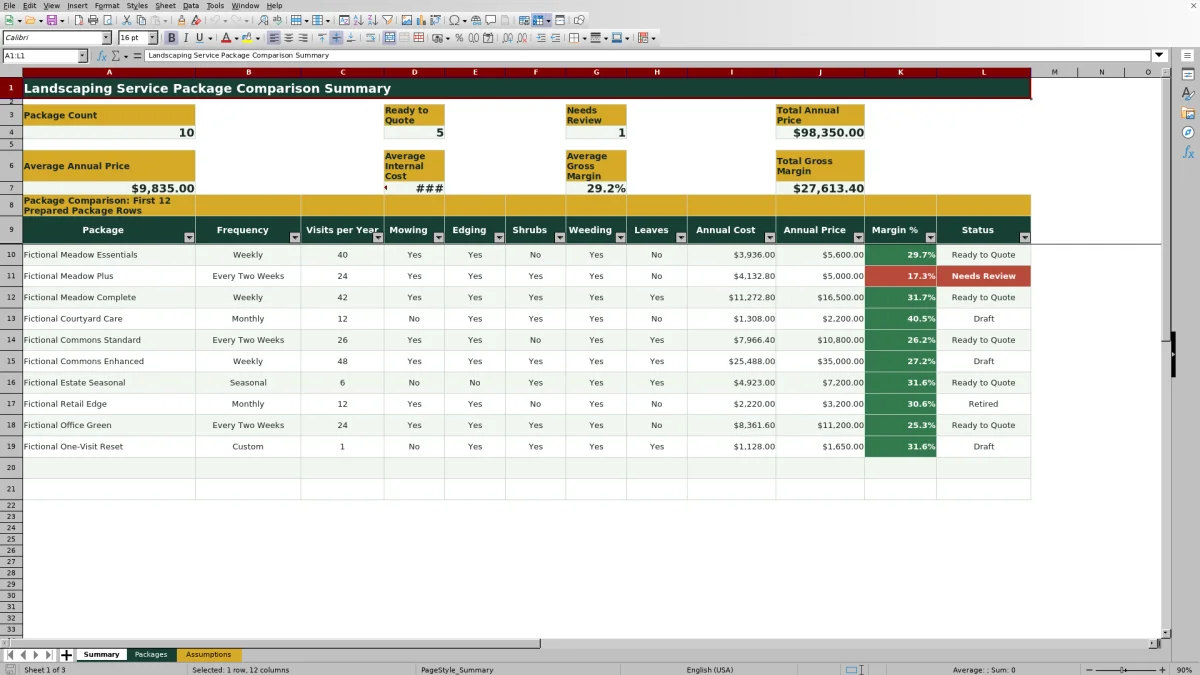
Use the Summary sheet for portfolio counts, totals, averages, and the first 12 prepared package rows. Use filters on the Packages sheet when reviewing all available rows, resolve packages marked Needs Review, and move an approved package to Ready to Quote.
Situation: Package Pricing Needs a Consistent Operating View
A low annual price does not necessarily represent a small job, and a high annual price does not explain what the customer receives. Lawn care operators need to consider service inclusions, visit count, crew time, equipment, materials, and property profile together. This workbook places those factors beside annual cost and price so sales staff can present packages without separating scope from operating requirements.
Action: Establish Cost and Visit Assumptions
The Assumptions sheet contains loaded hourly rates for Standard, Enhanced, and Specialty crews, plus per-visit costs for the Mower Set, Full Grounds Kit, and Hand Tools. It also provides reference visit counts of 42 for weekly, 24 for every two weeks, 12 for monthly, 6 for seasonal, and 1 for custom service. These values provide a visible basis for package planning, while Planned Visits per Year remains a separate package input that operators should confirm for the actual service season.
Result: Interpreted Practical Package Example
Fictional Meadow Essentials uses a Standard Crew at $62.00 per hour for 1.2 hours, a Mower Set costing $18.00 per visit, and $6.00 in materials. Labor is $74.40 per visit, making total internal cost $98.40. Across 40 planned visits, the result is a $3,936.00 annual internal cost. Against a $5,600.00 annual price, the calculated gross margin is $1,664.00, or 29.7%, and the price per visit is $140.00.
Fictional Meadow Plus has a lower annual price of $5,000.00 but only 24 planned visits, includes shrub trimming, and uses the Full Grounds Kit. Its calculated internal cost is $4,132.80, leaving an $867.20 gross margin, or 17.3%. The interpretation is that annual price alone can obscure differences in visit frequency, service scope, per-visit effort, and retained margin.
Interpretation: Read Margin Alongside Scope and Capacity
Margin percentage is not the whole decision. A package with an acceptable percentage may still consume crew capacity during a busy route window, while a lower-percentage package may support a strategic customer relationship or efficient route density. Review the inclusion columns, hours per visit, annual visits, dollar margin, and package status before deciding whether the price or operating plan should change.
Errors and Solutions in Package Review
Error: A labor or equipment calculation is blank after data was pasted into the sheet. Solution: Select a recognized crew type and equipment set from the validated lists because the cost formulas use exact lookups against the Assumptions sheet. Error: Price per visit or annual economics are blank. Solution: Confirm that planned visits, crew hours, materials, and annual price contain valid numeric entries.
Error: The selected frequency and planned annual visits do not agree. Solution: Compare the package entry with the reference visit count on the Assumptions sheet and enter the service-season plan intentionally; frequency does not automatically populate planned visits. Error: A package is absent from the Summary comparison. Solution: Review it in the filtered Packages grid because the detailed Summary view displays only the first 12 prepared rows, although its portfolio KPIs evaluate the full 100-row package area.
Comparison With Manual and Software Alternatives
The workbook operates as one method combining assumptions, package inputs, calculated economics, status tracking, and summary review. The appropriate alternative depends on transaction volume, process complexity, and whether the business also needs dispatch or field execution tools.
| Method | What it supports | Limitations | More suitable when |
|---|---|---|---|
| Landscaping comparison workbook | Structured scope, visit, resource, cost, price, margin, and status review across as many as 100 prepared rows. | It does not provide routing, mobile work orders, dispatch, or invoicing, and its detailed Summary comparison is limited to 12 rows. | More suitable when a team wants a repeatable Excel-based package-pricing method with visible assumptions. |
| Paper form or manual process | Captures simple notes without requiring a computer in the field. | Recalculation, version control, package comparison, and portfolio reporting require manual work. | More suitable when estimates are rare, simple, and do not require recurring cost analysis. |
| Blank spreadsheet | Allows a business to design an entirely custom pricing model. | Users must build and test formulas, validation, formatting, summary logic, and error handling. | More suitable when the company has unique calculations and staff available to maintain the model. |
| Dedicated field-service software | May combine estimating with scheduling, routing, dispatch, mobile work orders, customer records, and invoicing. | Implementation, subscriptions, configuration, and user training can exceed the needs of a package-comparison task. | More suitable when pricing must connect directly to daily field operations and transaction systems. |
Next Decision: Quote, Revise, or Retire the Package
The next decision should follow the package result and its operating interpretation. Mark a package Ready to Quote when its scope, annual visits, resource plan, price, and margin have been reviewed. Use Needs Review when an assumption, inclusion, capacity issue, or price requires follow-up. Keep early concepts as Draft, and use Retired for offers that should no longer enter the active sales discussion.
Frequently asked questions
What does the landscaping package workbook calculate?
It calculates labor cost per visit, equipment cost per visit, total internal cost per visit, annual internal cost, price per visit, gross margin, and gross margin percentage from the package inputs and visible assumptions.
Does visit frequency automatically set planned visits per year?
No. The Assumptions sheet provides reference annual visits for each frequency, but Planned Visits per Year is a separate input on each package row so operators can account for the actual service season.
How many landscaping packages can the workbook hold?
The Packages sheet provides 100 prepared package rows, covering rows 4 through 103.
Why is a package cost or margin cell blank?
A required input may be missing or invalid. Check the package ID, planned visits, crew type, equipment set, crew hours, materials, and annual price, and use the validated list choices where provided.
Does the Summary sheet display every package row?
Its counts, totals, and averages evaluate the full 100-row package area, but its detailed comparison displays only the first 12 prepared package rows. Use filters on the Packages sheet to review the remaining entries.
Editorial responsibility

Nadia KesslerEstimates, customers and job workflows

Ethan ReedWorkbook QA, crews and business controls