This Excel workbook helps lawn care and landscaping estimators turn measured area and waste into a planned sod quantity, preparation labor, installation labor, delivery cost, and total project cost. It supports up to 100 estimates with customer, property, status, sod type, preparation level, mileage, other cost, and markup inputs.
The XLSX applies editable assumptions for material rates, crew labor, productivity, delivery, default markup, and minimum pricing. It then calculates the installed price, price per square foot, gross margin percentage, and review alert so an operator can evaluate the estimate before presenting a quote.
How this workbook can help
- Converts measured lawn area and an entered waste percentage into the required sod quantity.
- Estimates preparation and installation labor using editable crew productivity and labor-cost assumptions.
- Combines material, labor, delivery, and other costs before applying markup and minimum-price logic.
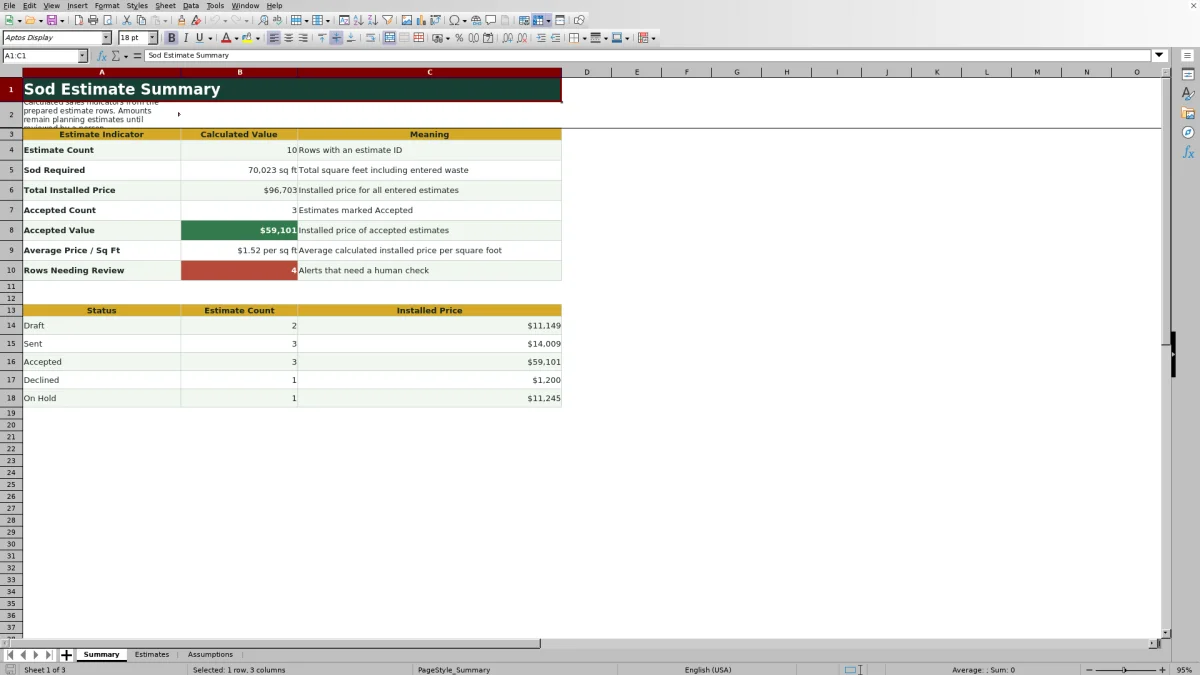
- Summarizes estimate volume, required sod, installed value, accepted work, average unit price, and rows needing review.
What is in the file
How to get started
1. Review the operating assumptions
Open the Assumptions sheet and confirm the editable planning rates, including crew labor cost, installation productivity, delivery charges, default markup, minimum installed price, sod material costs, and preparation productivity.
2. Enter the estimate details
On the Estimates sheet, add an estimate ID, date, customer, property, status, sod type, preparation level, measured area, waste percentage, delivery miles, and any other cost. Use the provided lists for status, sod type, and preparation level.
3. Review the calculated result
Check the required sod, preparation hours, installation hours, material cost, labor cost, delivery cost, estimated cost, installed price, price per square foot, and gross margin percentage.
4. Resolve the review message
Read the Review Alert column for missing or invalid inputs, elevated waste, zero markup, default-markup use, or application of the minimum price. Correct the entry or document why it is appropriate.
5. Decide the next sales action
Verify the estimate against current supplier pricing and actual site conditions, then update its status as Draft, Sent, Accepted, Declined, or On Hold. Use the Summary sheet to monitor counts and installed value by status.
Situation: Building a Consistent Sod Installation Estimate
Situation: A sod quote begins with measured lawn area, but the selling price also depends on waste, sod variety, site preparation, crew productivity, delivery distance, and additional project costs. This workbook keeps those inputs in one estimating method instead of relying on disconnected notes and calculator entries.
Action: Enter Area, Waste, Preparation, and Cost Inputs
Action: Enter the job information in a prepared estimate row and select the applicable sod type and preparation level. The workbook increases measured area by the entered waste percentage, looks up the sod material rate, converts area into preparation and installation hours, calculates delivery from its base and mileage assumptions, and includes an optional other-cost entry.
Result: Review Installed Price and Sales Indicators
Result: The estimate row returns sod required, preparation labor, installation labor, sod cost, labor cost, delivery cost, estimated cost, installed price, price per measured square foot, gross margin percentage, and an alert. The Summary sheet then aggregates required sod and installed value while showing accepted work and totals for Draft, Sent, Accepted, Declined, and On Hold estimates.
Interpreted Practical Sod Estimate Example
Situation: The fictional demonstration estimate for Alder Grove uses 4,800 square feet of measured area, 10% waste, Tall Fescue, Standard preparation, 12 delivery miles, $250 of other cost, and 30% markup. Action: The workbook calculates 5,280 square feet of sod, 8.0 preparation hours, and about 8.1 installation hours using the displayed assumptions.
Result: At $0.55 per square foot, sod cost is $2,904. Crew labor is about $1,854.15, delivery is $217, and estimated cost is about $5,225.15. The cost-plus price at 30% markup is about $6,792.70 before any higher minimum-price override, or about $1.42 per measured square foot.
Interpretation: A 30% markup on cost produces a gross margin of about 23.1%, so markup and margin should not be treated as the same percentage. Next decision: Confirm the minimum-price assumption, current Tall Fescue rate, access conditions, preparation scope, and delivery mileage before sending the estimate.
Common Estimate Errors and Solutions
Error: A row contains an estimate ID but is missing customer, property, status, sod type, preparation level, area, waste, mileage, or another required input. Solution: Complete or correct the input identified by the review message before relying on the calculated price.
Error: A typed sod type or preparation level does not match the Assumptions sheet. Solution: Use the provided selection list or update the corresponding assumption list and rate together.
Error: Waste exceeds the review threshold. Solution: Recheck measurements and site complexity, then retain the higher allowance only when cuts, curves, damage, or layout conditions support it.
Error: Markup is blank, zero, or confused with gross margin. Solution: Recognize that a blank entry uses the default markup, zero produces a review message, and the calculated gross margin will differ from the markup percentage. Also check whether the minimum installed price controls the final result.
Comparison: Excel Workbook vs Other Estimating Methods
The most suitable estimating method depends on job volume, field conditions, customization needs, and whether estimating must connect to scheduling or customer-management systems.
| Method | Setup and control | Calculation and reporting | More suitable when |
|---|---|---|---|
| This complete Excel workbook method | Uses prepared inputs, validated ranges, editable assumptions, and consistent formulas. | Calculates quantity, labor, costs, pricing, margin, alerts, and summary indicators for up to 100 estimates. | More suitable when an estimator wants a controlled, reusable pricing process without adopting a broader service platform. |
| Paper form or manual calculator | Requires little technical setup but depends on handwritten records and repeated calculations. | Provides no automatic lookup, status summary, margin calculation, or review alert. | More suitable when a quick field sketch or handwritten measurement record is needed and pricing will be completed later. |
| Blank spreadsheet | Allows unrestricted customization, but the operator must build and maintain formulas, lists, validation, and reports. | Capabilities depend entirely on what the user creates and tests. | More suitable when the company uses a substantially different pricing model and has someone responsible for spreadsheet design and maintenance. |
| Dedicated field-service software | May connect estimating with customer records, scheduling, crew activity, invoicing, or payments, depending on the product. | Can support a wider operating workflow but may require configuration, subscriptions, and staff training. | More suitable when multiple teams need estimates integrated with broader field-service operations. |
Next Decision: Check the Quote Before It Leaves the Office
Use the calculated result as a planning estimate rather than a substitute for field judgment. Confirm measurements, grading and removal requirements, soil conditions, access, sod availability, supplier rates, crew productivity, delivery requirements, and additional costs. After resolving the alert, choose the next sales status and use the Summary sheet to track the resulting pipeline value.
Frequently asked questions
What does the sod installation estimate calculator calculate?
It calculates sod required after waste, preparation and installation labor, material cost, labor cost, delivery cost, estimated cost, installed price, price per measured square foot, gross margin percentage, and a review alert.
How does the workbook account for sod waste?
It multiplies measured area by one plus the entered waste percentage and rounds the result up to a whole square foot. A waste percentage above the editable review threshold produces a review message.
How are preparation and installation labor estimated?
Preparation hours equal measured area divided by the productivity assigned to the selected preparation level. Installation hours equal required sod divided by the installation productivity assumption. The workbook applies the crew labor rate to the combined hours.
What happens when the markup field is left blank?
The installed-price formula uses the default markup from the Assumptions sheet and generates a message noting that default-markup use. It also compares the cost-plus amount with the minimum installed price and uses the larger value.
Does this Excel estimate replace a site inspection or pricing review?
No. The workbook organizes planning inputs and calculations, but a person should still confirm measurements, site conditions, preparation scope, supplier pricing, delivery requirements, productivity, and additional costs before presenting a customer quote.
Editorial responsibility

Nadia KesslerEstimates, customers and job workflows

Ethan ReedWorkbook QA, crews and business controls