This Excel snow removal estimate calculator helps lawn care and landscaping operators price per-event and seasonal snow service. Enter each customer, property, service area, service level, pricing method, crew, equipment, and estimate status on the Estimates sheet.
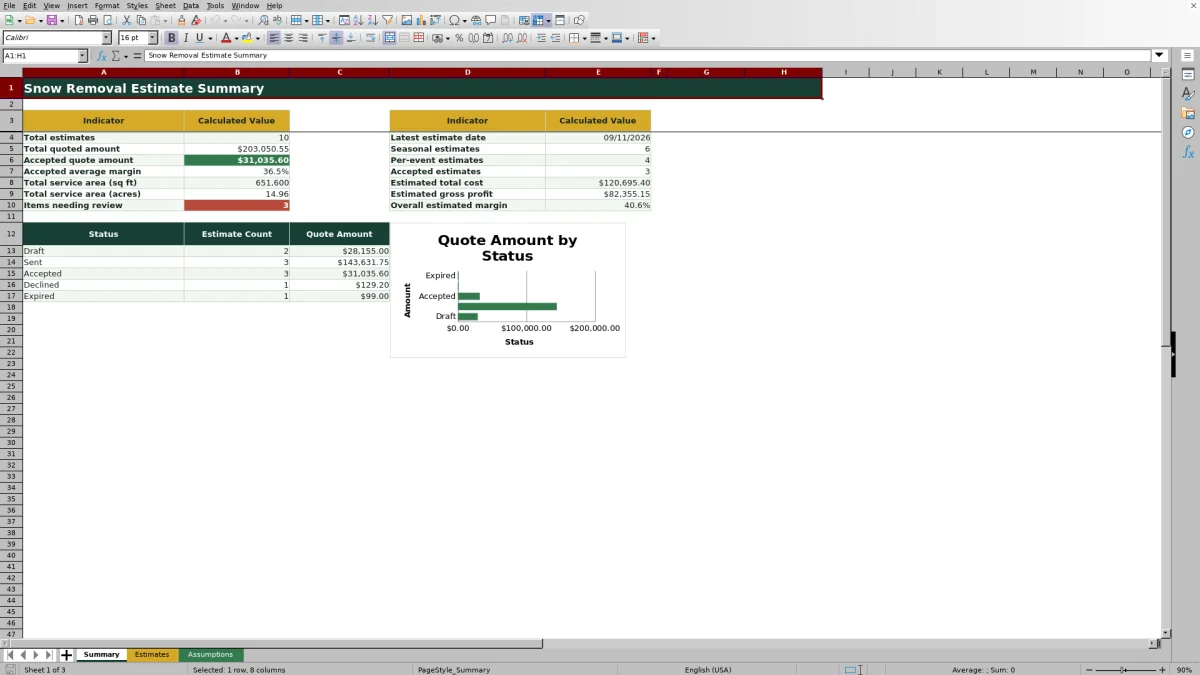
The XLSX calculates pricing from service area and service level, applies minimum event charges, estimates labor and equipment costs, and reports quote amount, gross profit, and margin. The Summary sheet then consolidates sales activity, accepted work, service area, profitability, status totals, and estimates that need review.
How this workbook can help
- Price seasonal and per-event snow work with a consistent area-based method.
- Account for minimum event charges when small properties do not meet the calculated area price.
- Estimate labor and equipment costs before sending or accepting a quote.
- Monitor quote value, accepted work, margin, status, and review items from one summary.
What is in the file
How to get started
1. Configure the assumptions
Review the yellow input cells on the Assumptions sheet. Update the seasonal multiplier, margin threshold, service-area limits, expected-event limits, service-level rates, minimum charges, production hours, labor costs, and equipment costs for your operation.
2. Enter the property and service plan
On the Estimates sheet, enter an estimate ID, date, customer, property, and service area. Select the service level, pricing method, crew, equipment, and status from the available lists. Enter expected events when using Seasonal pricing.
3. Review the calculated estimate
Check the rate, minimum charge, crew hours, equipment hours, estimated event cost, event price, total quote, gross profit, and estimated margin. Confirm that the figures account for how your crews actually service the property.
4. Resolve alerts and make the sales decision
Use the Review Alert column to find missing, invalid, or review-worthy entries. Correct the input or assumption, confirm the updated result, and then assign the appropriate estimate status before using the Summary sheet for pipeline review.
Build Snow Estimates From Operational Inputs
The estimate starts with the property and service plan rather than a single flat price. Operators enter the service area in square feet and select a service level, pricing method, crew, and equipment assignment. The workbook uses those choices to retrieve the applicable rate, minimum event charge, production-hour assumptions, labor rate, and equipment operating cost. This structure gives a landscape company a repeatable estimating method while keeping its pricing and production assumptions editable.
How Per-Event and Seasonal Pricing Is Calculated
For each property, the price per event is the greater of the service-level minimum charge or the service area divided by 1,000 and multiplied by the customer rate per 1,000 square feet. A Per Event estimate uses that event price as the quote amount. A Seasonal estimate multiplies the event price by expected events and the seasonal pricing multiplier, which is 0.9 in the supplied assumptions. Estimated seasonal cost uses the event cost multiplied by expected events, while gross profit equals quote amount minus estimated total cost.
Interpreted Practical Snow Estimate Example
Situation: A 500-square-foot property is entered as Plow Only with Per Event pricing, Fictional Crew Pine, and Fictional Plow Truck A. Action: The $10.50 rate per 1,000 square feet produces an area price of $5.25, so the $75 minimum becomes the event price. Crew time is 0.02 hour and equipment time is 0.0175 hour; at the listed $76 labor rate and $48 equipment rate, estimated event cost is $2.36. Result: The quote is $75, estimated gross profit is $72.64, and estimated margin is about 96.9%. Interpretation: The minimum charge controls this small-property estimate, and the unusually high modeled margin signals that the operator should confirm whether travel, loading, materials, supervision, or other overhead belongs in the assumptions. Next decision: Adjust the operating assumptions or minimum charge if needed, review the recalculated margin, and then decide whether to send the quote.
Common Estimate Errors and Solutions
A missing or out-of-range date should be corrected to fall within the configured date limits. A service area below 500 or above 500,000 square feet should be verified or addressed by changing the editable limits. If rate or production values remain blank, select a service level that exists in the Assumptions list. If Seasonal pricing does not produce a quote, enter an expected-event count between the configured minimum of 1 and maximum of 40. When the margin triggers review, verify the property measurements, selected resources, production factors, rates, minimum charge, and omitted operating costs before approving the estimate.
Comparison With Manual and Software Alternatives
The workbook functions as one complete estimating method: assumptions feed estimate inputs, formulas calculate price and cost, alerts flag entries for review, and the Summary sheet supports the next sales decision. The comparison below shows when this method or an external alternative may be more suitable.
| Method | Workflow | More suitable when | Trade-off |
|---|---|---|---|
| Excel snow removal estimate workbook | Configure assumptions, enter properties, calculate quotes and costs, review alerts, and monitor results in one XLSX. | More suitable when a landscape or snow contractor needs structured estimating and sales visibility without deploying a larger software platform. | Users still need to maintain assumptions, control file access, and transfer approved information into scheduling, billing, or customer systems. |
| Paper form or manual calculator | Record measurements and calculate each estimate by hand. | More suitable when quoting a very small number of simple properties where no shared digital reporting is required. | Repeated calculations, assumption changes, and pipeline totals require additional manual work. |
| Blank spreadsheet | Create columns and formulas separately for each estimating process. | More suitable when the operator needs a completely custom model and has the time and spreadsheet skill to build and test it. | Pricing logic, validation, alerts, and summary reporting must be designed and maintained by the user. |
| Dedicated field-service software | Connect estimating with customer records, dispatch, mobile crews, work orders, and invoicing. | More suitable when a company needs integrated field operations, permissions, automation, and multiuser workflows. | Implementation, subscriptions, configuration, and staff training may be more involved than maintaining an Excel workbook. |
Use the Summary for Sales and Margin Review
The Summary sheet reports total estimates, total quoted amount, accepted quote amount, accepted average margin, total service area, estimated total cost, estimated gross profit, and overall estimated margin. It also separates Seasonal and Per Event counts, reports accepted estimates, and counts records with check or review alerts. Status counts and quote amounts appear alongside a chart, helping an operator identify where quoted revenue sits in the sales process.
Turn Estimate Results Into the Next Decision
A calculated quote is a planning result, not a substitute for inspecting access, obstacles, snow-storage space, service timing, material requirements, or unusual site conditions. After reviewing the formulas, compare calculated crew and equipment hours with recent production experience. If the operational plan is realistic and the margin meets company requirements, move the estimate to the appropriate status. If not, revise the service level, resource assignment, rate, minimum, event count, or cost assumptions and review the result again.
Frequently asked questions
How does the Excel workbook calculate a per-event snow removal price?
It compares the service-level minimum charge with the area-based price, calculated as service area divided by 1,000 and multiplied by the applicable rate. The greater amount becomes the price per event.
How does the calculator price a seasonal snow contract?
It multiplies the calculated price per event by the expected number of events and the seasonal pricing multiplier. The supplied multiplier is 0.9, and it can be changed on the Assumptions sheet.
Can I change the labor rates, equipment costs, and service-level pricing?
Yes. The Assumptions sheet contains editable customer rates, minimum event charges, crew and equipment hours per 1,000 square feet, hourly labor costs, and hourly equipment operating costs.
Why does an estimate show a review alert?
An alert can indicate a missing or out-of-range date, invalid service area, unavailable service level, incorrect pricing method, incomplete seasonal event entry, or another condition requiring review. Correct the inputs and confirm that the assumptions reflect the property.
Does this snow removal estimate calculator replace a site inspection?
No. The workbook provides a structured financial estimate from entered assumptions. Operators should still inspect access, pavement and walkway conditions, obstacles, snow-storage areas, service timing, material needs, and other site-specific risks before finalizing a quote.
Editorial responsibility

Nadia KesslerEstimates, customers and job workflows

Ethan ReedWorkbook QA, crews and business controls