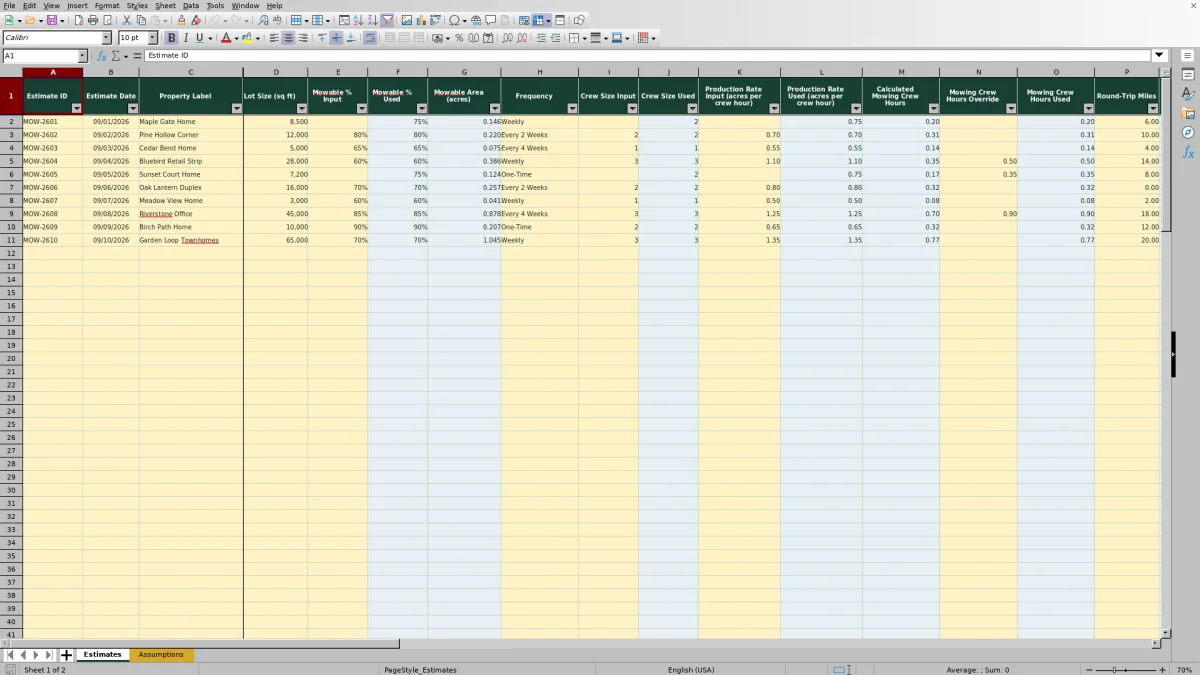
This Excel workbook is a lawn mowing price calculator for estimating the price of individual mowing visits. It converts lot size into mowable acres, estimates crew and travel time, calculates operating costs, applies overhead and target margin, and checks the result against a minimum visit price.
Use the Estimates sheet for property-level inputs and calculated prices, and review the editable Assumptions sheet before preparing quotes. The workbook supports pricing one mowing visit while also estimating monthly sales from the selected service frequency.
How this workbook can help
- Builds mowing prices from property size, labor, equipment, vehicle, overhead, and margin inputs instead of relying only on a flat guess.
- Uses business-wide defaults while allowing estimate-specific values for mowable percentage, crew size, production rate, and mowing time.
- Shows the effect of travel and crew size on total worker hours and direct labor cost.
- Provides per-visit pricing, estimated monthly sales, and a status message for each of up to 100 estimates.
What is in the file
How to get started
1. Review the business assumptions
Open the Assumptions sheet and review assumptions first. Confirm loaded labor cost, equipment cost, vehicle cost, average travel speed, overhead, target gross margin, minimum visit price, default mowable percentage, default crew size, default production rate, and frequency settings.
2. Enter the property and service details
On the Estimates sheet, enter the lot size, service frequency, and round-trip miles. Add an estimate ID, date, property label, and notes when they are useful for tracking the quote.
3. Add job-specific values when needed
Enter a mowable percentage, crew size, or production rate when the default does not reflect the property. Use the mowing crew-hours override when a site visit or prior job history supports a more accurate time estimate.
4. Review the price and status
Check total worker hours, direct costs, cost with overhead, suggested price before the minimum, price per visit, estimated monthly sales, and the price indicator. Resolve missing inputs or questionable assumptions before using the amount in a customer quote.
What the Lawn Mowing Price Calculator Does
The workbook turns field and business inputs into a structured mowing estimate. Lot size and the mowable percentage determine mowable acres. Production rate converts those acres into mowing crew hours, while round-trip miles and average travel speed determine travel crew hours. Crew size then converts elapsed crew time into total worker hours.
Those worker hours drive direct labor cost. Mowing crew hours drive equipment cost, and round-trip miles drive vehicle cost. The workbook adds overhead, applies a margin-based pricing formula and the selected frequency multiplier, enforces the minimum visit price, and calculates estimated monthly sales from visits per month.
How Crew Time, Travel, and Margin Affect Price
A crew hour is elapsed time for the entire crew, not one labor hour. The workbook adds mowing and travel crew hours and multiplies that total by crew size to obtain worker hours. This distinction matters because sending two workers for half an hour represents one worker hour, even though only half a crew hour elapsed.
After labor, equipment, and vehicle costs are calculated, the workbook increases their total by the overhead rate. It then divides cost with overhead by one minus the target gross margin and applies the frequency-specific price multiplier. This uses gross margin as a percentage of selling price rather than treating it as a simple markup on cost.
Practical Pricing Example and Interpretation
Situation: Consider the fictional Cedar Bend sample estimate: a 5,000-square-foot lot with 65% mowable area, a one-person crew, a production rate of 0.55 acre per crew hour, and four round-trip miles. The workbook assumptions shown in the XLSX use $24 per worker hour, $14 per mowing crew hour, $0.75 per mile, 30 mph average travel speed, 15% overhead, 35% target gross margin, and a $45 minimum visit price.
Action: The calculator converts the property to about 0.0746 mowable acre, estimates about 0.136 mowing crew hour, and adds about 0.133 travel crew hour. With one worker, total worker time is about 0.269 hour.
Result: Direct labor is about $6.46, equipment cost is about $1.90, and vehicle cost is $3.00. After 15% overhead, cost is about $13.06. The margin-based amount is about $20.09 before the frequency adjustment. Because the validated frequency multiplier can be no more than 2.00, the adjusted amount remains below $45, so the workbook returns a $45 price per visit and reports “Minimum price applied.”
Interpretation: The price floor, rather than the calculated production cost, controls this small job. That indicates the minimum is covering the practical cost of dispatching a crew even when estimated on-site work is brief.
Next decision: Confirm that the $45 minimum reflects current scheduling and mobilization needs. If terrain, trimming, gates, or obstacles make the mowing time longer than the acreage formula suggests, record a supported mowing crew-hours override and review the recalculated price.
When to Use Defaults and Overrides
Leaving the mowable percentage, crew size, or production rate input blank causes the estimate to use the corresponding default from the Assumptions sheet. This is useful when most properties follow a consistent operating pattern. Enter a job-specific value when measured conditions differ from that pattern.
The mowing crew-hours override replaces calculated mowing time but does not replace travel time. Use it when prior service records, a site walk, or known obstacles provide stronger evidence than the acreage-based production estimate. Because the override affects labor and equipment costs, document the reason in the Notes column.
Common Errors and Solutions
A “Missing inputs” indicator means lot size, frequency, or round-trip miles is blank. Enter all three, using zero for mileage only when zero round-trip miles is factually correct. A “Check assumptions or inputs” message can appear when the formulas cannot use the supplied values, such as an invalid travel speed, margin, frequency lookup, or production input. Fix the input or assumption rather than replacing a calculated cell.
If “Minimum price applied” appears unexpectedly, compare cost with overhead and suggested price before the minimum with the configured $45 floor. The message is not a formula error; it means the calculated amount is lower than the minimum. If time looks understated, verify the mowable percentage and production rate, then use the mowing-hours override only when field evidence supports it. Also avoid entering worker hours in the crew-hours override because crew size multiplies that value later.
Comparison With Manual and Software Alternatives
The Excel workbook is one complete operational method: assumptions feed standardized property estimates, formulas calculate costs and prices, and each row retains its inputs, outputs, notes, and status. The table compares that workflow with realistic external alternatives. Each option is more suitable when the stated operating condition applies.
| Method | More suitable when | Operational tradeoff |
|---|---|---|
| This Excel lawn mowing price calculator | A small or growing lawn care business wants repeatable cost-based estimates, editable assumptions, overrides, and monthly sales projections without adopting a larger platform. | Users need access to the XLSX, must protect formula cells, and must keep assumptions current. |
| Paper estimate form or manual calculator | Only a few simple quotes are prepared and the estimator needs an offline field process with no computer. | Calculations, frequency adjustments, and historical comparisons require additional manual work and are more exposed to arithmetic or transcription mistakes. |
| Blank spreadsheet | The business has a unique pricing method and has time to design, test, document, and maintain its own formulas and validations. | Setup and quality control remain the operator's responsibility, including defaults, margin logic, error handling, and input controls. |
| Dedicated field-service software | The operation needs connected scheduling, routing, customer records, invoicing, payments, crew dispatch, or mobile job updates in one system. | It can require subscription costs, implementation work, and adaptation to the software's pricing structure. |
The workbook is focused on estimating rather than dispatch, invoicing, or customer relationship management. A company can use its calculated visit price as an input to those separate operating systems.
Reading the Output and Making the Next Pricing Decision
Price per visit is the customer-facing starting point, while suggested price before the minimum explains whether the calculated economics or the minimum controls the result. Cost with overhead shows the modeled cost base, and estimated monthly sales extends the visit price using the frequency table's visits-per-month value.
Before quoting, compare calculated mowing time with field experience, verify travel mileage, and check whether the selected frequency reflects expected grass growth and visit cadence. After completing work, compare actual crew time with the estimate and update the production rate, defaults, or documented override process when a consistent difference appears.
Frequently asked questions
What information is required to calculate a mowing price?
Enter lot size in square feet, select a service frequency, and provide round-trip miles. The workbook can use default values for mowable percentage, crew size, and production rate when their estimate-specific input cells are blank.
What is the difference between crew hours and worker hours?
Crew hours measure elapsed time for the whole crew. Worker hours equal mowing crew hours plus travel crew hours, multiplied by crew size. Labor cost uses worker hours, while mowing equipment cost uses mowing crew hours.
Can I override the calculated mowing time?
Yes. Enter a value in the Mowing Crew Hours Override column. The workbook will use that value instead of the acreage-based mowing time while continuing to calculate travel separately.
Why does the workbook show Minimum price applied?
This status means the suggested price before the minimum is below the minimum visit price on the Assumptions sheet. The Price Per Visit formula therefore uses the configured minimum and rounds it to a whole dollar.
How is estimated monthly sales calculated?
The workbook multiplies price per visit by the visits-per-month value associated with the selected service frequency. Review the frequency inputs on the Assumptions sheet because they affect both monthly sales and the frequency-based pricing adjustment.
Editorial responsibility

Nadia KesslerEstimates, customers and job workflows

Ethan ReedWorkbook QA, crews and business controls