This Excel landscaping customer profitability spreadsheet connects customer records, service activity, cost assumptions, and a summary of completed-job profitability. It is designed for landscaping operators who need to compare revenue, service cost, profit, and margin for each customer.
Enter labor hours, equipment hours, materials, travel miles, other direct costs, revenue, and job status in the Service Log. The Excel workbook calculates direct service cost and uses completed jobs to identify customer accounts that may need a pricing, cost, or data review.
How this workbook can help
- Compare completed-job revenue, direct service cost, profit, and margin across customers.
- Identify customer accounts that fall below the editable margin review threshold.
- Apply consistent labor, equipment, and mileage rates when estimating direct service cost.
- Trace customer-level results back to individual landscaping jobs and their underlying inputs.
What is in the file
How to get started
Step 1: Review the assumptions
Set cost rates first. On the Assumptions sheet, review the mileage cost, margin threshold, crew labor rates, equipment operating rates, service choices, statuses, and units. Replace the fictional planning values with rates appropriate for your operation.
Step 2: Maintain the customer list
Keep customer IDs unique. Add or update each customer, property, property size, account start date, and status on the Customers sheet. The Service Log and Summary use Customer ID to connect records.
Step 3: Enter service activity
Record complete job facts. In the Service Log, enter the service date, Job ID, Customer ID, service type, crew, equipment, quantity, hours, materials, travel, other direct costs, revenue, and status. Mark a job Completed only when it should contribute to profit and margin results.
Step 4: Review customers and decide what to investigate
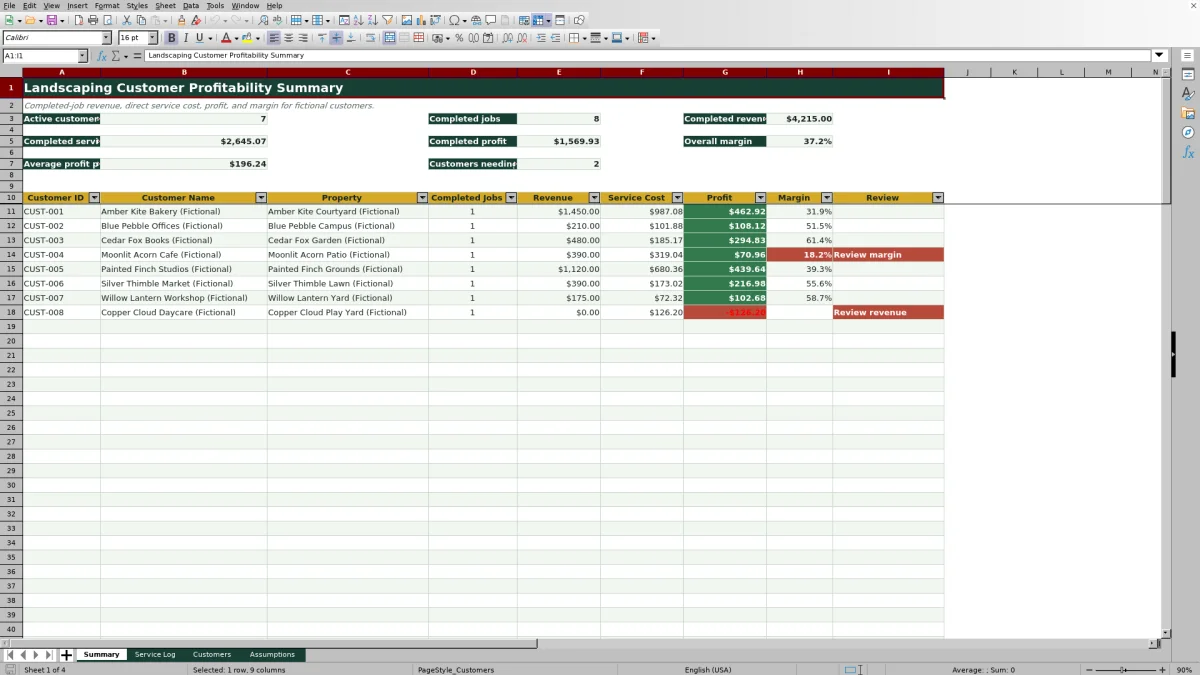
Use the Summary for account review. Compare completed jobs, revenue, service cost, profit, margin, and review messages by customer. Investigate low margins, missing revenue, incomplete cost inputs, or customers with no completed jobs before changing pricing or service plans.
What the Customer Profitability Workbook Measures
The workbook measures completed-job revenue against direct service costs for each customer. Direct service cost includes calculated labor, equipment, and travel costs plus entered material cost and other direct cost. Customer profit is revenue minus service cost, while customer margin is profit divided by revenue. These results are operational contribution figures rather than full accounting net income because unspecified overhead, taxes, financing costs, and other indirect expenses are not included.
How Job Costs Flow Into Customer Results
Labor cost equals labor hours multiplied by the selected crew's loaded hourly rate. Equipment cost equals equipment hours multiplied by the selected equipment's operating rate, and travel cost equals miles multiplied by the mileage rate. The workbook adds those amounts to materials and other direct costs. When a job is marked Completed and contains the required values, its revenue and service cost flow into the matching customer's Summary row.
Interpreted Practical Landscaping Job Example
Situation: the included fictional JOB-26-002 records $210 of revenue for CUST-002, with 2.4 labor hours assigned to Blue Heron Crew, 1.5 equipment hours for a 52-inch mower, and 9 travel miles. Action: using the included rates of $31 per labor hour, $14 per equipment hour, and $0.72 per mile, the workbook calculates $74.40 of labor cost, $21.00 of equipment cost, and $6.48 of travel cost. Result: with no material or other direct cost entered, total service cost is $101.88, profit is $108.12, and margin is approximately 51.5%. Interpretation: the completed job is above the included 25% margin review threshold, so it does not receive a low-margin message. Next decision: the operator can compare this result with other completed jobs for the same customer before deciding whether to maintain pricing, investigate cost variation, or adjust the service plan.
Errors and Solutions During Data Entry
If a completed job shows blank cost results or a Review inputs message, confirm that its crew, equipment, labor hours, equipment hours, travel miles, material cost, and other direct cost are present and that the selected crew and equipment exist on the Assumptions sheet. If the margin is blank or the row says Review revenue, inspect the revenue value. If a job is missing from the customer totals, verify that its Customer ID matches the Customers sheet and its status is Completed. Duplicate Customer IDs or Job IDs should be corrected because the workbook applies uniqueness validation to those entry ranges.
Comparison: Excel Workbook and Other Operational Methods
The appropriate method depends on job volume, staff workflow, reporting needs, and available systems. This workbook operates as one connected method consisting of customer records, job entry, cost assumptions, calculated profitability, and customer review.
| Method | Operational approach | More suitable when | Trade-off |
|---|---|---|---|
| This Excel workbook | Connects a customer list, service log, editable rates, direct-cost calculations, review messages, and a completed-job summary. | More suitable when an operator wants a prepared, transparent profitability method for up to 100 customer and 100 service records. | Requires disciplined data entry and does not provide dispatching, mobile crew management, or accounting integration. |
| Paper form or manual ledger | Records job details by hand and requires manual calculations or later data entry. | More suitable when job volume is very low or crews need temporary offline field capture. | Customer totals and margins take longer to calculate, and transcription errors can occur. |
| Blank spreadsheet | Starts without prepared fields, formulas, validations, assumptions, or review rules. | More suitable when the business needs a fully custom model and has time to design and test it. | The operator must build and maintain the calculation structure. |
| Dedicated field-service software | May combine estimating, scheduling, dispatch, mobile updates, invoicing, and reporting. | More suitable when multiple crews need coordinated workflows, integrations, permissions, or larger-scale automation. | May involve subscription costs, setup work, training, and less direct control over calculation design. |
Using Review Messages for Pricing Decisions
The included margin review threshold is 25% and can be changed on the Assumptions sheet. A Review margin message indicates that completed-job margin is below that threshold; it does not identify the cause by itself. Before changing a price, inspect labor hours, crew rates, equipment use, travel, materials, other direct costs, and revenue. A low-margin result may reflect pricing, operational inefficiency, unusual job conditions, or an entry error.
Workbook Scope and Next Decisions
The Summary provides active customer count, completed job count, completed revenue, completed service cost, completed profit, overall margin, average profit per completed job, and the number of customers carrying a review message. Use those results to decide which accounts warrant a job-level review. Because scheduled, draft, canceled, and other non-completed jobs do not contribute to completed-job profitability, confirm statuses before using the workbook to support pricing, renewal, routing, or service-mix decisions.
Frequently asked questions
Which jobs are included in the customer profitability summary?
Only Service Log records marked Completed contribute to customer job counts, revenue, service cost, profit, and margin.
What costs are included in total service cost?
Total service cost includes calculated labor, equipment, and travel costs plus entered material cost and other direct cost.
Can I change the labor, equipment, mileage, and margin assumptions?
Yes. The Assumptions sheet contains editable mileage cost, margin threshold, crew labor rates, equipment operating rates, and dropdown choices.
Does the workbook calculate accounting net profit?
No. It calculates profit after the direct service costs represented in the workbook. Unspecified overhead, taxes, financing costs, and other indirect expenses are outside its calculation structure.
How many customer and service records are prepared in the workbook?
The configured ranges support up to 100 customer records and 100 Service Log records, with corresponding customer rows on the Summary.
Editorial responsibility

Nadia KesslerEstimates, customers and job workflows

Ethan ReedWorkbook QA, crews and business controls