This Excel workbook organizes one-time launch costs and initial funding needs for a lawn care or landscaping business. Enter equipment, vehicle and trailer, tools, safety gear, office, and other planned purchases in the 100-row Startup Costs sheet, then use the calculated Summary to review the projected budget.
The XLSX combines estimated and quoted costs with paid amounts, funding sources, contingency, an opening cash buffer, owner cash, and secured financing. It helps an operator move from a list of purchases to a practical funding decision while keeping assumptions and validation choices visible.
How this workbook can help
- Build a consolidated launch budget instead of tracking equipment, supplies, deposits, and setup expenses in separate notes.
- See how contingency and an opening cash buffer affect the amount of funding needed before launch.
- Separate paid costs from unpaid planned costs so available cash is not confused with money already spent.
- Identify items that lack a vendor or source, remain deferred, or still need a quote or actual amount.
What is in the file
How to get started
Set assumptions
Open the Assumptions sheet and review the contingency rate, opening cash buffer, owner cash allocation, financing already secured, target launch date, allowed date range, and numeric limits. Adjust the editable category, unit, funding, status, and inclusion choices when needed.
Enter startup costs
Use one row per cost in the Startup Costs sheet. Add the item, category, vendor or source, need-by date, quantity, unit, estimated unit cost, any quoted or actual total, amount paid, funding source, status, and notes. Select Yes under Include in plan for costs that should affect the Summary.
Review calculated amounts
Check the estimated total, projected cost, unpaid amount, and variance columns. The projected cost uses a numeric quoted or actual total when available; otherwise, it uses quantity multiplied by estimated unit cost.
Make the funding decision
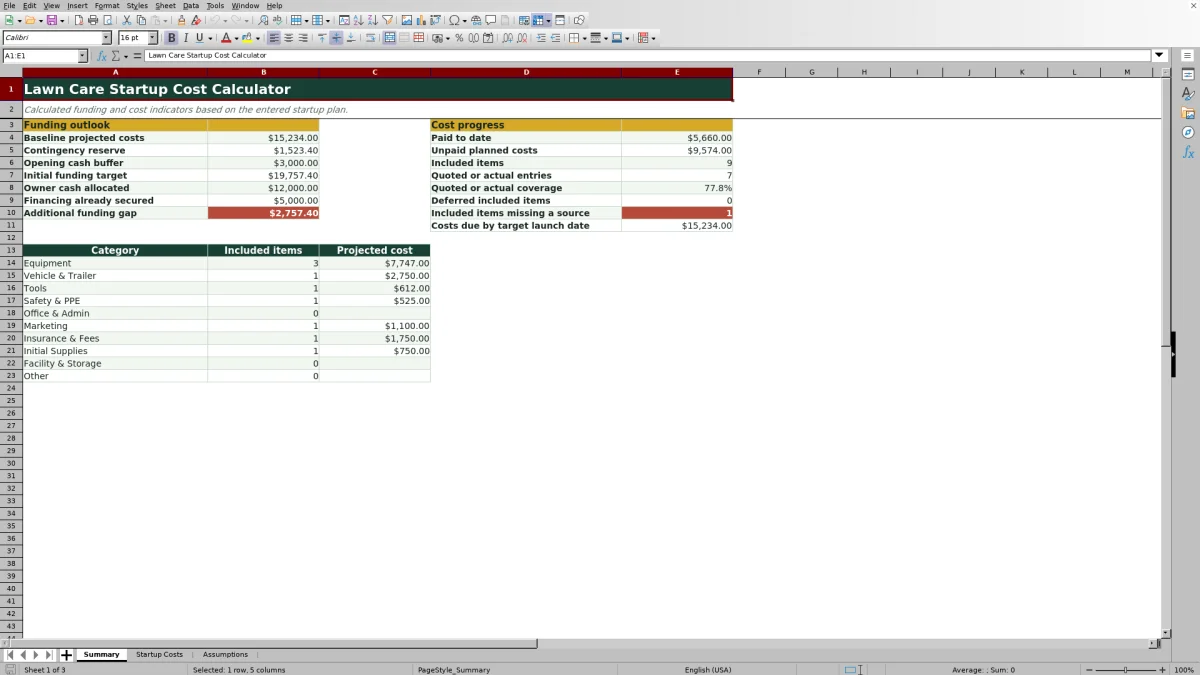
Read the Summary for baseline projected costs, contingency, opening cash buffer, initial funding target, owner cash, secured financing, and any additional funding gap. Then decide whether to obtain funding, revise a cost, secure a quote, change timing, or defer an included item.
What the Lawn Care Startup Cost Calculator Measures
The workbook turns individual launch purchases into a baseline projected cost. It adds the selected contingency reserve and opening cash buffer to calculate an initial funding target, then subtracts owner cash allocated and financing already secured. The resulting funding gap cannot fall below zero, so excess funding is not displayed as a negative need.
From Purchase List to Funding Plan
A lawn care operator can record mowers, trimmers, blowers, trailers, safety equipment, administrative costs, and other launch items with quantities, dates, vendors, payment progress, and funding sources. Selecting Yes in Include in plan makes an item eligible for the calculated plan; selecting No keeps the row available without adding it to projected totals.
Interpreted Practical Example
Situation: Consider only the three visible sample items: a mower quoted at $6,250 with $2,000 paid, trimmers quoted at $898 and fully paid, and a blower estimated at $599 with nothing paid. All three are included. Action: Enter those costs and apply the workbook's sample 10% contingency and $3,000 opening cash buffer. Result: The illustrative baseline is $7,747, contingency is $774.70, and the funding target is $11,521.70. Paid costs total $2,898, leaving $4,849 unpaid on the three items. Interpretation: With the sample assumptions of $12,000 in owner cash allocation and $5,000 in secured financing, the additional funding gap is $0. This does not mean every item is ready to purchase; the blower still lacks a quoted total and vendor entry. Next decision: Obtain the blower quote and choose its funding source, or mark it deferred if it is not required at launch. Totals on the actual Summary may differ when other included rows are present.
Common Entry Errors and Solutions
If an item is unexpectedly absent from totals, confirm that Include in plan is set to Yes. If an estimated total is blank, enter a cost item, numeric quantity, and numeric estimated unit cost; a numeric quoted or actual total can supply the projected cost when available. If unpaid cost appears too low, check the Paid to date entry because the formula reduces projected cost by that amount and stops at zero. For a rejected date or amount, review the minimum and maximum limits on the Assumptions sheet. If the Summary flags an included item as missing a source, add its vendor or source entry.
Comparison With Manual and Software Alternatives
The Excel workbook is a complete operational method for setting assumptions, entering up to 100 startup costs, calculating funding needs, and reviewing exceptions. The alternatives below may be more suitable when a different level of structure or business management is required.
| Method | How it works | More suitable when |
|---|---|---|
| Lawn care startup cost Excel workbook | Connects a structured cost plan and editable assumptions to a formula-driven funding Summary. | More suitable when an operator wants transparent calculations, quote tracking, payment progress, category totals, and a funding-gap estimate in one XLSX. |
| Paper form or manual list | Records purchases by hand and requires totals, changes, and funding calculations to be recomputed manually. | More suitable when the plan has only a few stable costs and no need for automatic recalculation. |
| Blank spreadsheet | Lets the operator design columns, formulas, validation, and reports from the beginning. | More suitable when the business requires a custom model and the operator can build and maintain its formulas. |
| Dedicated field-service software | May combine estimating with customer records, scheduling, dispatch, invoicing, payments, and mobile field workflows. | More suitable when ongoing job operations and customer management matter more than a focused startup-funding model. |
How to Interpret the Summary
Baseline projected costs represent included rows and use quoted or actual totals where entered, falling back to calculated estimates. Initial funding target adds contingency and the opening cash buffer. Paid to date and unpaid planned costs describe purchase progress, while quote coverage, deferred-item count, missing-source count, and costs due by the target date show where the plan still needs attention.
Scope and Planning Limits
This workbook focuses on startup purchases and initial funding rather than route scheduling, customer estimates, recurring job profitability, dispatch, or invoicing. Quotes, financing availability, taxes, registration requirements, insurance terms, and local operating costs can change, so operators should update source figures and assumptions before committing funds.
Frequently asked questions
How does the workbook choose between an estimate and a quoted cost?
Projected cost uses the numeric quoted or actual total when one is entered. If that field is blank, it uses the estimated total calculated from quantity multiplied by estimated unit cost.
Can the calculator track deposits and partial payments?
Yes. Enter the amount already paid in Paid to date. The unpaid amount is the projected cost minus the numeric paid amount, with the result limited to zero or more.
What happens when Include in plan is set to No?
The row remains in the Startup Costs sheet, but its projected cost and unpaid amount are left blank and it is excluded from the included-item Summary calculations.
Can I change the categories and dropdown choices?
Yes. The Assumptions sheet contains editable lists for categories, units, funding sources, statuses, and Yes or No inclusion choices. The Startup Costs dropdowns reference those lists.
Does this workbook manage lawn care jobs after launch?
No. It is designed for startup-cost and initial-funding planning. It does not provide dedicated customer management, route scheduling, dispatch, job invoicing, or field-service workflows.
Editorial responsibility

Nadia KesslerEstimates, customers and job workflows

Ethan ReedWorkbook QA, crews and business controls