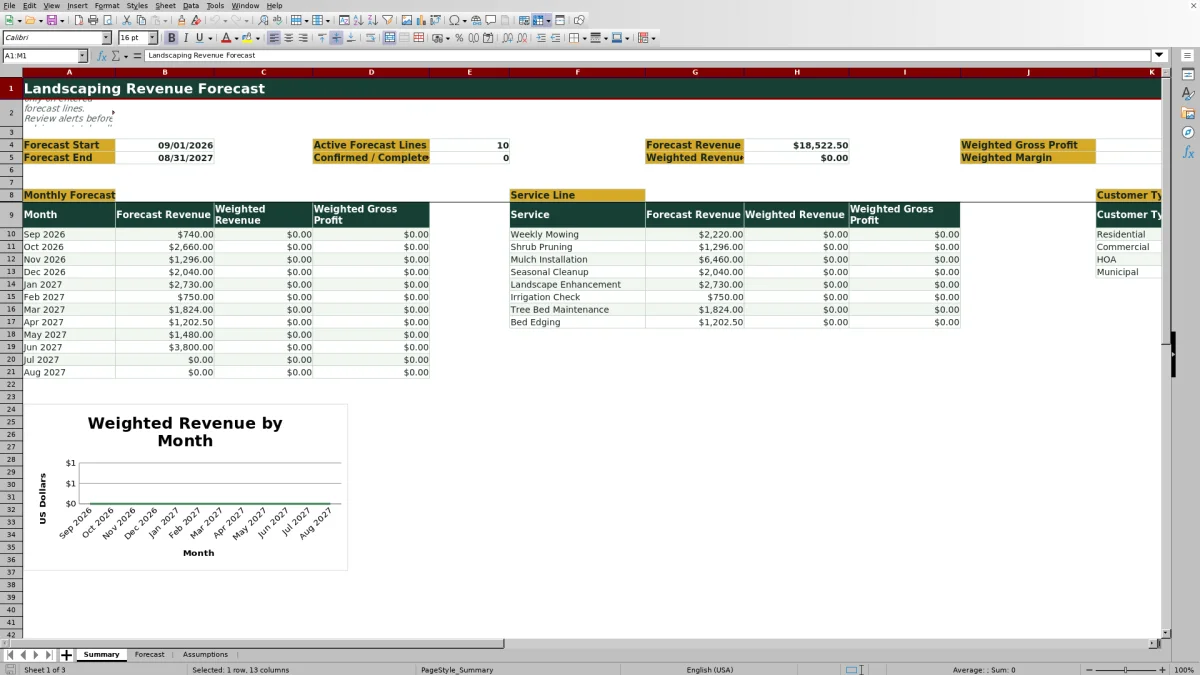
This landscaping revenue forecast spreadsheet is a formula-driven Excel workbook for projecting revenue by month, service line, and customer type. It organizes up to 120 expected service events or monthly service groups across a configurable rolling 12-month period.
The XLSX applies service rates, quantities, probabilities, estimated direct costs, and statuses to calculate forecast revenue, weighted revenue, and weighted gross profit. Crew and equipment fields support planning assignments, while review alerts help operators find incomplete or inconsistent forecast lines before using the Summary sheet for decisions.
How this workbook can help
- See monthly forecast revenue, probability-weighted revenue, and weighted gross profit in one planning view.
- Separate expected revenue by landscaping service and by residential, commercial, HOA, or municipal customer type.
- Use default service rates while retaining the option to enter a rate override for an individual forecast line.
- Identify incomplete entries, duplicate forecast IDs, and out-of-period dates before relying on summary totals.
What is in the file
How to get started
1. Set the planning period and assumptions
Open the Assumptions sheet, choose the forecast start month, and review the service units, default rates, customer types, statuses, crew labels, and equipment labels. The forecast end is calculated automatically as the last day of the 12-month period.
2. Enter expected landscaping work
On the Forecast sheet, use one row for each expected service event or monthly service group. Enter the forecast ID, customer, property, customer type, service, date, quantity, probability, estimated direct cost, assignments, and status. Add a rate override only when the row should not use the selected service's default rate.
3. Resolve alerts and recalculate
Review the Review Alert column for missing information, duplicate IDs, or dates outside the planning window. Correct the source inputs and recalculate the Excel workbook so its formulas and summaries reflect the latest entries.
4. Review results and choose the next action
Use the Summary sheet to examine monthly results and the service-line and customer-type breakdowns. Compare weighted revenue and weighted gross profit with crew availability, equipment needs, and sales priorities before deciding which tentative or planned work needs confirmation.
Start With the Revenue Planning Situation
A lawn care or landscaping operator may know which properties are likely to need mowing, pruning, mulch, cleanup, or other services without knowing how that work will affect each month. The workbook turns those expectations into dated forecast lines, allowing the Summary sheet to group revenue into the configured 12-month window. Because each line also includes a customer type, the same forecast can show whether expected revenue depends mainly on residential, commercial, HOA, or municipal work.
This structure is useful when the operating question is not simply how much work is in the pipeline, but when the work may occur, what service will produce the revenue, and how much of that amount should be treated as probable rather than certain.
Understand the Forecast Calculations
Forecast revenue equals quantity multiplied by the applied rate. The applied rate uses the row's rate override when one is entered; otherwise, it uses the default rate associated with the selected service on the Assumptions sheet.
Weighted revenue equals forecast revenue multiplied by the entered probability. Weighted gross profit equals forecast revenue minus estimated direct cost, with the result multiplied by probability. A canceled line returns zero for both weighted measures. The Summary sheet also calculates weighted margin by dividing total weighted gross profit by total weighted revenue.
These measures separate the full value of the sales or service pipeline from a probability-adjusted planning view. They are forecasts based on entered assumptions, not booked revenue or accounting records.
Interpreted Practical Landscaping Example
Situation: Assume a residential customer is expected to receive four Weekly Mowing visits in September 2026. The service's fictional default rate is $185 per visit, estimated direct cost for the forecast line is $500, probability is 75%, and status is Planned.
Action: The operator enters the customer and property, selects Residential and Weekly Mowing, uses a September date, enters a quantity of 4, records 75% probability and $500 of estimated direct cost, and assigns the Planned status.
Result: Forecast revenue is $740 because 4 multiplied by $185 equals $740. Weighted revenue is $555 because $740 multiplied by 75% equals $555. Weighted gross profit is $180 because the $240 difference between revenue and direct cost is multiplied by 75%.
Interpretation: The full $740 represents the potential service value, while $555 is the probability-adjusted contribution to the revenue plan. The $180 weighted gross profit indicates that the expected contribution is modest after the entered direct cost, even though the unweighted revenue appears larger.
Next decision: The operator can decide whether to seek customer confirmation, revise the cost estimate, adjust the probability, or compare the planned work with September crew and equipment availability.
Common Forecast Errors and Solutions
If a row displays a missing-ID alert, enter a forecast ID; if it reports a duplicate, assign a unique ID to the affected line. Alerts for missing customer, customer type, service, or date should be resolved by completing the corresponding input rather than typing over a calculated cell.
When a date falls outside the forecast period, either correct the service date or change the forecast start month on the Assumptions sheet. If an expected line does not appear in Summary totals, confirm that its date is within the period and that its status is neither blank nor Canceled. If corrected inputs do not immediately change the output, recalculate the workbook in Excel before reviewing the totals again.
A blank estimated direct cost can also leave weighted gross profit unavailable for that row even when revenue is calculated. Enter a reasonable planning estimate when gross-profit analysis is needed.
Landscaping Revenue Forecast Method Comparison
The Excel workbook operates as one connected method: maintain assumptions, enter forecast lines, resolve alerts, recalculate, and interpret the Summary sheet. The comparison below places that complete process alongside realistic external alternatives.
| Method | Operating approach | More suitable when | Main limitation |
|---|---|---|---|
| This Excel workbook | Uses controlled assumptions, detailed forecast lines, probability weighting, review alerts, and monthly, service, and customer summaries. | More suitable when an operator wants a structured 12-month financial forecast without implementing a full field-service platform. | It requires disciplined row entry and recalculation, and it does not dispatch crews, route vehicles, invoice customers, or record payments. |
| Paper form or whiteboard | Records expected work manually and relies on visual review or hand calculations. | More suitable when a very small team needs a temporary daily or weekly planning aid and does not need calculated financial projections. | Monthly aggregation, probability weighting, version control, and gross-profit calculations are difficult to maintain. |
| Blank spreadsheet | Lets the operator design columns, formulas, lists, checks, and summaries from the beginning. | More suitable when the business has unusual calculations and someone available to build and maintain the model. | Setup takes time, and inconsistent formulas or uncontrolled entries can undermine totals. |
| Dedicated field-service software | May combine estimates, scheduling, dispatch, customer records, invoicing, and payment workflows in one system. | More suitable when live scheduling, routing, mobile crew access, customer communication, and transaction processing are central requirements. | It may involve subscriptions, implementation work, and processes that exceed the needs of a standalone revenue forecast. |
The workbook is therefore a financial planning tool with assignment fields, not a replacement for accounting, dispatch, route optimization, or customer relationship software.
Read Service-Line and Customer Mix
The service-line section of the Summary sheet reports forecast revenue, weighted revenue, and weighted gross profit for the services listed in Assumptions. This helps an operator see whether the plan depends on recurring mowing, labor-based pruning or cleanup, material-driven mulch work, or another configured service. A high forecast value paired with much lower weighted revenue signals uncertainty in the underlying opportunities.
The customer-type section reports forecast and weighted revenue for residential, commercial, HOA, and municipal categories. Concentration in one category is not automatically a problem, but it can reveal exposure to a narrow customer base or a seasonal approval cycle. Operators can use that interpretation to decide where follow-up activity or pipeline development is needed.
Turn the Forecast Into the Next Operating Decision
Begin with the monthly view to identify periods with unusually high or low weighted revenue. Then use the service and customer breakdowns to determine what is driving those months. Return to the Forecast sheet to inspect the relevant dates, quantities, probabilities, costs, crews, equipment, and statuses.
The next decision should follow the evidence in the rows. A month with strong forecast revenue but low probability may call for customer follow-up. A month with high weighted revenue and many confirmed lines may call for a crew or equipment review. A service with acceptable revenue but weak weighted gross profit may require a cost check, a rate review, or a change in work mix. Update the inputs after the decision so the next recalculation reflects the current plan.
Frequently asked questions
What should one row on the Forecast sheet represent?
Use one row for an expected service event or a grouped monthly service quantity. Include enough customer, service, date, quantity, probability, cost, assignment, and status information for the formulas and review alert to evaluate the line.
Can I change the default landscaping service rates?
Yes. Edit the service rates on the Assumptions sheet to match your planning needs. You can also enter a rate override on an individual Forecast row when that job or service group should use a different rate.
What is the difference between forecast revenue and weighted revenue?
Forecast revenue is quantity multiplied by the applied rate. Weighted revenue then multiplies that amount by the row's probability, providing a probability-adjusted planning value. Neither measure represents booked or collected revenue by itself.
How does a Canceled status affect the forecast?
A canceled line returns zero weighted revenue and zero weighted gross profit. Summary formulas also exclude canceled lines from applicable period totals, so use the status consistently when work is no longer expected.
Why might a forecast line be missing from the Summary totals?
Check whether the forecast date falls within the configured start and end dates and whether the status is populated and not Canceled. Resolve any message in the Review Alert column, then recalculate the workbook in Excel so the Summary formulas use the corrected inputs.
Editorial responsibility

Nadia KesslerEstimates, customers and job workflows

Ethan ReedWorkbook QA, crews and business controls