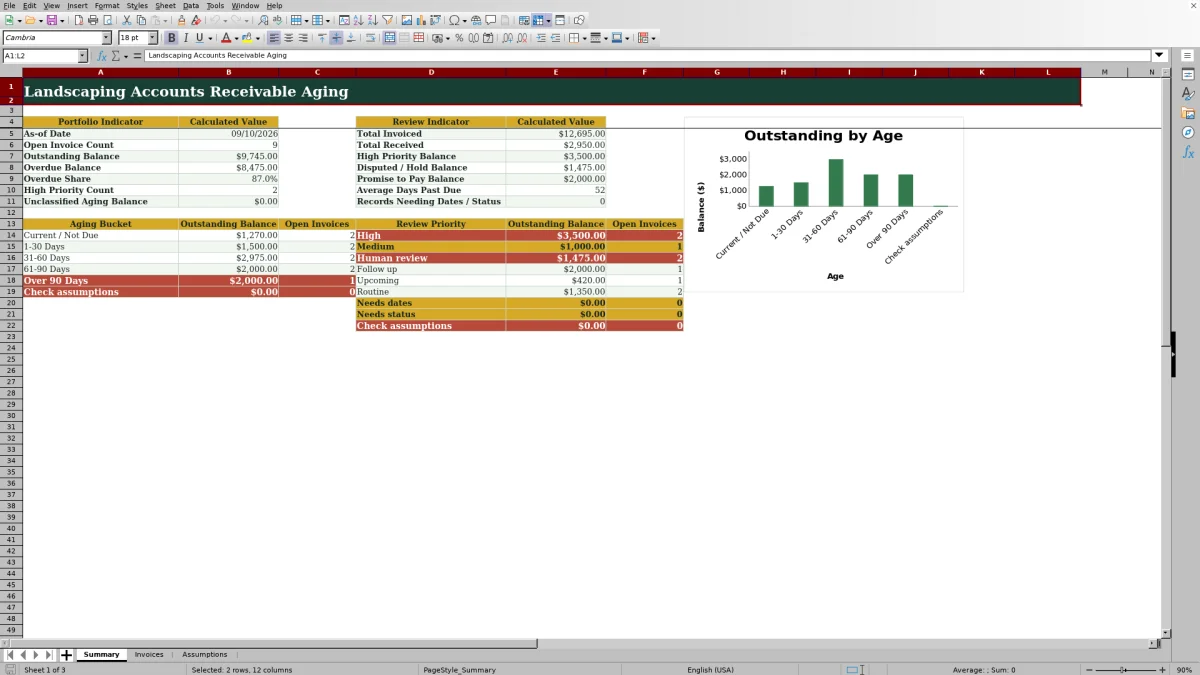
This Excel workbook provides a structured method for landscaping accounts receivable aging. It records customer, property, service, invoice, payment, due-date, collection-status, and note details while calculating each invoice’s outstanding balance, days past due, aging bucket, and review priority.
The XLSX includes Summary, Invoices, and Assumptions worksheets. Landscaping and lawn care operators can replace the fictional examples with actual invoices, adjust the reporting assumptions, and use the resulting totals and classifications to plan collection calls, investigate disputes, and follow up on payment commitments.
How this workbook can help
- Shows how much customers still owe after recorded receipts are deducted from invoice amounts.
- Separates current and overdue balances into configurable aging buckets for a clearer collection queue.
- Flags high-priority accounts, disputes, holds, promises to pay, and records with missing dates or statuses.
- Summarizes open invoice counts, outstanding balances, overdue share, and other portfolio indicators in one view.
What is in the file
How to get started
1. Set the reporting assumptions
Open the Assumptions worksheet and confirm the as-of date, high-balance threshold, critical overdue days, upcoming due window, and aging limits. Keep the aging upper limits in ascending order.
2. Enter landscaping invoices
On the Invoices worksheet, replace the fictional records with customer, property, service, invoice number, invoice date, due date, invoice amount, collection status, and notes. Use the available service and status lists where applicable, and preserve the formulas in columns K through N.
3. Record customer payments
Enter receipts in Amount Received and add the Last Payment Date when available. The recorded receipt cannot exceed its invoice amount, and the workbook calculates the remaining balance.
4. Review aging and exceptions
Check Days Past Due, Aging Bucket, and Review Priority for each open invoice. Resolve entries labeled Needs dates, Needs status, Human review, or Check assumptions before relying on the collection queue.
5. Choose and document the next action
Use the Summary worksheet to identify overdue, high-priority, disputed, held, or promised balances. Contact the appropriate customer, record the outcome in Collection Status and Notes, and update receipts as money arrives.
What the Landscaping Aging Workbook Tracks
The Invoices worksheet provides 100 invoice lines, covering rows 5 through 104. Each line can identify the customer, serviced property, landscaping service, invoice number, invoice date, due date, amount billed, amount received, last payment date, collection status, and notes. The calculated columns then show the open balance, age, aging category, and review priority without requiring those outputs to be entered manually.
Available service choices include mowing, landscape maintenance, mulch installation, seasonal cleanup, irrigation checks, tree and shrub care, hardscape maintenance, and bed weeding. Collection-status choices are Normal, Promise to Pay, Disputed, and Hold.
How Aging and Collection Priorities Work
The Assumptions worksheet uses the as-of date as the reporting date for age calculations. If an invoice has an open balance and a valid due date, Days Past Due measures the time from that due date to the as-of date without returning a negative age for an invoice that is not yet overdue.
Default aging categories are Current / Not Due, 1-30 Days, 31-60 Days, 61-90 Days, and Over 90 Days. Review Priority is a separate operational classification. It accounts for conditions such as missing dates, missing statuses, disputes, holds, promises to pay, configured balance and overdue thresholds, and upcoming due dates. Operators should therefore review both the aging bucket and the priority result.
Practical Landscaping Invoice Example
Situation: The fictional Copper Kettle Cafe record shows a $1,250 landscape maintenance invoice due September 9, 2026. A $250 receipt was recorded on September 5, and the workbook’s as-of date is September 10.
Action: The operator enters the invoice amount, receipt, payment date, due date, and Normal collection status on the Invoices worksheet.
Result: The formulas produce a $1,000 outstanding balance and one day past due, placing the open amount in the 1-30 Days aging bucket.
Interpretation: The account is only recently overdue, but the partial payment and remaining balance still warrant review. The displayed Review Priority should be read alongside the configured $1,000 high-balance threshold rather than inferred from the aging bucket alone.
Next decision: The operator can contact the customer about the remaining $1,000, document the conversation in Notes, and change the status to Promise to Pay only if the customer makes a payment commitment.
Common Errors and Practical Solutions
An old as-of date produces stale aging results; update the date on the Assumptions worksheet for the reporting cycle. A missing or invalid due date can lead to Needs dates, so confirm the invoice and due dates are valid. A blank collection status can produce Needs status; select Normal, Promise to Pay, Disputed, or Hold after reviewing the account.
If Amount Received is greater than Invoice Amount, correct the billing or receipt entry because the workbook’s validation is designed to reject that condition. If aging limits are missing, duplicated, or out of order, the formulas can return Check assumptions; restore ascending upper limits such as 0, 30, 60, and 90. If a calculated cell in columns K through N is overwritten, restore its row formula from an intact workbook copy before using the summary.
Comparison With Manual and Software Alternatives
The workbook is a complete operational method that combines invoice entry, validated inputs, balance calculations, aging categories, review priorities, portfolio indicators, and an aging chart. The alternatives below can still be more suitable when their stated conditions apply.
| Method | More suitable when | Operational trade-offs |
|---|---|---|
| This Excel aging workbook | An operator manages up to 100 invoice lines, already uses Excel, and needs a repeatable invoice-to-collection review process. | Provides configured formulas and controls, but entries, payment updates, and customer follow-up remain manual. |
| Blank spreadsheet | The business needs unusual columns or custom calculations and has someone able to build and test them. | Offers flexibility, but aging formulas, validation, summaries, and exception handling must be created and maintained. |
| Paper form or manual ledger | The business has only a few open invoices and does not need automatic totals or remote access. | Is simple to start, but requires hand calculations and makes portfolio-level aging harder to update. |
| Dedicated field-service software | The company needs integrated scheduling, invoicing, payment processing, customer records, and multi-user workflows. | Can connect more operations, but may require subscriptions, setup, data migration, and staff training. |
Using Statuses to Guide Customer Follow-Up
Normal is appropriate when no special collection condition applies. Promise to Pay supports a scheduled follow-up after a customer commitment. Disputed and Hold route an open balance to Human review so the office can investigate contract terms, service questions, approvals, or other account details before continuing routine collection activity.
The status is not a substitute for documentation. Record useful context in Notes, such as who was contacted, what was discussed, and the expected next step. Update Amount Received and Last Payment Date when a receipt arrives so the remaining balance and portfolio totals reflect the new information.
Building a Repeatable Receivables Review
Start each review by advancing the as-of date and checking the Summary indicators for outstanding balance, overdue balance, overdue share, high-priority balance, disputed or held balance, promises to pay, and records needing dates or statuses. Then filter the Invoices register to inspect the accounts behind those totals.
After correcting data exceptions, work through customer contacts in the order that fits the displayed priority, aging, balance, and known account circumstances. Finish by documenting outcomes and recording payments. This cycle connects the current portfolio situation to an action, a calculated result, an operational interpretation, and the next collection decision.
Frequently asked questions
What does the Excel landscaping accounts receivable aging workbook calculate?
It calculates outstanding balance, days past due, aging bucket, and review priority for each invoice row. The Summary worksheet also calculates portfolio totals, open invoice counts, overdue share, average days past due, and balances by aging bucket and review priority.
How many invoice records can the workbook hold?
The Invoices worksheet contains 100 prepared entry rows, from row 5 through row 104. Formulas for Outstanding Balance, Days Past Due, Aging Bucket, and Review Priority are already present across those rows.
Can I change the landscaping services and collection statuses?
The Assumptions worksheet contains editable service and collection-status lists used by the Invoices worksheet dropdowns. The supplied statuses are Normal, Promise to Pay, Disputed, and Hold.
Can I adjust the accounts receivable aging buckets?
Yes. The Assumptions worksheet provides editable upper-day limits for Current / Not Due, 1-30 Days, 31-60 Days, and 61-90 Days, followed by Over 90 Days. Keep the numeric limits in ascending order to avoid a Check assumptions result.
Which unpaid landscaping invoices should I review first?
Begin with records flagged High, Human review, Follow up, Needs dates, Needs status, or Check assumptions, then consider the outstanding balance and aging bucket. Also review disputed or held balances and customer promises before deciding the next contact or account action.
Editorial responsibility

Nadia KesslerEstimates, customers and job workflows

Ethan ReedWorkbook QA, crews and business controls