This Excel lawn care tax provision worksheet helps landscaping and lawn service operators estimate how much business income to reserve for taxes by month or quarter. The XLSX organizes revenue, deductible expenses, and estimated tax payments while ensuring that only cleared records from the selected provision year feed the calculations.
Use the Assumptions sheet to enter planning rates and an opening tax reserve, record transactions on Tax Activity, and review monthly and quarterly schedules on Summary. The result is a planning estimate, not a tax return or a substitute for advice from a qualified tax professional.
How this workbook can help
- Turns cleared lawn care revenue and deductible expenses into a structured estimate of the amount to reserve for business taxes.
- Separates cleared, pending, and excluded records so unresolved transactions remain visible without affecting the provision.
- Shows monthly and quarterly provision changes, tax payments, and unfunded balances for practical cash planning.
- Highlights a possible funding gap after accounting for the opening tax reserve and cleared estimated tax payments.
What is in the file
How to get started
1. Confirm the planning assumptions
Open the Assumptions sheet and review the provision year, federal, state, local, and self-employment effective rates, planning buffer, minimum taxable profit, opening tax reserve, and set-aside cadence. Enter or revise the assumption inputs in the editable cells.
2. Record lawn care business activity
On Tax Activity, enter the date, entry type, customer or payee, description, and amount. Use positive amounts; the Revenue, Deductible Expense, or Estimated Tax Payment selection determines how each amount is treated.
3. Assign and review each status
Set the record status to Cleared only after the transaction is ready to affect the calculation. Leave unresolved activity as Pending, and use Excluded for records that should remain visible without entering the provision.
4. Read the funding schedules
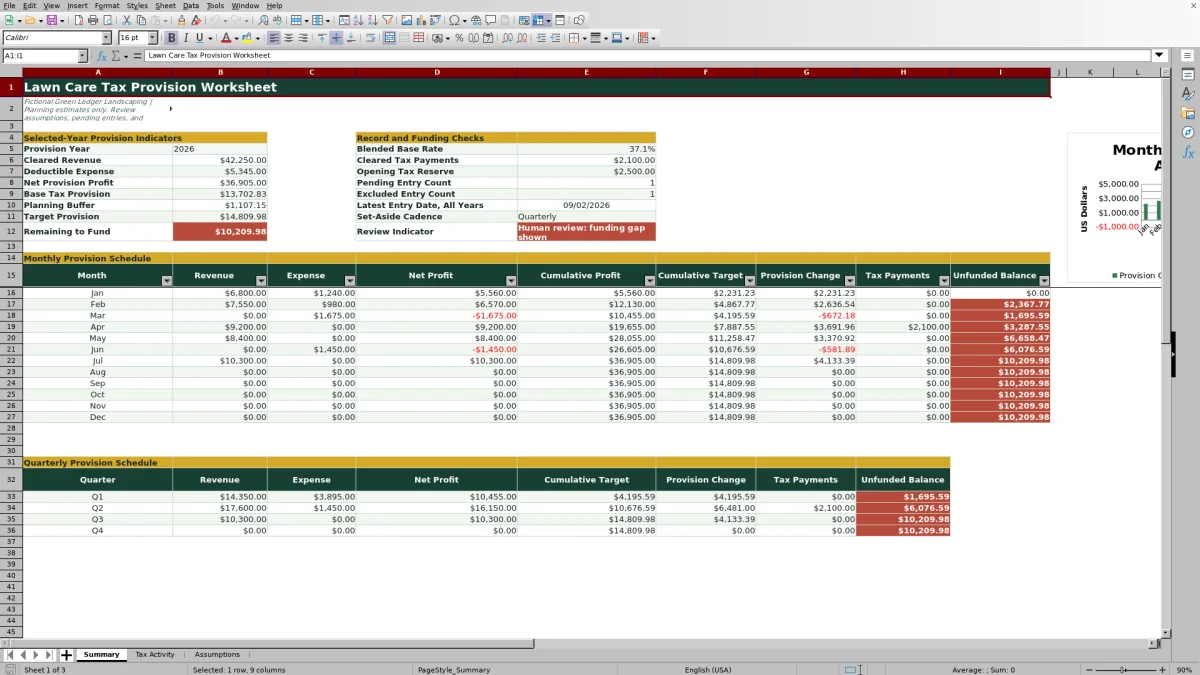
Use Summary to review cleared revenue, deductible expenses, net provision profit, the target provision, tax payments, and the remaining to fund. Consult the monthly or quarterly schedule according to the business's chosen cadence, then investigate any pending, excluded, unusual, or year-end records before deciding on the next reserve transfer.
Situation: Seasonal lawn care income can make tax funding uneven
Situation: A lawn care or landscaping business may collect more revenue during mowing and installation seasons while still paying for fuel, equipment, parts, and other deductible costs throughout the year. Setting aside the same dollar amount every month can therefore lose touch with actual cleared profit. This workbook addresses that issue by organizing selected-year activity before calculating a provision.
Action: Record and classify tax activity
Enter each transaction on Tax Activity with its date, type, customer or payee, description, positive amount, and status. Formulas derive its year, month, and quarter. A cleared Revenue entry contributes to revenue used, a cleared Deductible Expense contributes to expense used, and a cleared Estimated Tax Payment contributes to tax payments used. Pending and excluded entries remain available for review but do not enter the provision totals.
Result: Review monthly and quarterly provision schedules
The Summary sheet totals cleared revenue and deductible expenses to determine net provision profit. It applies the combined federal, state, local, and self-employment effective rates above the minimum taxable-profit assumption, then adds the planning buffer. Monthly rows show cumulative profit, cumulative target, provision change, tax payments, and unfunded balance, while the quarterly schedule consolidates the same planning process into Q1 through Q4.
Interpretation: A practical January example
Example condition: If the two visible January sample records were the only cleared January records, the worksheet would use $6,800 of revenue and $1,240 of deductible expense, producing $5,560 of net profit. The listed federal, state, local, and self-employment assumptions total 37.13%, so the base provision would be about $2,064.43. The 3% planning buffer would add $166.80, bringing the cumulative target to about $2,231.23.
With the listed $2,500 opening tax reserve and no estimated tax payment in that two-record scenario, the unfunded balance would be $0. The practical interpretation is not that no tax will be due; it is that the entered opening reserve covers that provisional January target by about $268.77. The next decision would be to continue recording cleared activity and reassess the funding position as later revenue, expenses, and tax payments are added.
Next decision: Select a set-aside cadence and review the gap
The Assumptions sheet records whether the intended cadence is Monthly or Quarterly, while Summary presents both schedules for review. Monthly review is more responsive to changing seasonal profit; quarterly review may align more closely with a business that evaluates estimated payments every three months. Before moving cash, compare the target provision with cleared estimated tax payments and the opening reserve, then investigate the pending and excluded entry counts shown on Summary.
Common errors and solutions
Error: entering expenses as negative amounts. Solution: enter positive amounts and select Deductible Expense so the workbook classifies the value correctly. Error: leaving a finalized transaction marked Pending. Solution: verify the record and change it to Cleared when it is ready to affect the provision. Error: using an incorrect date or provision year. Solution: correct the transaction date and confirm the selected year on Assumptions because dates control the monthly and quarterly grouping.
Error: overwriting calculated columns on Tax Activity. Solution: enter business records only in the designated input cells and leave the year, month, quarter, and used-amount formulas intact. Error: treating the target provision as a filed tax liability. Solution: review the effective-rate assumptions and transaction treatment with a qualified tax professional, especially for unusual purchases and year-end entries.
Comparison: Excel workbook method and external alternatives
The workbook operates as one complete method: enter assumptions, record and classify activity, calculate the selected-year provision, inspect monthly or quarterly results, and decide whether additional funding is indicated. The comparison below places that complete process alongside realistic external approaches.
| Method | How records and calculations are handled | When it is more suitable | Limitation to consider |
|---|---|---|---|
| This Excel workbook | Connects editable assumptions, validated activity records, cleared-status logic, and monthly and quarterly provision schedules. | More suitable when a lawn care operator wants a transparent, file-based provision process with visible formulas and review checks. | Requires consistent data entry and does not prepare or file a tax return. |
| Paper form or manual ledger | Records transactions by hand and requires separate arithmetic for totals, rates, and funding gaps. | More suitable when transaction volume is very low and offline handwritten records are preferred. | Recalculation, status tracking, and monthly or quarterly rollups require additional manual work. |
| Blank spreadsheet | Allows a custom layout, but classifications, validations, formulas, schedules, and review indicators must be built and tested. | More suitable when the operator or bookkeeper has specialized spreadsheet skills and needs a substantially different model. | Setup errors can affect calculations, and there is no prebuilt cleared, pending, or excluded workflow. |
| Dedicated field-service software | May combine customer management, scheduling, invoicing, payments, and operational reporting in one system. | More suitable when dispatching crews, scheduling jobs, and integrated invoicing are the primary needs. | Tax provision features vary, so the operator must verify whether the software supports effective-rate assumptions, status-based inclusion, and reserve-gap calculations. |
The workbook is a focused tax-planning tool rather than a full accounting or field-service platform. Its value depends on accurate records, realistic assumptions, and informed human review.
Frequently asked questions
Which transactions affect the lawn care tax provision?
Only records marked Cleared and dated within the selected provision year feed the provision calculations. Revenue, deductible expenses, and estimated tax payments are routed to separate calculated totals according to their entry type.
How does the Excel worksheet calculate the target provision?
It subtracts cleared deductible expenses from cleared revenue, applies the combined federal, state, local, and self-employment effective rates to profit above the minimum taxable-profit assumption, and adds the planning buffer. These inputs are estimates and should be reviewed for the business's circumstances.
What happens to pending and excluded entries?
Pending and excluded entries remain visible on Tax Activity but do not contribute to the provision. Summary counts these statuses for the selected year so the operator can identify records that still need a decision or review.
Can the workbook be used for both monthly and quarterly tax planning?
Yes. Summary contains a 12-month provision schedule and a Q1 through Q4 schedule. The Assumptions sheet also records whether the preferred set-aside cadence is Monthly or Quarterly.
Does this worksheet determine the business's final tax liability?
No. It produces a planning estimate from entered effective rates and cleared records. It does not prepare a tax return, determine the deductibility of every expense, or replace review by a qualified tax professional.
Editorial responsibility

Nadia KesslerEstimates, customers and job workflows

Ethan ReedWorkbook QA, crews and business controls