This Excel workbook is a book depreciation schedule for landscaping equipment such as mowers, vehicles, trailers, and other fleet assets. It organizes equipment details and calculates depreciable basis, accumulated depreciation, current book value, current-year depreciation, and annual depreciation by asset.
The XLSX supports Straight-Line and Declining Balance methods for up to 100 equipment records. Its calculations use a full calendar-year convention, so operators should confirm that the workbook's timing, useful-life, salvage-value, and method assumptions agree with company accounting policy.
How this workbook can help
- Keep mower, vehicle, trailer, and equipment depreciation records together in one workbook.
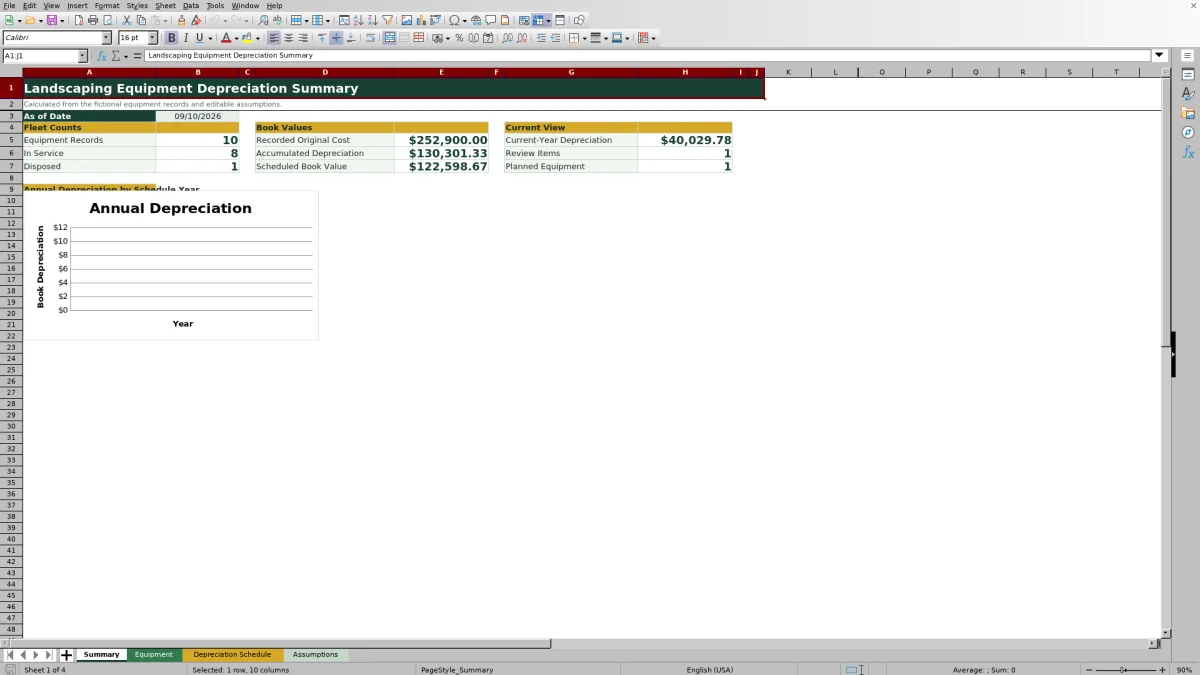
- See original cost, accumulated depreciation, scheduled book value, and current-year depreciation at the fleet level.
- Identify incomplete or inconsistent asset records through calculated review alerts.
- Use a 10-year annual schedule to support equipment budgeting, replacement planning, and book-value reviews.
What is in the file
How to get started
1. Review the assumptions
Open the Assumptions sheet and confirm the as-of date, schedule start year, declining-balance multiplier, acceptable useful-life range, date limits, amount limit, equipment categories, statuses, and methods. Yellow cells are intended for editable entries.
2. Replace the fictional equipment records
On the Equipment sheet, enter each asset's ID, description, category, status, in-service date, original cost, salvage value, useful life, depreciation method, assigned crew or use, disposal date when applicable, and notes.
3. Resolve review alerts
Check the Review Alert column for missing inputs, invalid amounts or useful lives, salvage values above cost, or disposal-date issues. Correct the source entry rather than overwriting calculated columns.
4. Read the calculated results
Use the Equipment sheet for asset-level book values, the Depreciation Schedule for annual amounts across 10 calendar years, and the Summary for fleet counts, totals, review items, and the annual depreciation chart.
Situation: Know What the Fleet Is Worth
A landscaping company may have mowers, pickups, trailers, and specialized equipment entering service in different years. The workbook uses one editable as-of date to present recorded original cost, accumulated depreciation, scheduled book value, current-year depreciation, equipment status counts, and review-item counts in a consistent view.
Action: Build a Reliable Equipment Register
Enter the source facts on the Equipment sheet before relying on the schedule. Each record can include an asset ID, description, category, status, in-service date, cost, salvage value, useful life, method, crew or use, disposal date, and notes. Data validation covers IDs, categories, statuses, dates, amounts, useful lives, and methods, while calculated columns carry those facts into the depreciation results.
Result: Interpret a Fictional Mower Example
The fictional zero-turn mower in the workbook has a $14,500 original cost, $1,800 salvage value, five-year useful life, Straight-Line method, and January 15, 2022 in-service date. Its depreciable basis is $12,700, and the full-year calculation produces $2,540 of depreciation per year. At the September 10, 2026 as-of date, five calendar-year periods have elapsed, so accumulated depreciation reaches $12,700 and book value reaches the $1,800 salvage value. The practical interpretation is that 2026 is the final scheduled depreciation year under these assumptions; the next decision is whether the mower should remain in service, be replaced, or be marked disposed when that occurs.
Interpretation: Understand the Two Book Methods
Straight-Line spreads depreciable basis evenly over the stated useful life. Declining Balance applies the editable multiplier in the Assumptions sheet and generally places more depreciation in earlier schedule years while preventing calculated value from dropping below salvage value. The selected method should reflect the company's book policy rather than being chosen solely to change a period's expense.
Errors and Solutions Before Closing the Books
The Review Alert column can flag missing required inputs, nonpositive cost, negative salvage value, a useful life outside the assumption limits, salvage value above original cost, a disposal date before the in-service date, or a disposed record without a disposal date. Resolve these issues by completing the missing field, correcting the amount or life, confirming salvage does not exceed cost, and entering a valid disposal date. Also check for duplicate asset IDs through the worksheet's ID validation and verify that formulas have not been replaced in calculated columns.
Comparison: Excel Workbook vs. External Alternatives
This workbook functions as one complete operational method: operators enter controlled asset records, calculate book depreciation, review alerts, examine annual totals, and read a fleet summary in the same XLSX. The alternatives below may fit different operating conditions.
| Method | Record control | Depreciation output | More suitable when |
|---|---|---|---|
| This Excel workbook | Validated fields for up to 100 equipment records, with assumptions and review alerts | Asset-level book values, current-year depreciation, a 10-year annual schedule, totals, and a chart | A lawn care or landscaping operator wants a structured book schedule in Excel and can maintain the file carefully |
| Paper form or blank spreadsheet | Depends on manual design, entry, and review | Requires formulas or calculations to be created and checked by the user | The fleet is very small, calculations are simple, or only a temporary inventory list is needed |
| Dedicated field-service software | May connect equipment with crews, work orders, maintenance, or permissions | Depreciation capability varies and may require an accounting integration or separate asset module | The business needs multiuser operations, maintenance workflows, mobile access, or system integrations beyond a standalone depreciation workbook |
The workbook is more suitable when transparent Excel formulas and a focused book-depreciation process are priorities. Dedicated software is more suitable when broader field operations and controlled multiuser workflows outweigh the convenience of a standalone XLSX.
Next Decision: Turn Book Values Into Equipment Plans
After reviewing current book values and the annual schedule, compare depreciation timing with expected replacement dates, disposal plans, and capital budgets. Investigate assets that have reached salvage value but remain active, planned assets with future service dates, and disposed assets that need complete dates. Before posting entries or making tax decisions, confirm the workbook's full-year convention and methods against the company's accounting policy and professional advice.
Frequently asked questions
What equipment can this Excel depreciation schedule track?
It can track up to 100 records for landscaping assets such as mowers, vehicles, trailers, and other equipment categories maintained on the Assumptions sheet.
Which depreciation methods are included?
The workbook includes Straight-Line and Declining Balance methods. The declining-balance calculation uses an editable multiplier stored on the Assumptions sheet.
Does the workbook prorate depreciation by month or day?
No. The schedule uses full calendar-year periods, subject to the asset's service year, useful life, salvage value, and disposal year.
How does a disposal affect the depreciation schedule?
When a valid disposal date is entered, annual schedule amounts stop after the disposal year. A disposed record without a disposal date can produce a review alert.
Can this workbook be used for tax depreciation?
It is designed for book-depreciation scheduling and does not establish tax treatment. Tax rules may require different methods, recovery periods, conventions, elections, or limits, so consult a qualified tax professional before using the results for a return.
Editorial responsibility

Nadia KesslerEstimates, customers and job workflows

Ethan ReedWorkbook QA, crews and business controls