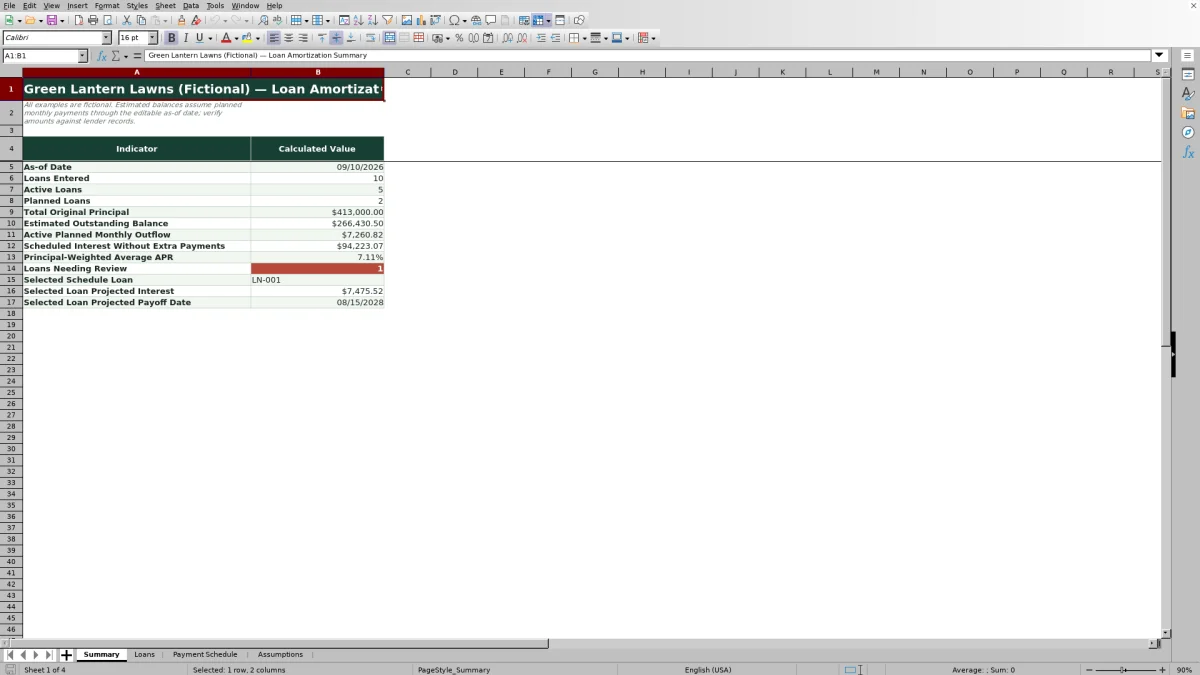
This Excel lawn care loan amortization spreadsheet organizes equipment and other business loans, calculates monthly payments, separates principal and interest, estimates balances, and projects payoff dates. It combines a 100-loan register, portfolio summary, assumptions area, and detailed schedule for one selected loan.
Use the XLSX as a planning estimate for mower, loader, trailer, irrigation, or other landscaping-business financing. The fictional examples illustrate the workflow, but calculated balances do not confirm that payments were made or replace lender records.
How this workbook can help
- See original principal, estimated outstanding balances, planned monthly outflow, scheduled interest, and weighted average APR in one portfolio view.
- Evaluate recurring and payment-specific extra payments before deciding how much cash to direct toward a lawn care business loan.
- Identify missing inputs, duplicate loan IDs, questionable payment dates, high APR entries, and active loans that appear to remain unpaid after maturity.
- Review a selected loan payment by payment, including due dates, beginning balances, principal, interest, total payments, and ending balances.
What is in the file
How to get started
1. Set the planning assumptions
On the Assumptions sheet, enter the editable as-of date, review tolerance, selected loan ID, and APR review threshold. The as-of date controls elapsed-payment and estimated-balance calculations.
2. Enter each business loan
On the Loans sheet, replace the fictional examples or add records beginning in row 5. Enter a unique loan ID, asset or purpose, lender, dates, principal, APR, term, recurring extra amount, and status.
3. Review the calculated loan fields
Check the standard payment, planned monthly outflow, scheduled interest without extra payments, scheduled maturity, payments elapsed, estimated balance, and review alert. Resolve alerts before relying on the totals.
4. Build a selected-loan scenario
Enter the loan ID in Assumptions cell B6, then open Payment Schedule. Use Added Extra for one-time extra-payment scenarios and Payment Note to record the reason. Clear these entries before switching loans if they do not apply to the next scenario.
5. Interpret and verify the result
Review the projected payoff date, projected interest, principal allocation, and ending balances. Compare the estimate with lender statements before making a payment or cash-flow decision.
Situation: Several Equipment Loans Affect Monthly Cash Flow
A growing lawn care or landscaping company may finance zero-turn mowers, compact loaders, trailers, irrigation equipment, or other assets at different rates and terms. Separate lender statements make it difficult to see total debt exposure, so the workbook uses a single loan register to organize up to 100 loans and calculate a consistent set of planning figures.
Action: Enter Terms and Set the Planning Date
Enter each loan's unique ID, business purpose, lender, funding date, first payment date, original principal, APR, term, recurring extra payment, and status. Set the as-of date on the Assumptions sheet so the workbook can estimate how many scheduled payments have elapsed. For a positive APR, the standard payment uses a monthly rate equal to APR divided by 12; for a 0% APR, principal is divided by the term.
Result: Review Payments, Interest, Balances, and Payoff Timing
The Loans sheet calculates standard payment, planned monthly outflow, scheduled interest without extra payments, scheduled total, maturity, payments elapsed, and estimated balance. Selecting a loan creates a payment-by-payment schedule and reports its projected payoff date and projected interest after regular and one-time extra-payment assumptions are applied.
Interpretation: A Practical Lawn Equipment Loan Example
The fictional mower-fleet example starts with $48,000 of principal, a 7.25% APR, a 60-month term, and $150 of regular monthly extra principal. Its standard payment is about $956.13, producing a $1,106.13 planned monthly outflow before payment-specific extras. Without extra payments, scheduled interest is approximately $9,368.
The example schedule also includes a $500 added payment in payment 3 and a $750 added payment in payment 12. Those amounts increase principal reduction in their respective months, move the projected payoff earlier, and reduce projected interest relative to the standard no-extra schedule. The useful interpretation is not simply that the balance falls faster; the business is exchanging near-term operating cash for lower future interest and a shorter debt commitment.
Next Decision: Balance Debt Reduction Against Seasonal Needs
The next decision is whether a recurring or one-time extra payment fits the company's cash cycle. Review the revised payoff date and interest alongside payroll, fuel, repairs, winter reserves, and planned equipment purchases. If the faster schedule strains working capital, test a smaller recurring extra amount or reserve added payments for stronger seasonal months.
Common Errors and Their Solutions
Resolve input and interpretation problems before using the workbook for a financing decision.
- Duplicate or incomplete loan records: Assign a unique loan ID and complete the required dates, principal, APR, term, and status fields.
- First payment before funding: Correct the dates so the payment schedule follows the actual agreement.
- Unexpected APR alert: Confirm that an APR such as 7.25% was entered as 7.25%, not 725%, and adjust the editable review threshold only when appropriate.
- Balance remaining after maturity: Check the as-of date, status, original terms, and payment assumptions, then compare the estimate with the lender's records.
- Extra payments carried into another scenario: Clear or revise Added Extra amounts and notes before changing the selected loan.
- Estimated balance differs from a statement: Verify against lender records because the workbook does not capture actual payment timing, fees, late charges, lender-specific accrual rules, or payoff adjustments.
Comparison With Manual Tracking and Other Alternatives
The workbook is one complete operational method: it combines structured loan inputs, portfolio calculations, review alerts, and a selected-loan amortization schedule. The alternatives below may be more suitable when their stated operating conditions apply.
| Option | How the work is handled | More suitable when |
|---|---|---|
| This Excel workbook | Uses validated loan inputs, automatic portfolio calculations, review alerts, and a 360-row selected-loan payment schedule. | More suitable when a lawn care operator manages several loans and wants transparent formulas and editable extra-payment scenarios without implementing another operating system. |
| Blank spreadsheet | Requires the operator to design fields, formulas, validations, balance logic, and error checks. | More suitable when the business needs a highly customized model and someone can build, test, and maintain every formula. |
| Paper form or manual calculator | Records terms by hand and calculates each payment or balance separately. | More suitable when there is only one simple loan, calculations are infrequent, and a digital portfolio view is unnecessary. |
| Dedicated field-service software | May connect scheduling, dispatch, customer management, invoicing, and broader financial workflows, depending on the product. | More suitable when loan tracking needs to be part of a larger field-service platform and the business accepts subscription costs, setup, and product-specific controls. |
Frequently asked questions
How many lawn care business loans can the Excel workbook track?
The Loans sheet provides 100 input rows, from row 5 through row 104. Each loan should have a unique loan ID so the review checks and selected-loan lookup work correctly.
Does the spreadsheet record actual payments made to lenders?
No. It estimates balances from the loan terms, planned monthly outflow, first payment date, and editable as-of date. Reconcile the results with lender statements because the workbook does not maintain an actual payment ledger.
Can I model extra principal payments?
Yes. Enter a recurring Extra per Month amount in the Loans sheet and payment-specific amounts in the Payment Schedule's Added Extra column. The selected schedule recalculates principal, interest, ending balances, projected interest, and payoff timing.
Why might the estimated balance differ from a lender statement?
The estimate assumes planned monthly payments through the as-of date. Differences may result from actual payment dates, missed or partial payments, fees, daily interest, lender rounding, late charges, or other contract terms that are not represented in the workbook.
Can the amortization spreadsheet calculate a zero-interest loan?
Yes. When APR is 0%, the workbook divides original principal by the term for the standard payment and calculates the remaining balance without monthly interest.
Editorial responsibility

Nadia KesslerEstimates, customers and job workflows

Ethan ReedWorkbook QA, crews and business controls