The Landscaping Referral Source Tracker Excel workbook is a sales attribution spreadsheet for lawn care and landscaping operators who need to connect each inquiry with a referral or marketing source, follow its outcome, and report won revenue. It provides a 150-row lead table and a source summary based on eight configurable referral and marketing choices.
Use one lead record per inquiry to capture the prospect, property or project, service, source, estimated opportunity, status, outcome date, and won revenue. The Assumptions sheet controls dropdown choices and input limits, while calculated review prompts help identify records that need attention.
How this workbook can help
- Connect landscaping inquiries and won revenue to consistent referral and marketing sources.
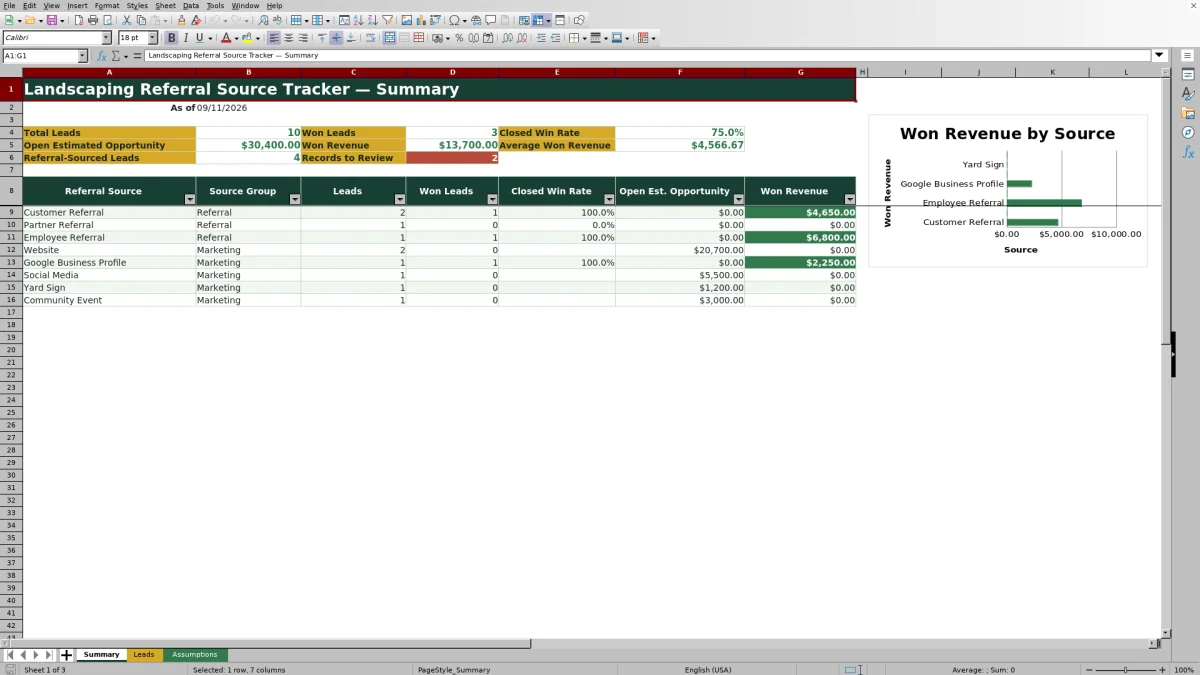
- See lead volume, closed win rate, open estimated opportunity, and won revenue by source.
- Catch duplicate IDs, missing information, date conflicts, and other records that require review.
- Standardize service, status, source, date, and monetary entries across a 150-row lead log.
What is in the file
How to get started
1. Configure the source and input choices
Open the Assumptions sheet and review the eight referral sources, Referral or Marketing groups, seven lead statuses, ten services, entry-date limits, maximum lead amount, and review-age setting. Keep source definitions clear so the same channel is not recorded under multiple names.
2. Record each landscaping inquiry
Enter a unique Lead ID and complete the editable fields on the Leads sheet, including the inquiry date, prospect, property or project, service, referral source, referrer or campaign, estimated opportunity, and current status.
3. Complete the outcome fields
When a lead is Won or Lost, enter its outcome date. For won work, also enter Won Revenue. The workbook calculates days to outcome for closed leads and age for open leads.
4. Resolve prompts and review source results
Read the Record Review column and correct the underlying entry rather than overwriting its formula. Then use the Summary sheet to assess lead counts, closed win rate, open estimated opportunity, and won revenue by source.
Situation: When landscaping lead sources become unclear
Landscaping inquiries can arrive through customers, partners, employees, a website, Google Business Profile, social media, yard signs, and community events. When those sources are written inconsistently or kept apart from sales outcomes, operators face an attribution gap: they may know that work was won without knowing which source produced it. This workbook addresses that situation by keeping the source, opportunity amount, status, outcome, and won revenue in the same lead record.
Action: Create consistent lead and source records
Enter each inquiry on one row and select its service, referral source, and lead status from the configured choices. Using the same source names prevents entries such as “Website,” “web,” and “site inquiry” from splitting one channel into separate totals. The Referrer or Campaign field can hold the specific person, partner, page, sign, or event associated with the inquiry, while the Referral Source field remains standardized for reporting.
Result: Read the sales attribution summary correctly
The Summary sheet reports total leads, won leads, open estimated opportunity, won revenue, average won revenue, referral-sourced leads, and records needing review. Its closed win rate divides Won leads by Won plus Lost leads, so open statuses do not enter the denominator. The source table applies the same logic to each configured source and also shows open estimated opportunity and won revenue. The accompanying chart compares won revenue across those source rows.
Interpretation: Practical landscaping referral example
Consider the fictional customer-referral record for the Alder household. The situation is a June 3 inquiry with a $4,800 estimated opportunity. The action is to record Customer Referral as the source, mark the lead Won, enter June 15 as the outcome date, and record $4,650 in won revenue. The result is one won lead, $4,650 attributed to Customer Referral, and a calculated outcome time of 12 days. The interpretation is that this referral produced closed work slightly below the original estimate by $150, but one record does not establish a lasting source trend. The next decision is to thank or follow up with the referrer and compare this result with accumulated lead volume, win rate, and revenue from the other sources.
Interpretation safeguards: Common errors and solutions
Review prompts protect the source summary from avoidable entry problems. If a duplicate Lead ID appears, assign a unique ID to the affected inquiry. If the inquiry date, referral source, or status is missing, fix the source record in its editable input cell. Add an outcome date when a Won or Lost lead lacks one, and correct either date when the outcome precedes the inquiry. When a revenue or age-related prompt appears, compare the status, Won Revenue, follow-up timing, and Assumptions limits before correcting or confirming the entry. Resolve these issues before interpreting totals because incomplete records can distort source-level results.
Comparison: Excel tracker and external alternatives
This workbook is one complete operational method for recording landscaping leads, checking data quality, and summarizing source-attributed outcomes. The alternatives below may be more suitable when their stated operating conditions apply.
| Method | More suitable when | Operational trade-off |
|---|---|---|
| Landscaping Referral Source Tracker Excel workbook | A team already works in Excel and needs structured lead-source attribution, review prompts, and won-revenue summaries in one file. | It supports up to 150 lead rows and focuses on sales attribution rather than dispatch, invoicing, or job scheduling. |
| Paper form or manual notebook | A solo operator receives only occasional inquiries and needs immediate offline capture. | Source totals, conversion calculations, aging, and revenue attribution require manual counting. |
| Blank spreadsheet | The business needs highly customized fields and is prepared to design and maintain all formulas, lists, and checks. | It offers flexibility but does not begin with this workbook's source summary, validation rules, or review logic. |
| Whiteboard | The main need is a visible short-term pipeline for a small crew in one location. | It is difficult to preserve historical source and revenue records or calculate consistent performance metrics. |
| Dedicated field-service software | The company needs connected mobile workflows, scheduling, dispatch, estimates, invoices, or broader multi-user operations. | It may require subscription costs, implementation, user training, and migration beyond a focused Excel attribution process. |
Next decision: Use source results to guide follow-up
Make the next source decision only after clearing review prompts. A source with many leads but a low closed win rate may need tighter qualification or different messaging. A source with few leads but meaningful won revenue may justify deeper relationship development. A large open estimated opportunity paired with aging leads points to follow-up work rather than a final source judgment. Because the workbook does not record marketing spend, treat won revenue as attributed revenue rather than a return-on-investment calculation.
Frequently asked questions
What does the Landscaping Referral Source Tracker attribute?
It connects individual landscaping leads with configured referral or marketing sources and summarizes lead counts, won leads, closed win rate, open estimated opportunity, and won revenue by source.
How many lead records can the Excel workbook hold?
The Leads sheet provides 150 data rows, from row 5 through row 154. The calculated age and review formulas are present across all 150 rows.
Can I customize the referral and marketing sources?
Yes. The Assumptions sheet contains eight editable source choices, and each can be classified as Referral or Marketing. Those choices feed the Leads dropdown and Summary source rows.
How is the closed win rate calculated?
Closed win rate equals Won leads divided by the total of Won and Lost leads. Leads with open statuses are excluded from that calculation.
What can trigger a Record Review prompt?
Review prompts can identify issues such as duplicate lead IDs, missing inquiry dates, missing referral sources, missing statuses, missing outcome dates for closed leads, outcome dates before inquiry dates, and records requiring revenue or age review.
Editorial responsibility

Nadia KesslerEstimates, customers and job workflows

Ethan ReedWorkbook QA, crews and business controls