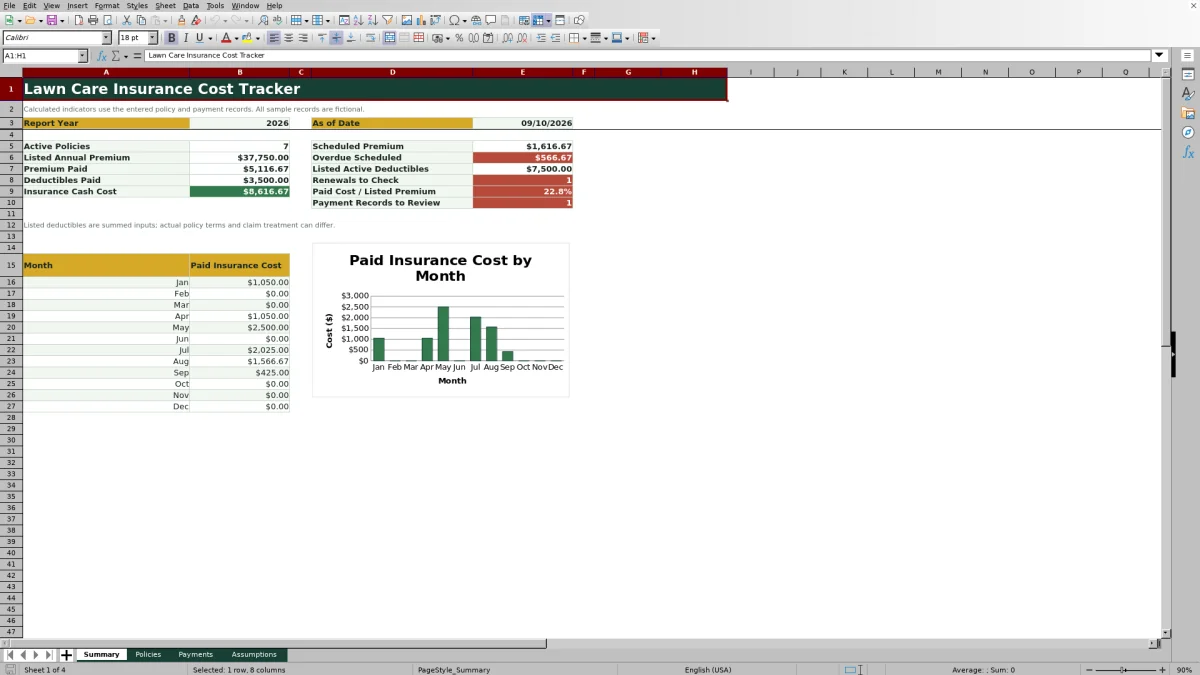
The 2026 Lawn Care Insurance Cost Tracker is an Excel workbook for recording policy terms, premium installments, deductible payments, renewal dates, and annual insurance cash costs for a lawn care or landscaping business.
Its Summary, Policies, Payments, and Assumptions worksheets connect policy details with scheduled and completed costs. The workbook contains fictional sample records that show how the calculations work and should be replaced or removed before the file is used for business reporting.
How this workbook can help
- Keeps policy details and related payment activity in one structured workbook.
- Shows how much premium has been paid, how much remains, and which scheduled costs are overdue.
- Helps operators plan for upcoming policy renewals and insurance payments.
- Separates premium installments from deductible payments so annual cash costs are easier to interpret.
What is in the file
How to get started
1. Set the reporting controls
Open the Assumptions sheet and confirm the report year, as-of date, renewal review period, and due-soon period. These values control the annual summary, monthly chart, expiration calculations, and payment alerts.
2. Enter each insurance policy
Replace the sample entries on the Policies sheet with the business's coverage details. Assign a unique Policy ID to each policy, then enter its coverage type, carrier, policy number, effective and expiration dates, annual premium, deductible, payment frequency, and status.
3. Record scheduled and completed costs
Use the Payments sheet for premium installments and deductible costs. Match each record to a Policy ID, enter the due date and amount, and select Scheduled, Paid, or Void. A Paid record also needs a paid date to be included in paid-cost calculations.
4. Review results and alerts
Check the Summary sheet for annual and monthly totals, then inspect the Review Alert columns on the Policies and Payments sheets. Correct incomplete records, investigate overdue items, and review policies approaching expiration.
What the Lawn Care Insurance Cost Tracker Handles
Lawn care businesses may carry general liability, commercial auto, workers compensation, inland marine, umbrella, or property coverage. The Policies sheet records the terms of each policy, while the Payments sheet records its premium installments and deductible costs. The Summary sheet then calculates the annual insurance cash cost from premium and deductible records marked Paid within the selected report year.
The workbook also distinguishes listed annual premiums from actual cash paid. That distinction matters when a policy starts partway through the year, uses monthly or quarterly installments, or has a scheduled payment that has not yet cleared.
From Insurance Situation to Next Decision
Situation: the operator has several policies, different payment frequencies, and renewal dates that are difficult to monitor from separate invoices. Action: each policy receives a unique Policy ID, and every installment or deductible record is linked to that ID. Result: the formulas calculate paid costs, remaining premiums, due dates, expiration timing, and review alerts. Interpretation: the operator can distinguish a future obligation from an overdue item or a completed payment. Next decision: verify the supporting document, schedule the required cash, update the record after payment, or contact the carrier about a renewal.
Practical Example: A Quarterly General Liability Policy
Situation: the fictional sample general liability policy has a $4,200 annual premium and four quarterly installments of $1,050. The January, April, and July installments are marked Paid, while the October 1 installment remains Scheduled.
Action: the three completed installments have paid dates and the fourth record retains its due date and Scheduled status. Result: the policy calculation reports $3,150 in premium paid and $1,050 in Premium Remaining. With an as-of date of September 10, the October installment is 21 days away and falls within the 30-day due-soon period.
Interpretation: 75% of the listed annual premium has been recorded as paid, and the final quarter is due soon rather than overdue. Next decision: confirm the upcoming invoice and cash availability, then change the record to Paid and add the actual paid date only after the payment occurs.
How to Interpret the Summary
Listed Annual Premium sums the full annual-premium inputs for policies whose coverage terms overlap the report year; it does not prorate premiums for partial-year coverage. Premium Paid and Deductibles Paid use payment records marked Paid and their paid dates. Insurance Cash Cost adds those two paid categories.
Scheduled Premium shows premium installments still marked Scheduled during the report year. Overdue Scheduled narrows scheduled records to due dates before the configured as-of date. Renewals to Check counts active policies expiring within the renewal review window, while Payment Records to Review counts selected payment alerts that require attention.
The monthly chart groups paid insurance costs by paid date, so it can include both premium installments and deductible payments. Operators should interpret a high-cost month by reviewing the underlying payment records rather than assuming the amount represents premium alone.
Common Entry Errors and Solutions
Error: a payment uses a Policy ID that does not match the Policies sheet. Solution: copy the exact Policy ID from the relevant policy row so the policy-level payment totals can include the record.
Error: a record is marked Paid without a paid date. Solution: enter the actual paid date after confirming payment; until then, the workbook displays Add paid date and the record cannot be placed correctly in annual or monthly paid-cost totals.
Error: a scheduled payment remains unchanged after its due date. Solution: investigate the invoice or bank record. If payment occurred, enter the paid date and change the status to Paid; otherwise, keep it Scheduled and address the Review overdue alert.
Error: a required policy or payment field is blank. Solution: follow the Check required fields alert and complete the missing values. If an expiration date precedes its effective date, correct the dates rather than overriding the warning.
Error: fictional sample entries remain mixed with business records. Solution: replace or remove every sample policy and transaction before using the Summary totals for a business decision.
Comparison With Other Insurance Tracking Methods
The workbook is one complete operational method: policy terms are entered in the policy register, costs are entered in the payment register, assumptions control timing, and the summary converts those records into review indicators. The appropriate method depends on transaction volume, available software, and the level of automation required.
| Method | How it works | Main limitation | More suitable when |
|---|---|---|---|
| Lawn Care Insurance Cost Tracker workbook | Connects policies and payment records through Policy IDs, calculates balances and timing, and provides alerts and annual summaries. | Requires consistent manual entry and is limited to the prepared policy and payment ranges. | A lawn care operator wants structured insurance cost control in Excel without adopting a broader business platform. |
| Paper form or manual file | Keeps invoices, policy schedules, and handwritten payment notes in physical folders. | Does not automatically total costs, calculate due dates, or flag missing information. | Record volume is very low and digital access is unavailable or unnecessary. |
| Blank spreadsheet | Allows the operator to design custom columns and calculations from the beginning. | Formulas, validation, alerts, and reporting logic must be created and maintained by the user. | The business has unusual insurance fields and someone can build and audit the spreadsheet logic. |
| Dedicated field-service software | May combine scheduling, customers, crews, jobs, billing, and expense records in a shared system. | May require subscriptions, configuration, staff training, and confirmation that policy-level insurance tracking is supported. | Multiple users need insurance information integrated with dispatch, customer management, job costing, or broader field operations. |
The Excel workbook is more suitable when the primary need is focused policy and payment monitoring. Dedicated software is more suitable when insurance tracking must operate inside a larger multiuser field-service workflow.
Limits, Review Practices, and the Next Reporting Decision
The workbook records entered costs and dates; it does not verify whether a policy is active, determine whether coverage is adequate, or predict how an insurer will apply a deductible to a claim. Listed deductibles are policy inputs, and their sum is not necessarily the amount the business will owe after an incident.
Review alerts should prompt a person to check policy documents, invoices, carrier notices, and bank records. After reconciling those sources, update the workbook and decide whether to pay an installment, investigate a discrepancy, prepare for renewal, or discuss coverage terms with a licensed insurance professional.
The prepared calculation ranges support policy rows 6 through 105 and payment rows 6 through 155. A business that exceeds those ranges should extend and audit the formulas, validation rules, filters, and chart references before relying on additional rows.
Frequently asked questions
What insurance costs can this Excel tracker record?
The Payments sheet records Premium Installment and Deductible costs. Each record can include a Policy ID, due date, paid date, amount, status, and reference note.
How does the workbook calculate annual insurance cash cost?
It adds premium installments and deductible records marked Paid when their paid dates fall within the selected report year.
Does the listed annual premium get prorated for partial-year policies?
No. Listed Annual Premium sums the full annual-premium inputs for policies whose effective and expiration dates overlap the report year, so partial-year terms are not prorated.
What causes a payment record to show an alert?
Alerts can identify missing required fields, a Paid record without a paid date, an overdue scheduled payment, a payment due within the configured due-soon period, or a record marked Void.
Can the sample carriers and transactions be used as actual business records?
No. The displayed carriers, policy numbers, transactions, and references are fictional examples. Replace or remove them and verify actual entries against policy documents, invoices, carrier statements, and bank records.
Editorial responsibility

Nadia KesslerEstimates, customers and job workflows

Ethan ReedWorkbook QA, crews and business controls