This Excel landscaping fuel budget worksheet records actual fuel activity by date, equipment ID, equipment class, property or job, gallons, price per gallon, and entry status. It calculates transaction costs and organizes fuel spending for landscaping vehicles and equipment.
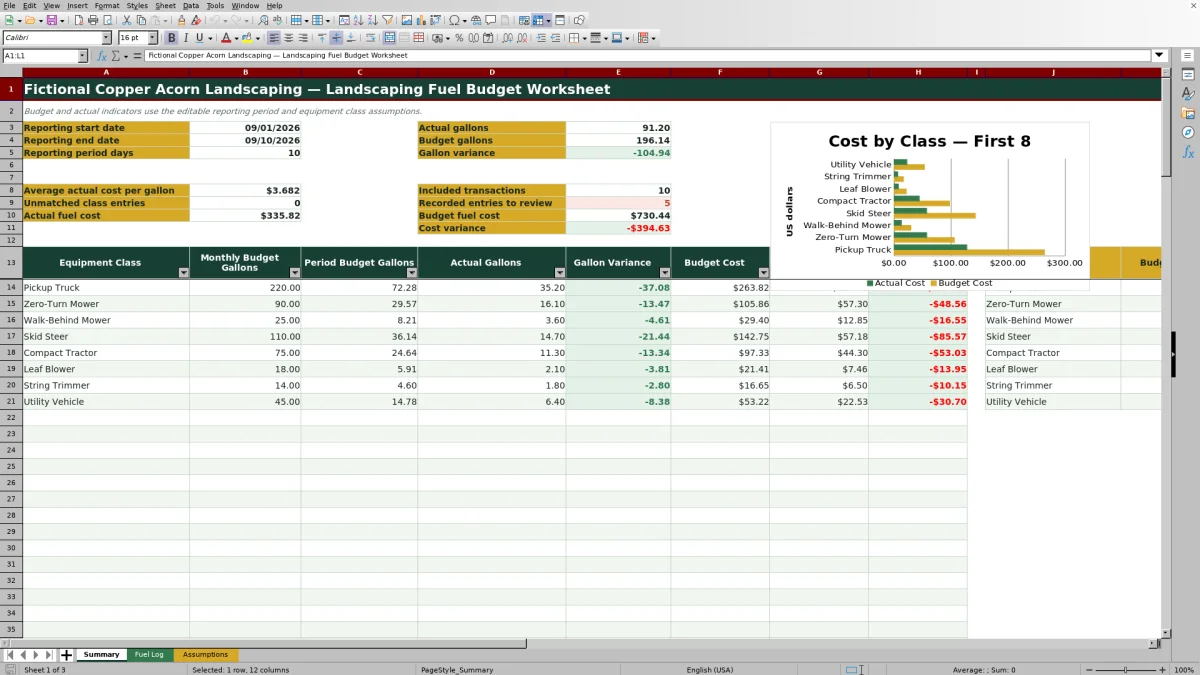
The XLSX also prorates monthly gallon budgets to an editable reporting period. Its Summary sheet displays budget variances, fuel costs, average actual cost per gallon, transaction counts, class-level results, and a budget-versus-actual cost chart.
How this workbook can help
- Connects transaction-level fuel records with monthly gallon and price assumptions for each equipment class.
- Shows whether gallon use and fuel spending are above or below prorated reporting-period budgets.
- Separates fuel-volume variance from price-related variance so operators can investigate the likely cause.
- Supports receipt review by distinguishing Planned, Recorded, and Reviewed fuel-log entries.
What is in the file
How to get started
1. Configure the reporting period and class budgets
On the Assumptions sheet, enter the reporting start and end dates, confirm the average days per month, and review each equipment class, default fuel type, monthly budget gallons, and budget price per gallon.
2. Record each fuel transaction
On the Fuel Log sheet, enter the date, equipment ID, equipment class, property or job, gallons, price per gallon, status, and any useful notes. Choose a class that exactly matches the Assumptions list so the fuel type and budget price populate.
3. Set the correct review status
Use Planned for future activity. Change completed transactions to Recorded or Reviewed because only those two statuses are included in Summary actuals. Resolve blank lookup results and check supporting receipts before marking an entry Reviewed.
4. Review results and make the next operating decision
Open the Summary sheet to examine actual and budget gallons, fuel costs, class variances, unmatched classes, and entries awaiting review. Investigate material variances before changing routes, equipment use, purchasing practices, or future budgets.
A Fuel Budget Workflow for Landscaping Operations
The workbook connects planning, transaction entry, review, and reporting. Monthly budget gallons and planning prices are entered by equipment class on the Assumptions sheet. The Fuel Log then records individual purchases by equipment ID and job, while the Summary prorates the monthly plan to the selected dates and compares it with included activity.
This structure helps a lawn care or landscaping operator move from a receipt to a class-level result without rebuilding totals manually. It also preserves job and equipment details that can help explain why a truck, mower, skid steer, tractor, blower, trimmer, or utility vehicle used more or less fuel than expected.
Interpreted Practical Example
Situation: The sample assumptions assign the Pickup Truck class 220 monthly gallons at a budget price of $3.65 per gallon. The sample reporting period covers September 1 through September 10, 2026, and uses 30.4375 as the average days per month.
Action: The workbook prorates 220 monthly gallons across the 10-day period, producing a period budget of about 72.28 gallons and a budget cost of about $263.82. A visible Reviewed pickup transaction records 18.4 gallons at $3.59 per gallon.
Result: If that transaction is the only included pickup entry for the period, actual cost is $66.06, gallon variance is about -53.88 gallons, and cost variance is about -$197.76.
Interpretation: The negative variances show that recorded pickup activity is below the prorated plan, but they do not by themselves prove reduced consumption. Missing receipts, incomplete entries, lighter work volume, or less pickup use could produce the same result.
Next decision: Confirm that all pickup receipts within the reporting dates have been entered and given an included status. Once the log is complete, decide whether the difference reflects a temporary workload change or supports revising the monthly pickup budget.
Reading Gallon, Cost, and Rate Variances
Gallon variance compares actual gallons with prorated budget gallons. Cost variance compares actual fuel cost with budget fuel cost. At the transaction level, rate variance compares the amount paid with a rate-based cost calculated from gallons and the equipment class's budget price per gallon.
These measures answer related but different questions. A positive gallon variance points to more fuel volume than planned. A positive rate variance indicates that the entered transaction cost exceeded the cost calculated at the planning rate. Operators should inspect both before attributing an unfavorable cost result solely to equipment use or fuel prices.
Common Errors and Solutions
An equipment class that does not exactly match the Assumptions list can leave Fuel Type and Budget Price per Gallon blank and increase the unmatched-class count. Correct the class name or add the intended class and its assumptions within the available range.
A completed transaction marked Planned will not appear in Summary actuals. Change its status to Recorded when entered or Reviewed after verification. Transactions outside the reporting dates are also omitted, so confirm both the log date and the Assumptions dates when expected activity is missing.
If the reporting end date precedes the start date, several Summary results remain blank. Correct the date sequence. Gallons and prices should also be stored as nonnegative numeric values rather than text so validation and cost formulas can process them.
Comparison With Other Fuel-Tracking Methods
The workbook is one complete operational method: assumptions establish the plan, the Fuel Log captures activity, and the Summary interprets budget performance. The appropriate alternative depends on transaction volume, field access, integration needs, and the amount of setup the business can support.
| Method | How it operates | Useful strengths | Practical limits | More suitable when |
|---|---|---|---|---|
| This Excel workbook | Combines class assumptions, a structured fuel log, formulas, review statuses, summary metrics, and a chart in one XLSX. | Provides repeatable calculations while retaining equipment and job details. | Uses fixed ranges, requires consistent entry, and does not automatically import fuel-card or telematics data. | More suitable when a small or midsize landscaping operation wants local spreadsheet control and can maintain the log routinely. |
| Paper form or manual receipt file | Staff write down purchases or retain receipts for later review. | Works without a computer in the field and requires little initial setup. | Totals, class comparisons, and variance calculations require separate manual work. | More suitable when transaction volume is very low or field conditions make electronic entry impractical. |
| Blank spreadsheet | The operator creates columns and calculations from scratch. | Allows a fully customized layout without adapting an existing structure. | Requires formula design, validation rules, status logic, and reporting setup. | More suitable when the business has specialized measures and someone who can build and audit the model. |
| Dedicated field-service software | A hosted system may connect jobs, vehicles, crews, purchasing, and mobile workflows. | Can centralize broader operations and may offer integrations, permissions, or automated data collection. | May involve subscriptions, implementation work, user training, and features beyond fuel budgeting. | More suitable when multiple crews need mobile access, centralized controls, or fuel-card, GPS, and job-management integration. |
Using Entry Status as a Review Control
Planned, Recorded, and Reviewed provide a simple workflow rather than three interchangeable labels. Planned entries can represent expected activity but are excluded from Summary actuals. Recorded and Reviewed entries are included, while the Summary separately counts Recorded entries that may still need a manual check.
A consistent policy makes the figures easier to interpret. For example, a company might use Recorded immediately after receipt entry and Reviewed only after confirming the date, gallons, equipment class, price, and supporting documentation.
Workbook Capacity and Ongoing Maintenance
The supplied ranges provide 100 Fuel Log rows, from row 5 through row 104, and 100 equipment-class assumption rows, from row 8 through row 107. Summary formulas likewise provide up to 100 class-detail rows, while the visible chart references the first eight class rows.
Because the XLSX uses fixed formula and validation ranges rather than Excel tables or defined names, adding records beyond those ranges requires deliberate extension of formulas, validation, filters, formatting, and Summary references. Archive completed periods or expand the workbook carefully when the operating volume approaches its current capacity.
Frequently asked questions
Which Fuel Log entries are included in Summary actuals?
Entries dated within the selected reporting period are included when their status is Recorded or Reviewed. Planned entries are excluded from actual gallons, actual costs, and included-transaction counts.
How does the workbook calculate a partial-period fuel budget?
It multiplies each class's monthly budget gallons by the number of reporting-period days and divides the result by the Average Days per Month value on the Assumptions sheet. Budget cost then uses the class's prorated gallons and budget price per gallon.
Why are the fuel type or budget price blank for an entry?
The Equipment Class may be blank or may not exactly match a class in the Assumptions range. Select a listed class or add the intended class with its default fuel type, monthly gallon budget, and budget price.
Can the Excel workbook track individual vehicles and pieces of equipment?
Yes. The Fuel Log includes an Equipment ID for individual assets and an Equipment Class for assumption lookups and class-level reporting. Budget assumptions and Summary comparisons are organized by equipment class rather than by individual ID.
Are the included company and fuel records ready for operational reporting?
No. The workbook contains fictional company, property, equipment, and transaction examples. Replace the examples, verify the reporting dates and assumptions, and review all entry statuses before relying on the results for business decisions.
Editorial responsibility

Nadia KesslerEstimates, customers and job workflows

Ethan ReedWorkbook QA, crews and business controls