The 2026 Lawn Care Owner Draw Tracker is an Excel workbook for recording money withdrawn by lawn care or landscaping business owners. It keeps owner withdrawals in a dedicated Draws sheet rather than mixing them with routine business costs.
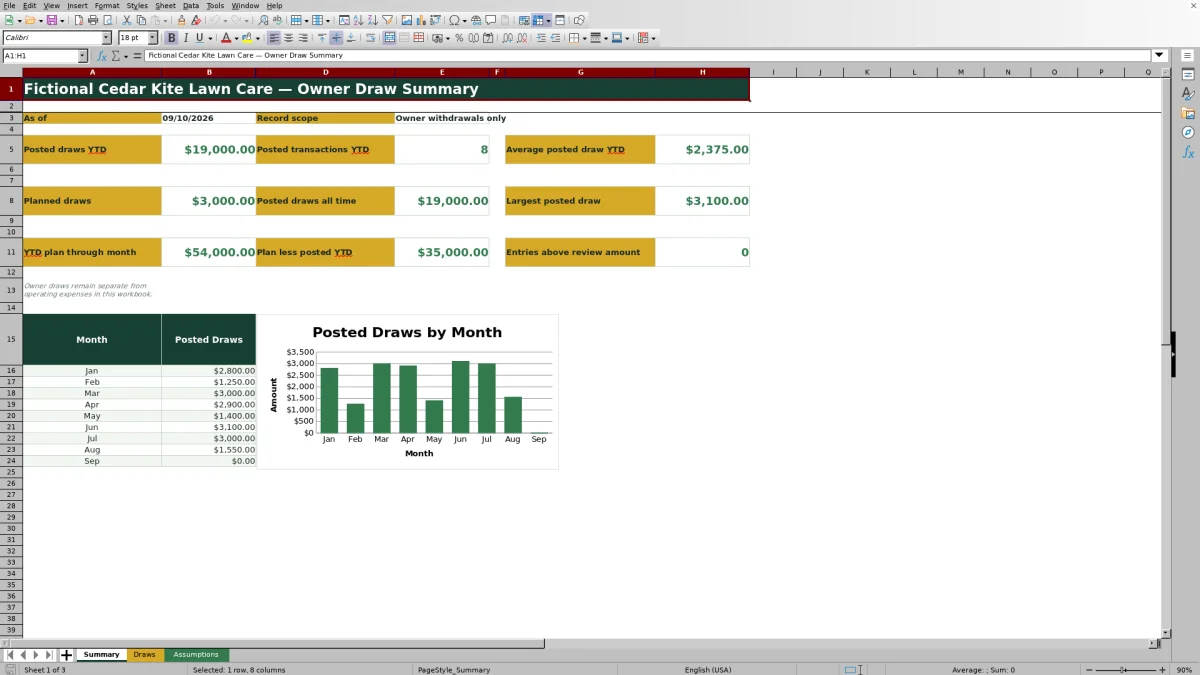
Enter each draw’s ID, date, owner, source account, method, amount, status, and internal note, then use the Summary sheet to review posted and planned draws, year-to-date activity, plan variance, review counts, and the January-through-September monthly chart.
How this workbook can help
- Keeps owner withdrawals separate from lawn care operating expenses.
- Shows posted, planned, year-to-date, and all-time draw amounts in one workbook.
- Uses drop-down lists, entry limits, and record checks to reduce inconsistent data.
- Compares posted year-to-date withdrawals with an editable monthly owner draw plan.
What is in the file
How to get started
Step 1: Configure the assumptions
Open the Assumptions sheet and replace the fictional owner and source account choices as needed. Review the monthly draw plan, large-draw review amount, maximum entry amount, and allowed date range. Leave the fixed status labels unchanged.
Step 2: Record each owner withdrawal
On the Draws sheet, enter a draw ID, draw date, owner, source account, method, positive dollar amount, and a status of Posted, Planned, or Voided. Add an internal note when it helps explain the withdrawal.
Step 3: Resolve flagged records
Read the Record Check result for each populated row. Correct missing inputs, invalid amounts, or future dates assigned to posted draws, and review entries above the configured large-draw amount.
Step 4: Review totals and decide what comes next
Use the Summary sheet to examine year-to-date posted draws, planned draws, average and largest posted withdrawals, plan variance, and monthly activity. Decide whether upcoming planned records or the monthly planning assumption should be updated.
Keep Owner Draws Separate From Operating Costs
This workbook is designed specifically for owner withdrawals rather than fuel, payroll, repairs, materials, or other lawn care operating costs. Recording owner draws separately helps preserve a clearer operational expense record while giving the owner a dedicated withdrawal history. The workbook supports internal recordkeeping and planning; it does not determine tax treatment or replace guidance from an accountant.
What the Draws Sheet Records
The Draws sheet provides 100 prepared rows for a draw ID, date, owner, source account, method, amount, status, and internal note. The Month, Posted Amount, and Record Check columns calculate automatically. Filters cover the record area, while list, date, and decimal validation help keep entries within the workbook’s configured choices and limits.
How Statuses Affect the Summary
A Posted record contributes to posted totals when its date meets the relevant formula conditions. A Planned record contributes to the planned-draw total but not the posted total. A Voided record remains in the history while being treated as excluded by the row check, and it is not counted among non-voided entries above the review amount. Because formulas use the exact status text, changing those labels can interrupt reporting.
Interpreted Practical Example
Situation: Assume the workbook is reviewed on March 31, 2026, with no posted records beyond the three fictional examples dated January 12, February 9, and March 13. Action: The owner records posted draws of $2,800, $1,250, and $3,000. Result: The Summary calculates $7,050 across three posted transactions, a $2,350 average, and a $3,000 largest posted draw. With the $6,000 monthly plan, the plan through March is $18,000 and plan less posted is $10,950. Interpretation: Posted withdrawals are below the planning benchmark, but that difference does not by itself indicate profit or available cash. Next decision: Confirm whether the lower withdrawals were intentional, then update upcoming Planned entries or revise the monthly plan if the original assumption no longer reflects the owners’ expectations.
Common Entry Errors and Solutions
Error: A populated row is missing a draw ID, date, owner, source account, method, amount, or status. Solution: Complete the missing required input identified by the Record Check column. Error: An amount is zero, negative, or above the configured $250,000 maximum. Solution: Correct the amount or deliberately revise the maximum on the Assumptions sheet before entering it. Error: A Posted record uses a future date. Solution: correct the date or use Planned until the withdrawal occurs.
An amount above the configured $10,000 review level produces a large-draw review message rather than automatically excluding the record. Dates also need to remain within the configured January 1, 2021, through December 31, 2028, range. If summary totals stop responding as expected, restore the exact Posted, Planned, and Voided labels.
Comparison With Manual and Software Alternatives
The Excel workbook functions as one complete operational method by combining controlled entry, record checks, planning assumptions, summary metrics, and a chart. The alternatives below involve different levels of structure and administration.
| Method | How it works | Trade-off | More suitable when |
|---|---|---|---|
| This Excel workbook | Uses prepared rows, validated choices, automatic checks, planning controls, summary formulas, and a monthly chart. | Requires access to compatible spreadsheet software and careful preservation of formulas and fixed status labels. | More suitable when a lawn care operator wants a structured owner-draw process without adopting a larger business platform. |
| Paper form or manual ledger | Records each withdrawal by hand and requires manual totals. | Works without a computer, but calculations, searches, and corrections take additional effort. | More suitable when transaction volume is very low or a physical approval trail is required. |
| Blank spreadsheet | Starts without prepared formulas, validation, checks, assumptions, or reporting. | Offers broad customization, but the operator must build and maintain the controls. | More suitable when the required workflow differs substantially and someone can maintain the spreadsheet logic. |
| Dedicated field-service software | May connect financial records with scheduling, invoicing, crews, or customer management, depending on the product and configuration. | Can involve subscriptions, setup, training, and features beyond owner draw tracking. | More suitable when withdrawal records need to sit within a broader lawn care management system. |
Planning Controls and Reporting Limits
The Assumptions sheet contains a fictional $6,000 monthly draw plan, a $10,000 large-draw review amount, a $250,000 maximum entered amount, and an allowed date range from January 1, 2021, through December 31, 2028. These values can be edited to reflect the business’s policy. The Summary uses the current date for year-to-date calculations and displays monthly chart data for January through September 2026, so later months are not included in that visible monthly section.
Frequently asked questions
What is the Lawn Care Owner Draw Tracker used for?
It records money withdrawn by lawn care or landscaping business owners and reports posted, planned, year-to-date, and all-time draw activity separately from operating expenses.
Does the workbook classify owner draws as operating expenses?
No. The workbook’s stated record scope is owner withdrawals only, and its sheets instruct users not to include those withdrawals with operating expenses.
What do the Posted, Planned, and Voided statuses mean?
Posted is used for completed withdrawals, Planned is used for expected withdrawals, and Voided is used for canceled records retained in the history. The exact labels should remain unchanged because workbook formulas depend on them.
Can I change the owners, accounts, methods, and planning amounts?
Yes. The Assumptions sheet contains editable owner, source account, and method choices, along with the monthly draw plan, review amount, maximum amount, and permitted date limits.
What causes a record to be flagged for review?
The Record Check can flag missing required inputs, amounts that are zero, negative, or above the configured maximum, future dates on Posted records, and withdrawals above the large-draw review amount.
Editorial responsibility

Nadia KesslerEstimates, customers and job workflows

Ethan ReedWorkbook QA, crews and business controls