This Excel irrigation installation estimate template is an XLSX for lawn care and landscaping operators who need to quote zones, controllers, water-connection work, distribution components, trenching, and related installation labor. It turns quantities and catalog rates into material, labor, equipment, direct-cost, and suggested-sell figures.
The workbook uses connected estimating sheets: Assumptions holds labor and markup inputs plus the item catalog, Estimate Lines captures up to 100 scope lines, and Summary rolls complete included work into review totals. The sample records are fictional, and operators should verify rates, quantities, site conditions, and scope before presenting a quote.
How this workbook can help
- Organize project-wide work, individual irrigation zones, components, trenching, and installation services in one estimate.
- Apply consistent labor, material, equipment, waste, overhead, contingency, and profit assumptions across included lines.
- Identify incomplete estimate lines, missing catalog inputs, duplicate catalog items, and date issues before presenting a quote.
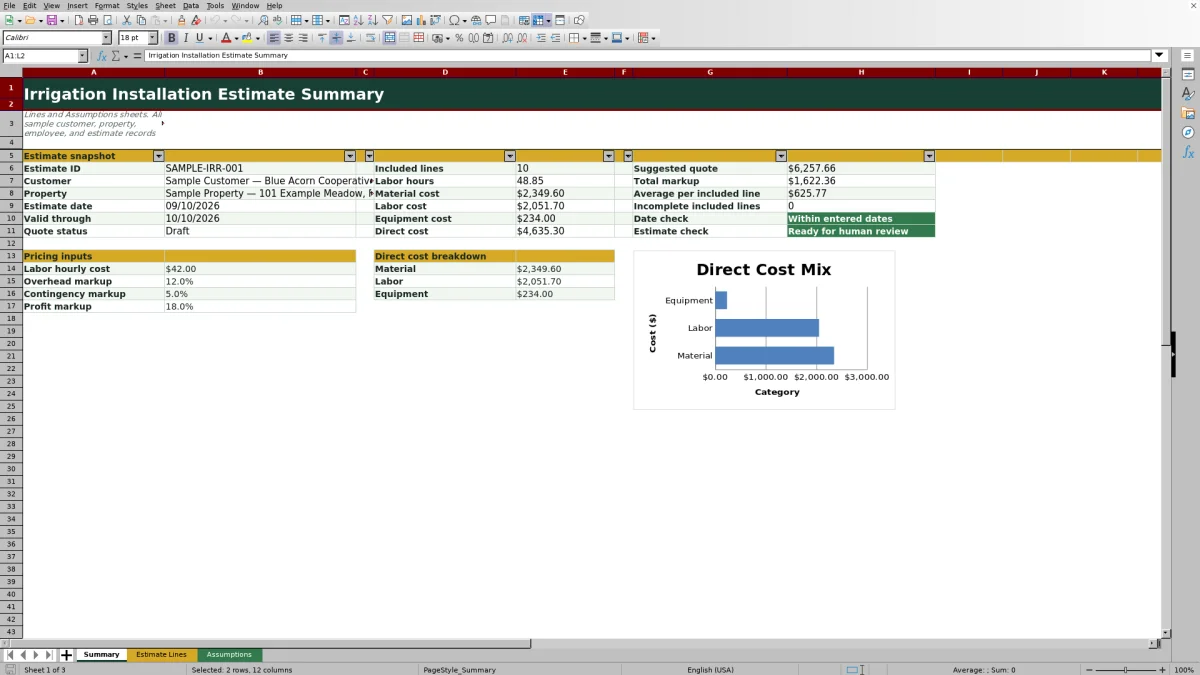
- Review direct costs, total markup, suggested quote, labor hours, and average value per included line from one summary.
What is in the file
How to get started
1. Set labor and markup assumptions
Open Assumptions and replace the sample labor hourly cost, overhead markup, contingency markup, and profit markup with reviewed company figures.
2. Prepare the item and service catalog
Enter each irrigation component or service with its category, unit, material cost per unit, labor hours per unit, equipment cost per unit, and waste percentage. Resolve duplicate-item or incomplete-input messages in Catalog Check.
3. Build the installation scope
On Estimate Lines, enter the project details and add up to 100 scope lines. For each line, select Yes or No under Include, identify the zone, choose a catalog item or service, enter a description, and provide the quantity.
4. Review the calculated quote
Resolve every Line Check message, then use Summary to review labor hours, material cost, labor cost, equipment cost, direct cost, markup, suggested quote, date status, and estimate readiness. Confirm field conditions and scope before deciding whether to present the quote.
Start with the irrigation installation situation
An irrigation estimate often combines project-wide controls, water connections, zone components, distribution materials, trenching, and installation labor. Recording those items as separate Estimate Lines lets a landscaping operator identify the applicable zone, describe the scope, enter a quantity, and decide whether each line belongs in the customer quote.
Apply catalog rates and pricing actions consistently
The Assumptions catalog connects each selected item or service to its unit, material cost per unit, labor hours per unit, equipment cost per unit, and waste percentage. Material cost equals quantity multiplied by the material rate and adjusted for waste. Labor hours equal quantity multiplied by labor hours per unit, while labor cost uses the editable hourly labor cost. Equipment cost equals quantity multiplied by the equipment rate.
Understand the calculated estimate result
For a complete included line, the workbook adds material, labor, and equipment costs to calculate direct cost. It then multiplies direct cost by one plus the overhead, contingency, and profit markup percentages to produce the suggested sell amount. Summary totals the complete included lines and separates material, labor, and equipment so the operator can see what is driving the quote.
Interpreted practical example for trenching work
Situation: The fictional sample estimate includes a Trenching line with a quantity of 450. Action: The operator confirms that the line is included, assigns its zone, selects Trenching from the catalog, enters the description and quantity, and checks that the catalog record and pricing inputs are complete. Result: The workbook retrieves the unit rates and calculates the line's material, labor, equipment, direct cost, and suggested sell amount. Interpretation: A high trenching quantity can materially affect labor hours and direct cost, so the calculated result should be checked against access, soil, routing, and equipment needs observed at the property. Next decision: The operator either keeps the line as scoped, adjusts the quantity or catalog assumptions, or separates unusual site work before presenting the estimate.
Errors and solutions during estimate preparation
If Line Check says Select include, choose Yes or No rather than leaving the field blank. Enter zone, Select item, and Enter quantity messages are resolved by completing the corresponding scope fields. A Review pricing inputs message calls for checking the labor rate and all three markup cells on Assumptions. Catalog warnings require the operator to remove duplicate item names or complete the category, unit, costs, labor hours, equipment cost, and waste inputs. If Summary reports incomplete included lines or withholds the suggested quote, correct those line-level issues first. Review date order means the valid-through date precedes the estimate date, while Review elapsed date means the entered validity period has passed.
Comparison with paper forms, blank spreadsheets, and field-service software
The connected Excel workbook acts as one complete operational method: establish assumptions, build itemized scope, calculate costs, check lines, and review the quote. The alternatives below may be more suitable when different operating conditions apply.
| Method | More suitable when | Operational approach | Tradeoff |
|---|---|---|---|
| This Excel workbook | More suitable when the company needs a repeatable catalog-driven estimate without adopting a larger software platform. | Connects assumptions, up to 100 estimate lines, calculations, validation checks, and summary review. | Rates, quantities, site conditions, and final scope still require human review. |
| Paper form or manual process | More suitable when basic scope must be captured in the field without access to a computer or spreadsheet app. | Records handwritten measurements, notes, and components for later pricing. | Totals and markups must be calculated or transferred manually, increasing the opportunity for omissions. |
| Blank spreadsheet | More suitable when the estimate is highly unusual and the operator needs a one-time layout with custom calculations. | Allows unrestricted columns, formulas, and formatting. | The operator must build and test lookup logic, validations, completeness checks, and summary formulas. |
| Dedicated field-service software | More suitable when estimating needs to connect with dispatch, customer records, mobile crews, invoicing, or broader job management. | Runs estimates inside a larger operational system. | Implementation, subscriptions, configuration, and staff training may be required. |
The choice depends on whether the immediate need is structured Excel estimating, offline field capture, unrestricted one-off modeling, or an integrated service-management workflow.
Interpret the summary and make the next decision
Summary shows the estimate identity, customer, property, dates, quote status, included-line count, labor hours, direct-cost categories, total markup, and suggested quote. The readiness message should be treated as a workflow check rather than approval of the underlying business assumptions. When the sheet reports Ready for human review, the next decision is to verify measurements, local material pricing, labor productivity, site access, exclusions, and customer-facing scope before changing the status or presenting the quote.
Frequently asked questions
What does the Excel irrigation installation estimate template calculate?
It calculates material cost, labor hours, labor cost, equipment cost, direct cost, and suggested sell amount for complete included lines, then summarizes those figures into a suggested quote.
Can the workbook estimate irrigation zones and trenching?
Yes. Estimate Lines includes a Zone field and an item or service field, and the fictional sample includes project-wide work, a water connection, and trenching. Operators can maintain corresponding components and services in the Assumptions catalog.
Which pricing inputs can I edit?
You can edit the labor hourly cost, overhead markup, contingency markup, profit markup, and catalog values for material cost, labor hours, equipment cost, and waste percentage.
Why is the suggested quote blank?
The Summary formulas withhold quote totals when included lines are incomplete. Check the incomplete-line count and each Line Check message, then complete the missing zone, item, quantity, pricing assumption, or catalog input.
Is the calculated amount ready to send to a customer?
It is a suggested estimate for human review. Confirm quantities, rates, soil and access conditions, equipment needs, scope, exclusions, and project-specific requirements before presenting it.
Editorial responsibility

Nadia KesslerEstimates, customers and job workflows

Ethan ReedWorkbook QA, crews and business controls