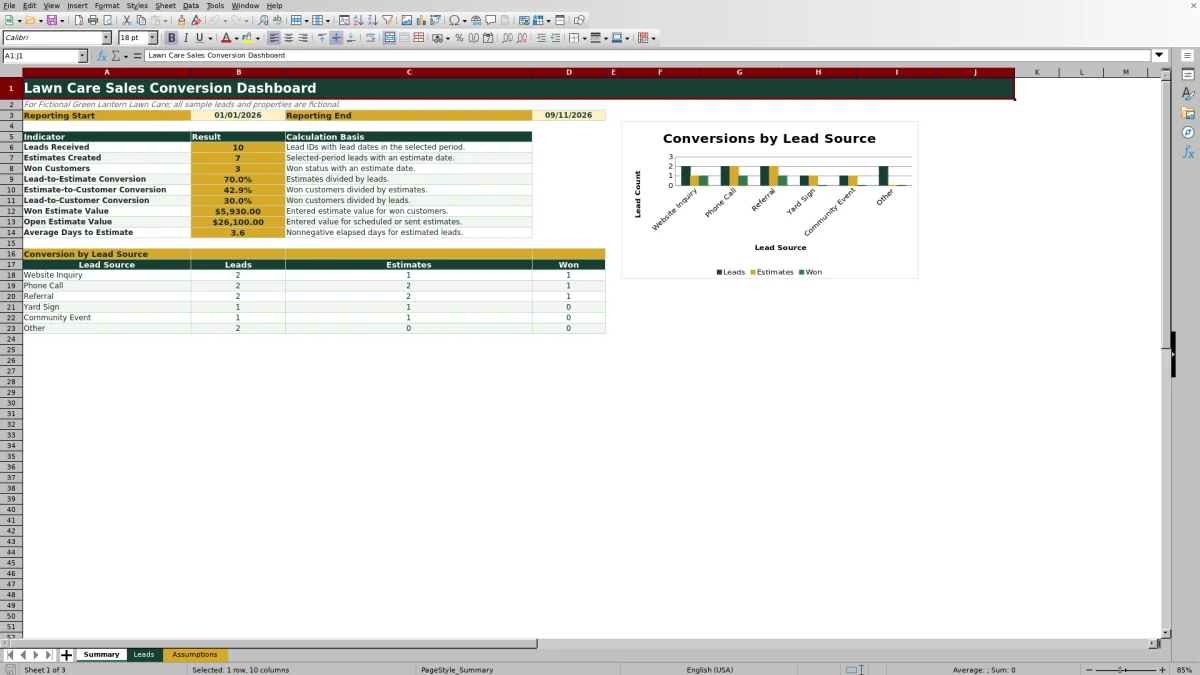
This lawn care sales conversion dashboard is an Excel workbook for measuring lead-to-estimate and estimate-to-customer conversion. It organizes sales activity in a 100-row lead register and calculates lead counts, estimates, wins, conversion rates, estimate values, and average days to estimate for a selected reporting period.
The XLSX includes Summary, Leads, and Assumptions worksheets. Formula columns, controlled entry lists, date and amount validation, record checks, conditional formatting, and a lead-source chart help lawn care and landscaping operators maintain consistent records and interpret where opportunities move forward or leave the sales funnel. The included company, properties, leads, and sales representatives are fictional examples.
How this workbook can help
- See how many reporting-period leads become estimates and how many estimates become customers.
- Compare lead-source counts across leads, estimates, and wins to identify sales-funnel drop-offs.
- Find incomplete, duplicate, or chronologically inconsistent lead records before relying on the dashboard.
- Adjust the reporting period, follow-up review interval, estimate limit, and entry lists for the business.
What is in the file
How to get started
1. Configure the dashboard assumptions
Open the Assumptions sheet and enter the reporting start and end dates, follow-up review days, and maximum estimate amount. Review the lists for lead sources, services, outcome statuses, and sales representatives before entering records.
2. Enter each sales lead
Use one row per opportunity on the Leads sheet. Assign a unique Lead ID, record the lead date and customer or property, and select the appropriate source, requested service, outcome status, and sales rep. Add estimate, decision, amount, and follow-up details as they become available.
3. Review formulas and record checks
Check the calculated Days to Estimate, Days to Decision, Estimated, Won, and Record Check columns. Correct missing IDs, duplicate IDs, invalid date sequences, or other flagged entries instead of replacing the formulas in columns L through P.
4. Interpret the Summary and choose an action
Review lead volume, estimates, wins, conversion rates, estimate values, average days to estimate, and lead-source counts. Use the stage showing the largest meaningful drop-off to choose the next action, such as improving estimate speed, reviewing sales follow-up, or investigating a source with many leads but few wins.
From Sales Situation to Next Decision
Situation: Lawn care inquiries can arrive through websites, phone calls, referrals, yard signs, community events, and other sources, making funnel performance difficult to assess from scattered notes. Action: Enter each opportunity on the Leads sheet and keep its estimate date, amount, status, decision date, and follow-up date current. Result: The Summary sheet calculates reporting-period counts, conversion rates, values, timing, and source-stage totals. Interpretation: A high lead-to-estimate rate with a lower estimate-to-customer rate points to a different sales issue than a low lead-to-estimate rate. Next decision: Focus on the stage with the clearest drop-off, then use individual lead records to investigate its cause.
Interpreted Practical Example
Example: Consider only the three manifest-visible fictional records in rows 5 through 7. All three have lead dates within the configured January 1 through September 11, 2026 reporting period, all three received estimates four days after their lead dates, and two became won customers. If those were the only records in the period, lead-to-estimate conversion would be 100%, estimate-to-customer conversion would be 66.7%, overall lead-to-customer conversion would be 66.7%, average days to estimate would be 4.0, and won estimate value would be $4,080. The practical interpretation is that estimate creation was not the bottleneck in this small subset; the next review should focus on why the remaining estimate was lost. Because each record came from a different source, three records are not enough to justify a broad source-budget decision.
What the Conversion Metrics Mean
Leads Received counts nonblank Lead IDs whose lead dates fall within the selected period. Estimates Created counts those reporting-period leads with an estimate date. Won Customers requires both an estimate date and an Outcome Status of Won. Lead-to-estimate conversion divides estimates by leads, estimate-to-customer conversion divides wins by estimates, and lead-to-customer conversion divides wins by leads. A blank result can indicate an incomplete or reversed reporting period or a zero denominator rather than a zero conversion rate.
Won Estimate Value sums entered estimate amounts for qualifying won records. Open Estimate Value uses entered amounts for records marked Estimate Scheduled or Estimate Sent. These values represent recorded estimates, not collected revenue or recognized accounting income.
Lead Timing and Follow-Up Control
Days to Estimate subtracts the lead date from the estimate date, while Days to Decision subtracts the lead date from the decision date. The Summary averages nonnegative Days to Estimate values for estimated leads in the selected lead-date period. This gives an operator a consistent way to judge estimating speed without treating blank dates as elapsed time.
The editable follow-up review period defaults to 14 days and supports record checking for open opportunities without timely follow-up information. Next Follow-Up Date remains an input field, so staff still need to update it as conversations progress. Use the timing columns and Record Check result together before concluding that a slow average reflects sales performance rather than incomplete data.
Comparison With Other Sales Tracking Methods
The workbook functions as one complete operational method: staff enter standardized lead records, formulas calculate funnel stages and timing, record checks identify common data problems, and the Summary presents period and source results. The comparison below distinguishes that method from realistic external alternatives.
| Method | What it provides | More suitable when |
|---|---|---|
| This Excel workbook | A structured lead register, editable assumptions, validated lists, calculated funnel metrics, record checks, and a source chart in one XLSX. | More suitable when the business wants a local spreadsheet process and can maintain up to 100 lead rows in the supplied entry area. |
| Paper form or whiteboard | A visible, low-setup way to note a small number of current inquiries, but conversion calculations and historical analysis remain manual. | More suitable when lead volume is very low, only one location needs the information, and formal reporting is not required. |
| Blank spreadsheet | Maximum freedom to design fields and calculations, with no supplied validation, formulas, record checks, or dashboard structure. | More suitable when the operator has a substantially different workflow and is prepared to build and maintain the entire model. |
| Dedicated field-service software | May combine sales tracking with scheduling, dispatch, customer communication, invoicing, payments, or mobile workflows, depending on the product. | More suitable when multiple crews need connected real-time operations and the business accepts software configuration, subscriptions, and migration work. |
The choice depends on lead volume, collaboration needs, operational complexity, and who will maintain the records. The workbook does not replace scheduling, dispatch, invoicing, payment processing, or a full customer relationship management system.
Common Errors and Solutions
Missing or duplicate IDs: A blank Lead ID prevents a row from being counted correctly, while a duplicate can count separate rows as separate leads. Assign one unique ID to each opportunity and resolve any corresponding Record Check message.
Invalid dates or reporting dates: An estimate or decision date earlier than the lead date can distort elapsed-day calculations, and an end date earlier than the start date causes Summary formulas to return blanks. Correct the record dates and confirm that the Assumptions reporting period covers the intended lead-date cohort.
Status and estimate mismatches: A Won status without an estimate date is not included in Won Customers under the dashboard logic. If an estimate was actually created, enter its date and amount; otherwise, correct the status. For open estimate value, use Estimate Scheduled or Estimate Sent only when that description accurately reflects the opportunity.
Using Lead-Source Results for the Next Decision
The Summary displays leads, estimates, and wins for the six source entries configured on the Assumptions sheet and charts those stage counts. Compare each source across the three columns rather than judging it only by lead volume. For example, a source with many leads but few estimates may indicate poor fit or slow qualification, while a source with fewer leads and a high share of wins may deserve closer attention.
Source counts should be interpreted with sample size and estimate value in mind. Review the underlying records before changing marketing activity, especially when a source has only a few leads. The next decision can then be specific: improve response handling, revise qualification, strengthen estimate follow-up, or collect more observations before reallocating effort.
Frequently asked questions
What sales conversion rates does the Excel dashboard calculate?
It calculates lead-to-estimate conversion, estimate-to-customer conversion, and overall lead-to-customer conversion for the selected reporting period.
Which leads are included in the Summary results?
The Summary uses nonblank Lead IDs with lead dates between the reporting start and end dates entered on the Assumptions sheet. The cohort is based on Lead Date rather than Estimate Date or Decision Date.
Does a Won status count if the estimate date is blank?
No. The Won Customers formulas require a populated estimate date and an Outcome Status of Won, so the estimate date should be entered when an estimate was actually created.
How many lead records can the supplied Leads sheet hold?
The prepared entry area runs from row 5 through row 104, providing 100 lead rows with formulas in the calculated columns.
Can the lead sources, services, statuses, and sales representatives be changed?
Yes. Those lists are stored on the Assumptions sheet and support the dropdowns on the Leads sheet. Keep entries within the supplied list ranges so the existing validation and source summary continue to reference them.
Editorial responsibility

Nadia KesslerEstimates, customers and job workflows

Ethan ReedWorkbook QA, crews and business controls