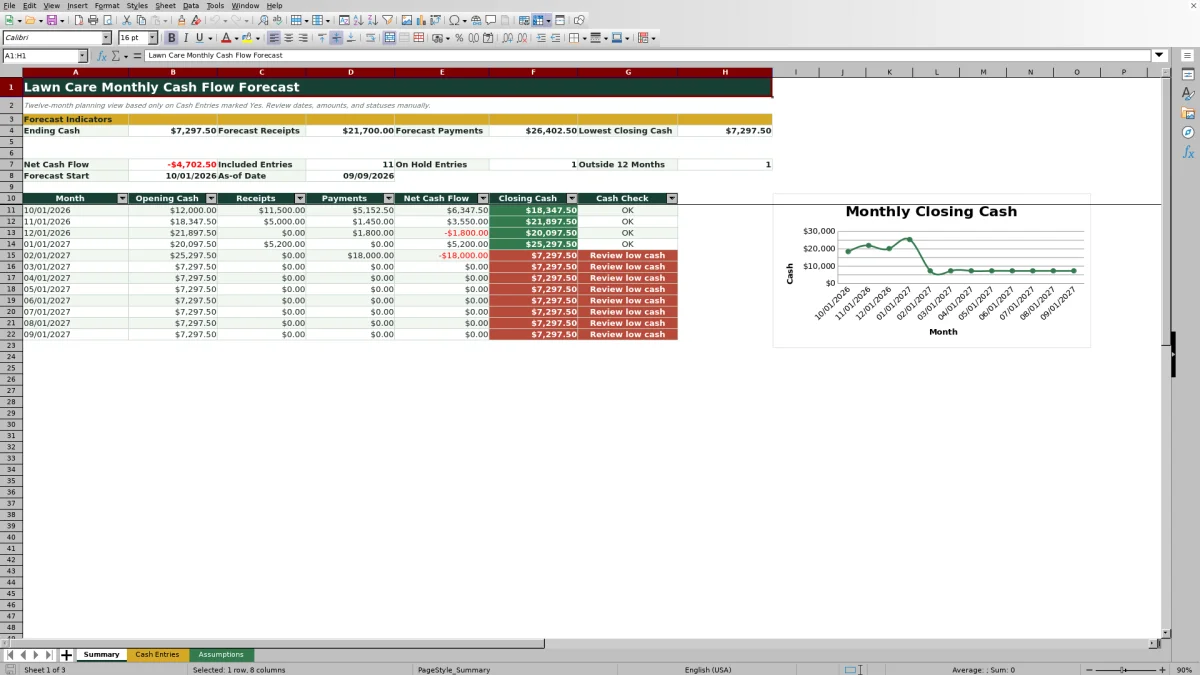
This Excel workbook provides lawn care and landscaping business operators with a 12-month cash flow forecast based on expected cash dates. It organizes anticipated customer receipts and business payments, then calculates monthly net cash flow, opening cash, and closing cash.
The XLSX includes a Summary sheet, 120 Cash Entries rows, and editable Assumptions. Operators can use the forecast to identify projected cash pressure, review included or on-hold entries, and decide whether timing or spending estimates need attention.
How this workbook can help
- See how expected receipts and payments affect cash over a rolling 12-month planning period.
- Identify months when projected closing cash falls below an editable review threshold.
- Separate cash timing from service timing by recording the date money is expected to enter or leave the business.
- Review included, on-hold, and out-of-period entries before making operating or purchasing decisions.
What is in the file
How to get started
1. Set the forecast controls
Open Assumptions and enter the opening cash balance, forecast start month, low-cash review threshold, as-of date, allowed cash-date range, maximum quantity, and maximum unit amount.
2. Enter expected cash activity
Use Cash Entries to record the expected cash date, receipt or payment type, category, customer or vendor, property or job, description, quantity, unit, and unit amount. Enter payment quantities and unit amounts as positive values because the Type field determines whether cash is added or subtracted.
3. Control forecast inclusion
Select Yes only for entries that should affect the forecast. Review the Status field separately because Planned, On Hold, and Canceled rows are still included whenever Include in Forecast? remains Yes.
4. Review the Summary and decide
Check monthly receipts, payments, net cash flow, closing cash, and Cash Check results. Investigate low-cash months and entries outside the 12-month period before changing collection timing, purchase timing, or forecast assumptions.
How the Monthly Cash Flow Forecast Works
The forecast begins with the opening cash entered on Assumptions. For each month, it sums Cash Entries marked Yes and classified as Receipt, separately sums included entries classified as Payment, and subtracts payments from receipts to calculate net cash flow. Closing cash is opening cash plus net cash flow, and that closing balance becomes the next month's opening cash.
The monthly Cash Check compares closing cash with the editable low-cash review threshold. The Summary also displays ending cash, total forecast receipts, total forecast payments, lowest closing cash, and counts that help operators find included, on-hold, or out-of-period activity requiring review.
Plan Around Lawn Care Cash Timing
Lawn care revenue and expenses do not always occur when the related work is performed. A maintenance visit may happen before customer payment arrives, while payroll, fuel, materials, insurance, equipment, rent, marketing, and utilities can require cash sooner. The workbook therefore directs operators to use expected cash dates rather than service dates.
Receipt categories include maintenance revenue, enhancement revenue, and other receipts. Payment categories include payroll, fuel, equipment, materials, insurance, rent, marketing, utilities, and other payments. These classifications support consistent data entry while the monthly calculation still depends on date, type, amount, and the Yes or No inclusion choice.
Practical Lawn Care Cash Forecast Example
Situation: An operator starts October 2026 with $12,000 in opening cash. An included maintenance receipt dated October 1 covers four visits at $1,175 each, producing a $4,700 cash receipt. An included payroll entry dated October 3 covers 80 hours at $28, producing a $2,240 payment.
Action: The operator enters both transactions with positive quantities and unit amounts, assigns Receipt to the customer payment and Payment to payroll, and marks both Yes for inclusion.
Result: Considering only these two entries, October net cash flow is $2,460, calculated as $4,700 minus $2,240. Closing cash would be $14,460, calculated as $12,000 plus $2,460.
Interpretation: The isolated example shows positive monthly cash movement, but the operator should not treat $14,460 as the complete October projection until every expected fuel, equipment, material, overhead, and customer cash entry has been reviewed.
Next decision: After all expected entries are included, the operator can compare closing cash with the $8,000 example threshold and decide whether collection dates, discretionary purchases, or other assumptions need adjustment.
Common Forecast Errors and Solutions
Error-and-solution check: Entering a service date instead of the expected cash date can place activity in the wrong month; use the date money is expected to be received or paid. Entering a payment as a negative amount can reverse the intended logic; enter a positive quantity and unit amount and select Payment as the type.
A row marked On Hold or Canceled can still affect the forecast when Include in Forecast? is Yes. Change the inclusion field to No when an entry should be excluded. If an expected transaction does not appear in the 12-month totals, confirm that its date is inside the forecast period and review the Outside 12 Months indicator.
If Cash Check displays Set threshold, enter a numeric low-cash review threshold on Assumptions. If calculated amounts remain blank, verify that the cash date, type, quantity, and unit amount are present and that the numeric fields contain numbers.
Comparison With Manual and Software Alternatives
Use the method that fits the operating situation: this workbook functions as one complete method by combining editable controls, transaction-level cash entries, monthly calculations, review indicators, and a closing-cash chart. The alternatives below may be more suitable when their stated conditions apply.
| Method | How it operates | More suitable when | Tradeoff |
|---|---|---|---|
| This Excel workbook | Uses structured assumptions and up to 120 cash-entry rows to calculate a 12-month forecast with inclusion controls and low-cash checks. | More suitable when an operator wants a repeatable monthly cash-planning process in Excel without building formulas from scratch. | Dates, amounts, statuses, and inclusion choices still require manual maintenance and review. |
| Paper form or whiteboard | Records expected receipts and payments manually with visual notes or handwritten totals. | More suitable when transaction volume is very small and the team needs a quick shared view without detailed calculations. | Monthly roll-forwards, revisions, and arithmetic are harder to maintain consistently. |
| Blank spreadsheet | Lets the operator design custom columns, formulas, categories, and reports. | More suitable when the business has specialized forecasting rules and someone can build and test the spreadsheet. | Setup takes additional time, and untested formulas can create calculation errors. |
| Dedicated field-service software | May connect forecasting work with broader scheduling, customer, estimating, invoicing, or operational processes. | More suitable when the company needs an integrated multiuser operating system rather than a stand-alone cash forecast. | Implementation, subscriptions, configuration, and staff training may require more resources. |
The workbook is intended for planning rather than accounting or payment processing. Operators that need bank reconciliation, formal financial statements, payment execution, or tightly integrated field operations should evaluate tools designed for those functions.
Turn the Forecast Into a Monthly Decision Routine
Decision rhythm: begin by confirming the opening cash and forecast start month, then update expected cash dates and amounts as customer commitments, crew plans, and vendor timing change. Review entries marked Yes, especially those with Planned, On Hold, or Canceled status, before relying on the totals.
Next, scan the monthly closing-cash line and identify the lowest projected balance. Trace a low month back to its receipt and payment entries, interpret whether the pressure comes from delayed collections, concentrated payroll, equipment spending, materials, or overhead, and decide which estimate or operating plan needs attention. Repeat the review whenever material cash timing changes.
Frequently asked questions
Which cash entries are included in the monthly forecast?
Only Cash Entries marked Yes in Include in Forecast? are included. The formulas then group those entries by cash date and classify them as receipts or payments using the Type field.
Does an On Hold or Canceled status remove an entry from the forecast?
No. Status does not control the forecast calculation. An On Hold or Canceled row remains included when Include in Forecast? is Yes, so change that field to No if the entry should not affect projected cash.
Should lawn care payments be entered as negative amounts?
No. Enter positive quantities and positive unit amounts. Select Payment in the Type field, and the monthly formulas will subtract the calculated cash amount from receipts.
How long is the forecast period?
The Summary covers 12 months beginning with the forecast start month entered on Assumptions. Included entries before that month or on or after the end of the 12-month period are counted by the Outside 12 Months indicator.
What happens when projected closing cash is below the threshold?
The monthly Cash Check displays Review low cash when closing cash falls below the numeric threshold entered on Assumptions. This is a review prompt, so the operator must assess the underlying entries and decide what action is appropriate.
Editorial responsibility

Nadia KesslerEstimates, customers and job workflows

Ethan ReedWorkbook QA, crews and business controls